

01The Operational CRM: Beyond the Address Book
A service business needs more than a list of names and phone numbers. Every call can become a scheduled visit; every visit can add a completion record, a payment status, and context that matters the next time the customer contacts the office. The practical question is not simply who the customer is. It is what work has been requested, where it is to be performed, what has happened before, and what the team needs to coordinate next.
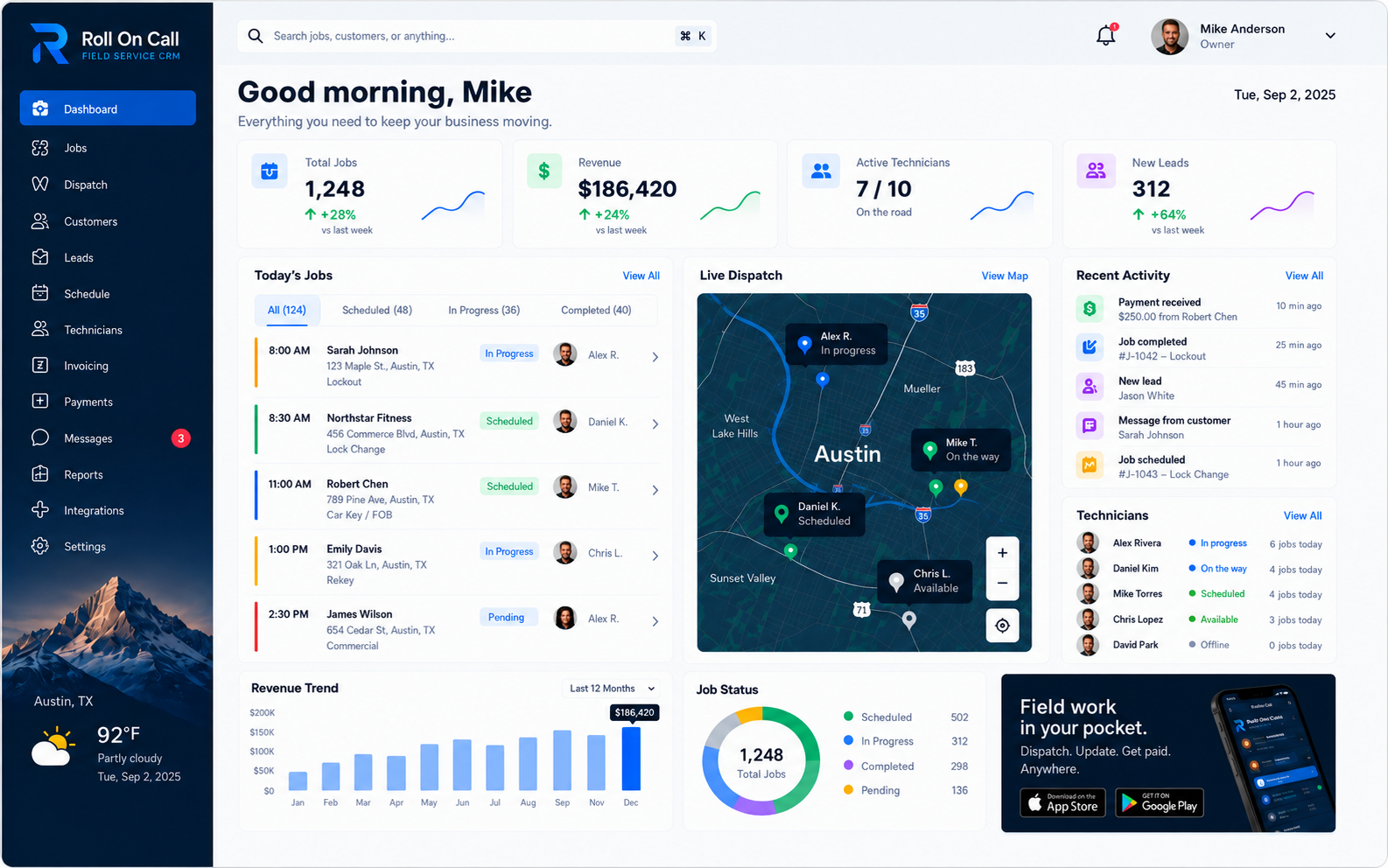
Roll On Call approaches CRM as a shared record connected to jobs and dispatch. Customer records can provide a starting point for the office. Service addresses identify the destination for the work. Previous job details and communication notes provide useful reference. From there, a dispatcher can create a job, place it into the scheduling workflow, assign a technician, and keep the job’s completion and payment status with the record.
This is useful for businesses that handle repeat service, urgent calls, and changing daily schedules. It gives staff a consistent place to review information already recorded instead of rebuilding the same background from separate notes. A record is only as good as the information entered into it, so the value comes from a clear team process as well as the software.
02The Anatomy of a Service Record
The customer record is the office’s reference point for a service relationship. It can hold the identifying details needed to find the right person when they call and connect that person to prior work.
Useful recordkeeping begins with accuracy. Staff can confirm the customer’s contact details, choose the applicable service address for the request, and read prior job details before setting expectations. If a prior conversation includes an important scheduling or access detail, an office note can preserve it as part of the operating history. The team should confirm current details with the customer when appropriate, especially when the request concerns a new location or a changed scope.
Over time, the record can become a practical index of the relationship: customer information, locations used on jobs, job status, communication notes, and payment statuses recorded against work. The Customer Management guide examines how that context supports repeat intake, job creation, dispatch, and technician handoff.
03Incoming-Call Context: Answering with Intelligence
An incoming call is often where the daily workflow begins. The caller may need an update, a return visit, or a new job. A helpful office process is to search the customer record, verify who is calling, confirm the service address, and review relevant previous job details while the request is discussed. This makes the recorded history available to the conversation without assuming that a phone system will identify the caller automatically.
Context should guide questions, not eliminate them. The dispatcher can ask whether the new request relates to a previous job, whether the same address is involved, and what scope needs to be scheduled. Communication notes can capture changes or details supplied on the call. That approach reduces reliance on memory while keeping the customer responsible for confirming the facts that affect the visit.
For example, a team member might see a completed job from last month and ask whether the present request concerns that work or a different issue. The record can make that follow-up more grounded.
04Managing Multiple Service Locations
Service work happens at an address, and that location belongs in the job context. A customer might request a visit to a residence today and a business address later, or a manager may call about several sites over time. The need is to select and confirm the address that applies to the particular job so that scheduling and technician assignment use the right destination.
Keeping service location context with a job makes the history easier to interpret later. The office can see where previous work was performed and refer to notes relevant to a future visit. It is good practice to verify unit numbers, gate instructions, parking constraints, and the customer’s requested scope before dispatching. Those details can change, so recorded information should be reviewed rather than treated as permanent fact.
Consider a caller requesting service at “Unit 4B.” The dispatcher can confirm the street address and unit, record the issue in the job scope, and schedule the job using that location. This is a consistent habits, not a promise that errors cannot occur. Clear confirmation at job creation remains the best way to avoid sending incomplete or incorrect directions into the field.
05Deep Customer and Job History
Previous job details give a new request a useful starting point. The record may show when a job was scheduled, its service address, the stated scope, its completion status, and communication notes captured by the office. Reviewing that information can help staff understand whether a caller is asking about a prior visit or initiating different work.
History is context, not a diagnosis. If a customer reports that an issue has returned, the dispatcher can reference the earlier job while documenting the current symptoms and scheduling the appropriate next step. The technician and office should evaluate the present work on its own facts. A history can inform preparation; it should not be used to make unsupported conclusions about equipment, cause, or responsibility.
Consistent records also support continuity when the person who handled an earlier call is unavailable. Another staff member can review what was recorded about the request and the job’s status before responding. Teams should use clear, factual language in notes and keep the record current. The goal is a dependable working reference, not an assertion that any single record settles every question about a job.
06The Power of Persistent Notes
Not every important detail belongs in a job title. Communication notes can capture the information shared during an office conversation: a reported problem, an agreed arrival window, a corrected unit number, or access instructions provided for a visit. Notes are most useful when they are specific enough to support the work and concise enough for the next person to understand.
A sound practice is to record the source and timing of a material update where the workflow allows. Staff can distinguish a customer’s current request from a note about a previous conversation, then verify details again when a later job is created. This helps avoid carrying an old instruction forward without checking whether it still applies.
Notes work best as part of a deliberate review process. Before assigning work, the dispatcher can consult the available customer and job context, decide what is relevant to the new scope, and include appropriate notes in the job communication. This guidance avoids a common operational mistake: assuming that every historical note is current, complete, or necessary for the assigned technician.
07Centralized Communication History
Customer conversations create job context. A phone discussion may define a problem, clarify an address, or change the requested work. Recording a communication note with the related customer or job gives office staff a shared reference when they need to schedule, update, or follow up on that work.
Roll On Call’s supported workflow includes communication notes and SMS for job assignments. Notes added by the office keep the context of calls and messages attached to the record. Teams that want a reliable history should enter material office notes consistently and confirm job details in the appropriate workflow before dispatch.
A clear note can help a covering dispatcher understand what was last discussed without relying on a private inbox or memory. It should describe the fact, such as “customer requested an afternoon appointment,” rather than imply a promise the team has not approved. Shared history supports consistency, while direct confirmation remains appropriate for anything that affects timing, scope, or access.
08Cultivating Repeat Business Through Context
Repeat customers benefit when the office can start from a record of prior work rather than an empty form. Customer details, service addresses used on earlier jobs, completed work, and communication notes can help the team ask better follow-up questions when a familiar customer calls. This is a practical service habit, not a claim that software creates loyalty by itself.
The best use of history is respectful and specific. Staff can confirm the customer’s current need, refer to a relevant previous job when it helps, and avoid assuming that an old address, note, or scope is unchanged. Good records make that review easier; good service still depends on accurate scheduling, clear communication, and work completed as agreed.
Over a series of jobs, the unified history gives managers a grounded view of customer interactions and work already performed. It can be used to prepare the office for a returning caller or to review operational patterns manually. It should not be treated as a prediction engine, a measure of customer value, or a substitute for deciding what service is actually needed now.
09Customer-to-Job Creation: The Critical Link
Customer-to-job creation is where a conversation becomes an action the team can schedule. Starting from a customer record lets the dispatcher use the available customer context while defining the current request. The essential work is still deliberate: select or enter the service address, state the scope, add relevant communication notes, and make sure the job is ready for scheduling.
This connection reduces the need to treat customer information and job information as unrelated records. It also gives the office a place to review the result later: the job remains connected to the customer’s history, including its service address, status, and payment status. Staff should check all key details before assigning the job, especially when information was provided quickly by phone.
A useful checklist at creation is simple: identify the customer, confirm the destination, write a clear scope, record essential customer notes, and set the job into the scheduling workflow. The checklist is guidance rather than a guarantee. Careful review is how a business limits missing information before the work reaches dispatch.
10Connecting the CRM to Dispatch and Field Operations
The dispatch connection turns a job record into scheduled field work. Once a job is created, the office can use scheduling and dispatch to choose a time and assign a technician. The customer record and job history remain useful reference points while the dispatcher coordinates the day.
Assignment decisions are day-to-day decisions. A dispatcher may consider the service address, stated scope, schedule, and technician availability when making them. Previous job details can help explain the request, but businesses should set their own priorities and verify urgency directly with the customer.
As a job moves through the workflow, its completion status becomes part of the job history. Office staff can review that status alongside the customer and payment record when responding to follow-up questions. Teams should communicate only the status they have confirmed and avoid presenting estimates or field activity as more certain than the record supports.
11Extending Context to the Field: Technician SMS
An assigned technician needs a usable job brief. In the Roll On Call workflow, an SMS can carry the core assignment information without asking the technician to reconstruct it from an office conversation. The message can contain the customer details, service address, job scope, and customer notes relevant to the visit.
A concise message is often more useful than a long history. The dispatcher should make sure the address is complete, the scope is understandable, and customer notes are appropriate for the work. Where facts are uncertain, the job should say so. The technician can then use the message as an assignment reference while the office retains the broader customer and job record.
SMS is a delivery method, not a guarantee that every condition at a property has been captured. Customers can change access instructions, job scope can evolve, and the field may reveal new information. A responsible operating process leaves room for confirmation and communication when what the technician finds differs from the assigned brief.
12Payment Continuity and the Financial Record
Invoices and payments belong with the job record because they finish the story of the work. Each job can produce an invoice from the details already captured, and the customer can pay it by card through Stripe.
Together, customer details, jobs, completion notes, invoices and payment status form one history. When a repeat customer calls about prior work, the office sees what was done, what was billed and whether it was paid without opening a second system.
Teams usually add a short weekly review of completed jobs with open invoices. The CRM keeps the list in front of them; bookkeeping and tax stay in the accounting tools the business already uses.
13Implementation and Consistent Habits
Adopting an operational CRM is as much about team habits as software. The record becomes more useful when staff agree on where customer details, job scope, communication notes, completion status, and payment status are recorded. A business can begin by deciding which information must be confirmed during an incoming call and which notes are relevant to a technician assignment.
A measured rollout can start with current customer records and active work. Train the office to search before creating a duplicate record, confirm the service address before scheduling, and write factual notes that help the next person handle the request. Review whether a job needs an update as it is scheduled, assigned, completed, or paid. These are habits worth building into your process.
Periodic record review helps a team find gaps in its own process: incomplete addresses, vague job scopes, missing completion statuses, or notes that need clarification. Over time, consistent use can make customer and job history easier to consult during everyday work. For a broader view of scheduling and dispatch, review our guide to Field Service Management Software.