

01Connecting the Service Operation
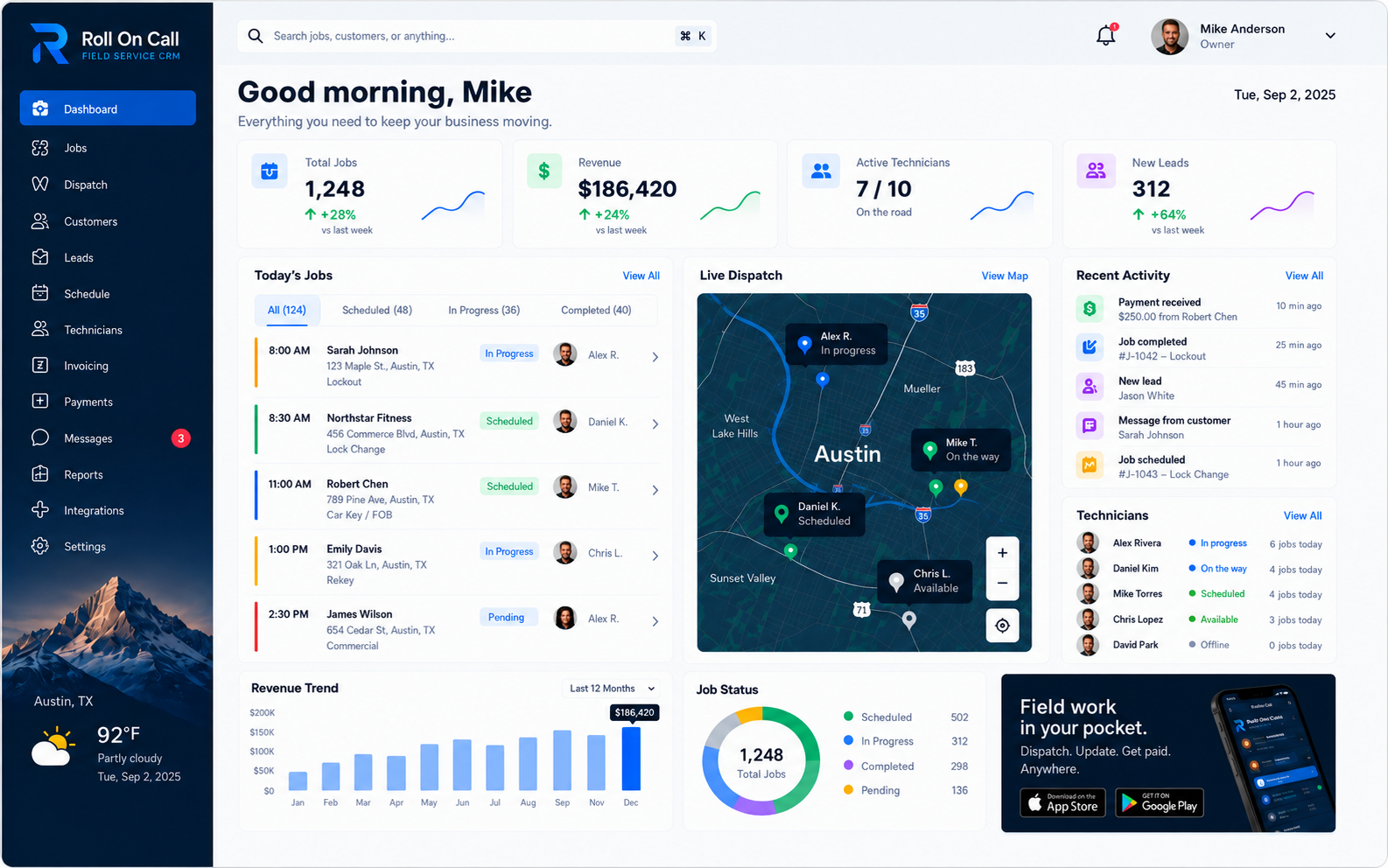
Operating a field service business involves a constant, unpredictable flow of changing information. When a customer calls to report an issue, intake staff may review past service records for context. That information can then become a structured job description for the dispatcher. The dispatcher works from the daily schedule, geographic map context, job details, and statuses recorded by the team. Once the decision is made, the technician needs a clear brief sent to their phone. Finally, the office can follow the work through recorded job statuses and an invoice and payment status.
Managing this sequence through fragmented tools, such as paper notes, standard text messages, disconnected calendars, and standalone spreadsheets, can make handoffs harder to follow. Roll On Call provides a connected workspace for the supported stages of that field-service workflow. This solutions hub examines eight operational areas: dispatch management, field workforce management, job management, technician communication, customer management, emergency service management, multi-location management, and the practical limits of consolidating disconnected tools.
For each area, we detail the operating question, the intended users, and the information the platform can place in a shared view. The product supports human coordination rather than automated dispatch. Read on to explore how Roll On Call fits into field service operations, or return to our home page for a high-level operational overview.
02Dispatch Management
Who it is for: Dispatchers, scheduling coordinators, and operations managers responsible for assigning daily work to field technicians.
The everyday problem: Assigning field service work is fundamentally a geographic and temporal challenge. A calendar alone only shows when a technician has an open time block; it fails to show where they are scheduled to be before or after that block. Without spatial context, dispatchers risk sending a technician across town for a minor job, wasting billable hours in transit. Conversely, relying solely on a map without seeing the schedule can lead to double-booking or missing priority commitments. Dispatchers need a combined view of time, location, and job requirements to make logical assignments in a fast-paced environment.
How the workflow connects: Roll On Call places customer location data, job details, and scheduling information on a dispatch board. A map sits alongside the daily schedule so the dispatcher can assess the geographic distribution of scheduled work. This context helps the office consider which technician to assign in light of planned jobs and recorded status. The dispatcher applies their own judgment, weighing technician skills, job priority, local traffic knowledge, and information obtained outside the software.
Live technician location is enabled at launch, so the map can show where the field team is alongside the day's jobs. Dispatch decisions and routing stay with your dispatcher. The map, live location and schedule are references, while assignment remains a human responsibility. Keeping intake context, map context, and calendar information in the workspace can reduce cross-referencing during dispatch. When a schedule changes, the dispatcher can review those reference points and communicate an update to the field. For an in-depth look at these capabilities, visit our Dispatch Management guide, which details a considered assignment workflow.
03Field Workforce Management
Who it is for: Service managers, operations directors, and lead dispatchers overseeing distributed teams across various job sites.
The everyday problem: Once technicians leave the office, maintaining a shared picture of work in progress becomes difficult. Phone calls and fragmented text threads can leave the office without a common record of what the team has reported. A manager considering the rest of the day may need to ask about an arrival or completion, then decide whether another call can be considered. This uncertainty can complicate customer updates and reassignment decisions when plans change. A consistent way to record job stages gives the office a clearer basis for those conversations, without treating the record as a verification of conditions in the field.
How the workflow connects: Roll On Call provides a shared dashboard where scheduled jobs appear alongside recorded technician and job statuses. The office can see labels such as "in progress" or "completed" when a team member records them. Those labels connect the dispatch record to the team's reported job stage. They are not an independently verified account of a technician's location, arrival, physical conditions, or completion time, and the product does not forecast completion times. The view depends on timely, accurate team updates.
When an authorized user records a job stage based on team-reported information, the office can use that entry as a shared reference point. A manager may review the day's flow, notice a job that appears to have remained in one stage, and decide whether a follow-up is appropriate. It creates a practical record for an operational conversation. The Field Workforce Management guide examines this coordination process in detail, while the Features page summarizes the supporting capabilities.
04Job Management
Who it is for: Office administrators, service coordinators, and dispatchers who must translate customer requests into actionable work orders.
The everyday problem: A service visit benefits from a well-defined job brief. When intake notes are vague, such as "equipment making noise" or "needs repair," the technician may have less context for preparation. They may need to clarify tools, access details, safety information, or the history of equipment at that location. Poor documentation can force a technician to repeat questions the customer has already answered.
How the workflow connects: The Roll On Call workspace links customer records with job creation. When a call comes in, the office can review the customer's history and prior notes before creating a work item. The dispatcher can capture a problem description, service address, and notes selected as relevant to the visit.
The office chooses which historical facts carry into a new job. Office staff review the record and choose notes for the current dispatch. The job record supplies the details used on the scheduling board and in an SMS brief when the dispatcher sends one. The business stays in charge of the completeness and accuracy of the record, and technicians stay in charge of confirming conditions on arrival. The result is a clearer handoff between customer record, job details, and dispatch, not a substitute for field judgment. The Job Management guide follows that record from intake through completion and payment status.
05Technician Communication
Who it is for: Field technicians executing the work and the dispatchers responsible for sending them accurate job instructions.
The everyday problem: Technicians need the job details where they already look. That can be a barrier for seasonal workers, subcontractors, or technicians who prefer direct communication. When details are scattered, they call the office instead, adding another handoff at the dispatch desk. Personal text threads can also make it difficult to compare a job record with the instruction a dispatcher intended to send.
How the workflow connects: Roll On Call can send job briefs by SMS text messaging. After the dispatcher finalizes an assignment on the board, they can send a structured message to the technician's mobile phone. The brief can include the service address, reported problem, and notes for the visit. The same job appears in the technician app, so the text and the app always agree.
SMS is subject to the receiving device, carrier access, device settings, and cellular reception. Businesses should define their own confirmation and escalation process for urgent or safety-critical dispatches. For routine briefs, SMS can be a familiar channel; the office should still treat the job record and direct communication as the basis for resolving missing or changed details. The Technician Communication guide covers the complete office-to-field handoff.
06Customer Management
Who it is for: Customer service representatives, intake coordinators, and anyone answering the phone to book new service requests.
The everyday problem: Every returning customer expects the business to remember their previous interactions. When intake staff have to search through different systems, flip through paper files, or ask the caller to repeat basic information like gate codes or equipment locations, the customer experience suffers. Without a unified customer record, the office cannot easily identify patterns of recurring issues or reference past notes that might influence how the next job should be scheduled or equipped. Managing customer relationships in a service context requires more than just an address book; it requires a historical timeline of service events that directly informs the next dispatch decision.
How the workflow connects: Customer management benefits when staff can consult client history before making a new day-to-day decision. Roll On Call centers intake around the customer record. The platform allows staff to search for an existing client, review service history, and access previously recorded notes before creating a new job. That context may prompt the dispatcher to ask a more targeted question, such as whether a previously noted access instruction remains valid.
The software provides a repository for these records, and its usefulness depends on the quality and currency of the notes entered by the team. Roll On Call is not an automated marketing engine or a comprehensive enterprise resource planning system. It is a focused tool that makes recorded client history available during intake and dispatch. Starting from the customer record gives the office a reference for an informed response, while staff still confirm details with the caller. The Customer Management guide examines this customer-to-job continuity in detail, while the Field Service CRM Guide covers the broader operating model.
07Emergency Service Management
Who it is for: Dispatchers and operations managers who must handle urgent, break-fix requests that disrupt the planned daily schedule.
The everyday problem: Field service plans are rarely static. A water leak, power failure, or equipment breakdown may require the office to reconsider the day's plan. When an urgent call comes in, the dispatcher has to decide how, or whether, to accommodate it alongside existing commitments. A static spreadsheet or whiteboard can make that review slower because schedule, address, and job details are separated. The dispatcher needs the board, the emergency address, and team-recorded statuses as inputs to a time-sensitive decision. Your team chooses the right response and judges the customer impact.
How the workflow connects: When an urgent request is received, the dispatcher can enter the details in Roll On Call as a new job record. They can view that job on the map alongside the existing schedule and technician statuses recorded by the team. With live technician location enabled, the map also shows where technicians are, so the dispatcher weighs proximity alongside availability and qualifications before confirming who responds.
The dispatcher reallocates work and weighs the knock-on effects of each change. The dispatcher weighs the urgent request against existing commitments and decides what to communicate. After a decision, the dispatcher can update the board and send a new SMS brief. The office stays in charge of confirming instructions and for contacting customers about any changes to their appointments. The Emergency Service Management guide covers the full urgent-work operating sequence.
08Multi-Location Management
Who it is for: Owners, operations directors, and regional managers overseeing field service businesses that cover expansive territories or operate from multiple branch offices.
The everyday problem: As a service business expands its geographic footprint, informal coordination can become harder. A whiteboard cannot be consulted easily by dispatchers in different offices, and a basic shared calendar may become difficult to scan as jobs span regions. Separate teams may need a common way to discuss customer records, scheduled jobs, and handoffs. That need does not itself create territory rules, branch controls, or a particular permission model.
How the workflow connects: Roll On Call provides a shared dashboard for customer records, scheduled jobs, map context, and technician statuses recorded by the team. Businesses can use this shared workspace while establishing their own naming conventions, service boundaries, and operational protocols. Whether a particular team should view, change, or act on information remains an internal business process to define and supervise.
Roll On Call is not presented as enterprise territory-routing software, a multi-branch data-isolation system, or a fleet analytics platform. It also should not be relied on to enforce multi-location permissions or access segregation. Its role is a shared shared workspace. Regional managers may use the recorded schedule and job context when discussing handoffs or documentation practices, while the business retains responsibility for governance and access decisions. The Multi-Location Management guide explores practical record and coordination standards, while the Industries page covers trade-specific operating needs.
09Replacing Spreadsheets and Disconnected Tools
Who it is for: Business owners and operations managers looking to transition away from fragmented administrative processes.
The everyday problem: Many field service teams begin with a spreadsheet for customer addresses, a digital calendar for scheduling, personal phones for technician texts, and paper invoices for billing. As job volume increases, staff may copy an address from one place to another and retype it into a message. That repetition can create transcription risk and make the source of a detail unclear. When a status update remains in one text thread, colleagues may not see the same recorded job stage while they plan the next call.
How the workflow connects: Roll On Call consolidates supported workflow elements: customer records, job creation, scheduling, dispatch map context, SMS communication, and recorded job statuses. A team can use the workspace as a common reference rather than moving among separate tools for every handoff. Creating a job from a customer record links that job to the record, and job details are available on the dispatch board. A dispatcher chooses what to include when sending an SMS brief; the platform does not assume that every historical note should be carried into every message.
Recorded completion and invoice and payment statuses can be reviewed in the office workspace as entries made by the team. Invoices and card payments through Stripe sit on the same jobs; bookkeeping and tax stay in the accounting software. It can serve as a coordination workspace for the functions it supports, while the business keeps the specialist tools and checks its operation requires. The Replace Spreadsheets guide covers the transition from disconnected tools, while the Field Service Management Software Guide provides the broader software context.
Frequently Asked Questions
Summary
Managing a field service operation requires coordination between the customer, the office, and the technician. Disconnected tools and fragmented communication can complicate that work. Roll On Call is built as a shared workspace for customer history, dispatch context, SMS job briefs, and recorded job statuses. Its value is in placing those supported references together for the people making the decisions. Your team verifies conditions and decides the response. Staff supply the judgment, confirmation, and expertise that turn a record into action.