
01The Foundation of Field Service Management Software
A useful foundation for field service operations is a dependable source of day-to-day information. Many businesses have customer details in one tool, a schedule on a whiteboard or calendar, dispatch instructions in individual text threads, and job outcomes on paper. That fragmentation can make context harder to find, create duplicate entry, and leave the office dependent on verbal updates. The practical goal is not technology for its own sake; it is a workflow in which people can find the information they need to make the next decision.
Service management tools are intended to connect those stages. A service call can be treated as a continuous sequence: identify the customer, capture the request, schedule and assign the work, communicate the details, update its status, and record the relevant payment state. Roll On Call supports that sequence in a shared workspace. This can reduce handoffs between unrelated tools, although accurate information still depends on office and field staff following the business's chosen process.
When evaluating a current process, ask concrete questions. How often does a dispatcher have to ask someone else for an address or prior note? How does the office learn that work has been completed? Can an authorized user find earlier service context when a customer calls again? The answers reveal where a connected workflow may help and where procedures need improvement. No platform can make incomplete notes complete, so clear ownership of data entry remains essential. To see how Roll On Call organizes these steps, explore the Roll On Call workflow.
02Incoming Calls and Customer Management
Many service interactions begin with an incoming phone call. Without accessible customer context, a dispatcher may need to determine whether the caller is new or returning and ask again for basic details. Some confirmation will always be appropriate: addresses, phone numbers, access instructions, and the current problem can change. The objective is to give the call taker relevant history without encouraging them to rely on stale information.
Roll On Call centers the workflow on customer information that the team has captured, such as service addresses, prior work details, and communication notes. When the correct customer is located, that history can help the dispatcher ask better questions and avoid starting from scratch. It is better to describe this as available recorded context, not a complete profile: the system only contains information that users have entered and retained.
Useful notes should be specific and actionable. For example, if a previous visit established that a property has an unusual access requirement, the team can attach that detail to the customer or work context available for a future call. The dispatcher should confirm safety-critical or time-sensitive instructions rather than assume an older note remains correct. Good software makes documented history easier to consult; good operating practice determines whether that history is reliable.
03Job Creation and Details
Once the customer and service location are identified, the focus shifts to creating the work item. The dispatcher needs to capture the reported symptoms, requested service, timing, location, and any relevant constraints. Vague descriptions such as “broken system” or “needs service” give the technician little preparation context. They increase the risk of follow-up calls, missing equipment, or a visit that does not match the customer's expectations, even though no intake process can diagnose every issue remotely.
A structured intake process helps the dispatcher build a clear work brief. Roll On Call connects customer and service context with the new job so the office can add the details of the current request before dispatch. The appropriate level of detail varies by trade: an emergency lockout needs different questions from a seasonal HVAC visit. Teams should define required intake fields and call scripts according to their own services, risk controls, and technician needs.
The resulting service entry provides the working context for scheduling and dispatch. It should state what the customer reported, where the work is located, when service is expected, and which notes are important to the visit. A practical review step is to ask whether the technician has enough information to begin safely and whether any uncertainty is labeled as such. Roll On Call can carry captured details into the dispatch workflow, but the business stays in charge of reviewing the brief and communicating changes.
04Live Dispatch & Scheduling
The dispatch board is a central coordination point for many service teams. A calendar is useful for time, but by itself it may not communicate the geographic reality of field work. Traffic, variable job duration, technician skills, customer availability, and urgent calls all affect the plan. Dispatchers need enough context to revise that plan without treating an initial schedule as a promise that conditions cannot change.
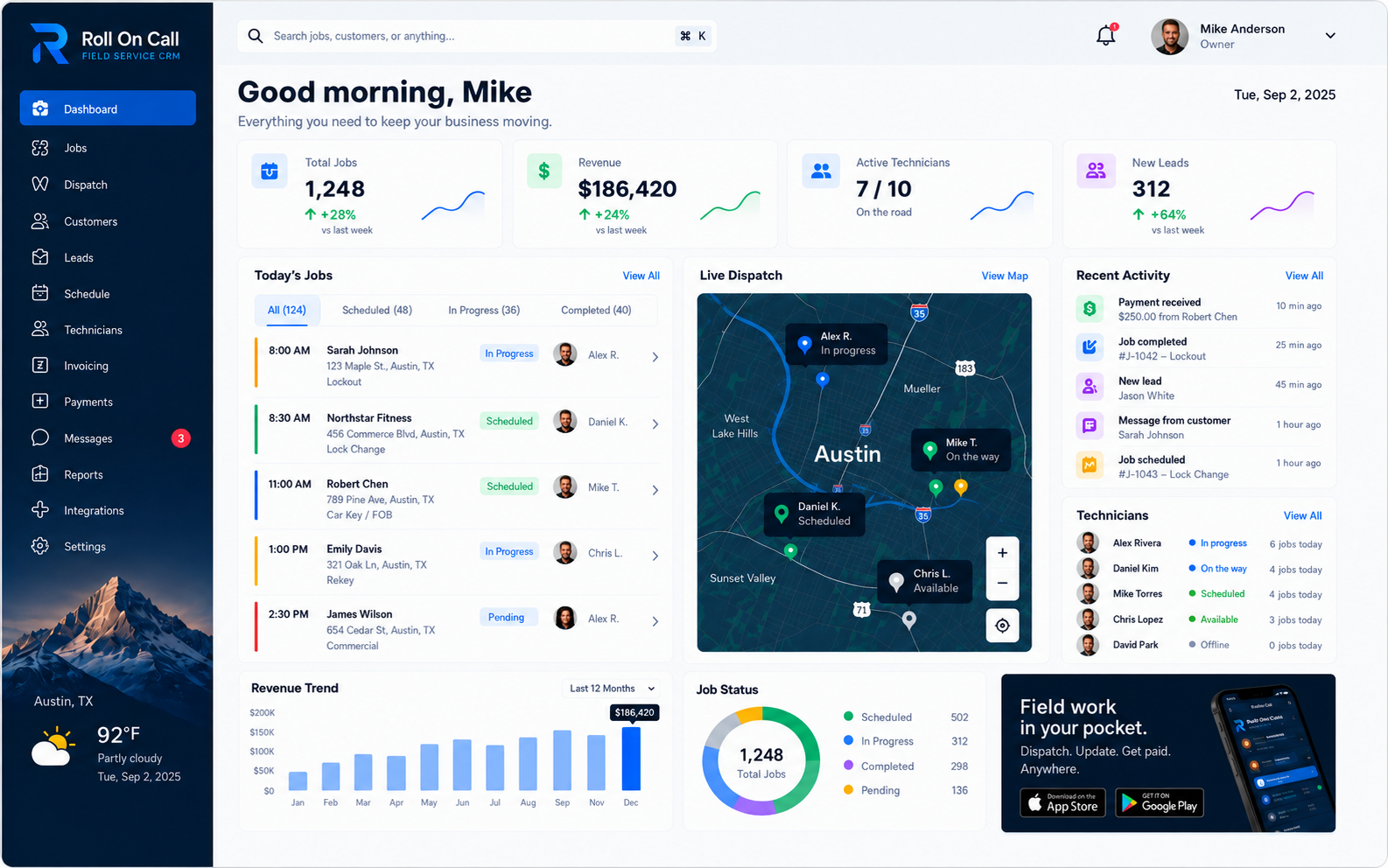
Roll On Call presents scheduling and dispatch information with a map-based view and technician status context. A map does not prove which technician is closest, fastest, qualified, or available: location data may be delayed or incomplete, routes change, and status must be kept current. Assignment remains a human decision informed by the displayed data and the team's knowledge.
Geographic context can help a dispatcher consider grouping nearby work and limiting avoidable travel, but it does not predict traffic, job duration, or schedule conflicts. Teams should review the board throughout the day, contact technicians when a status is unclear, and communicate revised arrival expectations to customers. When evaluating a scheduling process, ask whether dispatchers can compare time, location, job priority, technician suitability, and reported status in one decision. That is a more realistic measure than expecting software to forecast every disruption. The dispatch management solution guide examines that decision process in more detail.
05Technician Assignment & Field Coordination
A dispatch decision is only effective if the critical information is reliably transmitted to the technician in the field. If the field app is clumsy, technicians stop using it and call the office instead.
Roll On Call sends each assignment to the technician app and can also send it as an SMS brief. The office can send a structured text with the service address, problem description, and relevant customer notes captured for the assignment. SMS is familiar, but it is not infallible: carrier delays, poor coverage, outdated phone numbers, and device settings can affect delivery. Businesses should define a backup contact method for urgent or safety-critical work and avoid placing sensitive information in messages unnecessarily.
Coordinating a distributed workforce also requires updates after dispatch. Roll On Call provides a dashboard where the office can review scheduled work and reported technician or job statuses, including work shown as in progress or completed. Those indicators update as the office and technician app record changes. A status can be late, incorrect, or awaiting an update.
Shared status awareness helps bridge the field and the office. Teams should establish who updates each status, what each label means, and when the dispatcher should verify an item directly. With those habits, the board can provide a useful current view for subsequent assignments. It supports coordination and reduces reliance on memory, but it cannot prevent every scheduling error or independently verify what is happening at a property. The Field Workforce Management guide expands on schedule, assignment, SMS, and emergency reshuffling decisions.
06Emergency Service Workflows
Service businesses are often tested by sudden disruptions. A scheduled maintenance visit can usually be planned in advance, while an emergency request calls for prompt triage, clear prioritization, and deliberate action. A dispatch tool should give the office enough current context to reconsider the schedule. The business still needs written rules for what qualifies as an emergency, which technicians can handle it, and when to involve emergency services or other specialists.
When urgent work is added, the dispatcher can review the schedule, map context, and reported statuses in Roll On Call. The dispatcher should confirm with the technician, consider travel and safety, and review how a reassignment would affect existing commitments. Customers whose appointments may move should receive an appropriate update through the business's communication process.
After the office creates the urgent work and chooses an assignee, it can send the captured brief by SMS. Any displaced work should then be reviewed and adjusted according to the scheduling controls available and the company's policies; a disruption may require manual follow-up and will not always leave the rest of the day intact. Recording the urgent request in the same workflow can help preserve an audit trail, provided users enter the decision, notes, and later status changes accurately.
07Work Completion and Payment Status
Dispatch ends when the technician finishes the work, and the office needs to know right away. In fragmented systems, the office often learns a job is done only when paperwork comes back at the end of the day.
In Roll On Call, the technician marks the job complete in the technician app, so the office sees the change as it happens. Teams should agree on what complete means for them, for example whether a return visit for parts keeps the job open.
The completed job then becomes an invoice. Customers can pay by card through Stripe, and the job shows whether the invoice is sent, paid or overdue. Bookkeeping and tax stay in the business's accounting software.
08Multi-Location Operations and Scaling
As a field service business expands its footprint, managing distinct fleets across a wide metropolitan area or across multiple cities strains basic operational methods. A whiteboard or a simple calendar that functions adequately for a single local team becomes an incomprehensible mess when attempting to coordinate a much larger, distributed workforce.
A shared service platform can support teams working across the areas configured in their operation. The core practices remain familiar: consistent customer history, clear service intake, documented assignments, and understandable statuses. Roll On Call can give authorized users access to the information represented in the account. It should not be characterized as enterprise-wide oversight of every branch, department, financial measure, or external system unless those sources and permissions are actually configured.
Consistent tools and definitions can reduce avoidable silos, but software alone does not establish territory rules, permissions, staffing, or branch governance. If an authorized dispatcher can access a customer served in another zone, recorded history may help with the call; access still depends on account setup, data quality, and the team's policies. Businesses expanding across locations should document ownership of records, naming conventions, escalation paths, and reporting needs before assuming one screen will solve coordination at scale.
09Industries Built For Field Service Management
The recurring requirements of field service - identifying the customer, describing requested work, coordinating a schedule, communicating an assignment, and tracking status - appear across many trades. The details are not universal. Each business should configure its process around licensing, safety, privacy, documentation, and customer-service obligations specific to its work.
Locksmiths: Locksmith work can range from urgent lockouts to scheduled commercial service. Map and schedule context can help a dispatcher compare assignment options, while recorded customer notes can support recurring relationships. The business must still verify authorization, technician capability, and emergency priority.
Plumbers: Plumbing combines urgent triage with diagnostic work. The dispatcher can record symptoms reported during the call and send that description by SMS. The message is a preliminary brief, not a diagnosis or a guarantee that the final scope is known before arrival.
Electricians: Electrical work demands clarity and careful documentation. Recorded technical notes and earlier service details can give an authorized dispatcher useful context for a return visit, subject to retention, accuracy, and access. Those notes do not replace code-compliant inspection or the electrician's on-site assessment.
HVAC: Heating, ventilation, and air conditioning teams balance seasonal visits with urgent repair calls. Schedule, status, and map context can help the office reconsider assignments during demand spikes, while dispatchers stay in charge of customer communication and realistic capacity decisions.
Garage Door Companies: These teams coordinate service calls and installation schedules. A structured intake practice can capture the door type, reported issue, location, and access notes before dispatch. The quality of the technician brief depends on what the customer and dispatcher can accurately establish.
Mobile Mechanics: A repair business working away from a fixed shop needs geographic coordination. A map-based dispatch board can help the office compare breakdown and maintenance locations with technician information. Routing efficiency still depends on traffic, skills, equipment, parts, and reliable status updates.
Towing: Towing often requires prompt, precise dispatch. Map context and reported statuses can support assignment decisions, but they do not remove response delays or determine safety requirements. Dispatchers must account for equipment, road conditions, scene rules, and driver availability.
Pest Control: Pest control teams coordinate routine treatments with new requests. Retained service notes can provide previous-visit context when scheduling, as long as staff captured the information and are permitted to access it. Treatment and regulatory records may require separate procedures.
Property Maintenance: Portfolio work involves landlords, tenants, property managers, and service staff. Roll On Call can keep relevant contact, work, access-note, and invoice and payment together for dispatch. Teams should distinguish responsible parties, protect sensitive access information, and confirm who can approve work.
10Software Implementation Guidance
Adopting a service management platform can be a meaningful operational change for a business accustomed to paper or disconnected tools. A phased rollout is generally a useful implementation approach, not an automated Roll On Call capability or a promise of success. Before migration, teams should decide which data is trustworthy, who owns cleanup, which records must be retained, and how access will be controlled. Backups and validation are especially important when customer information is moved.
One reasonable sequence is to prepare customer information first, define the fields needed for service intake, and train a small office group on consistent entry. After users can create and find accurate work details, introduce dispatch views and test assignment procedures with representative scenarios. Do not retire a legacy process until required data has been checked and users know the fallback procedure. The right sequence may differ according to business size, risk, integrations, and contractual obligations.
SMS may be familiar to technicians, but training is still necessary. Field staff should know how assignments are identified, how to report missing or incorrect details, what status updates mean, how urgent messages are confirmed, and what information must not be shared by text. Office staff also need guidance for completion and payment-status entry. Pilot the process, collect specific feedback, and revise written procedures before wider adoption. A deliberate rollout can reduce disruption, though every transition requires time, support, and accountability.