
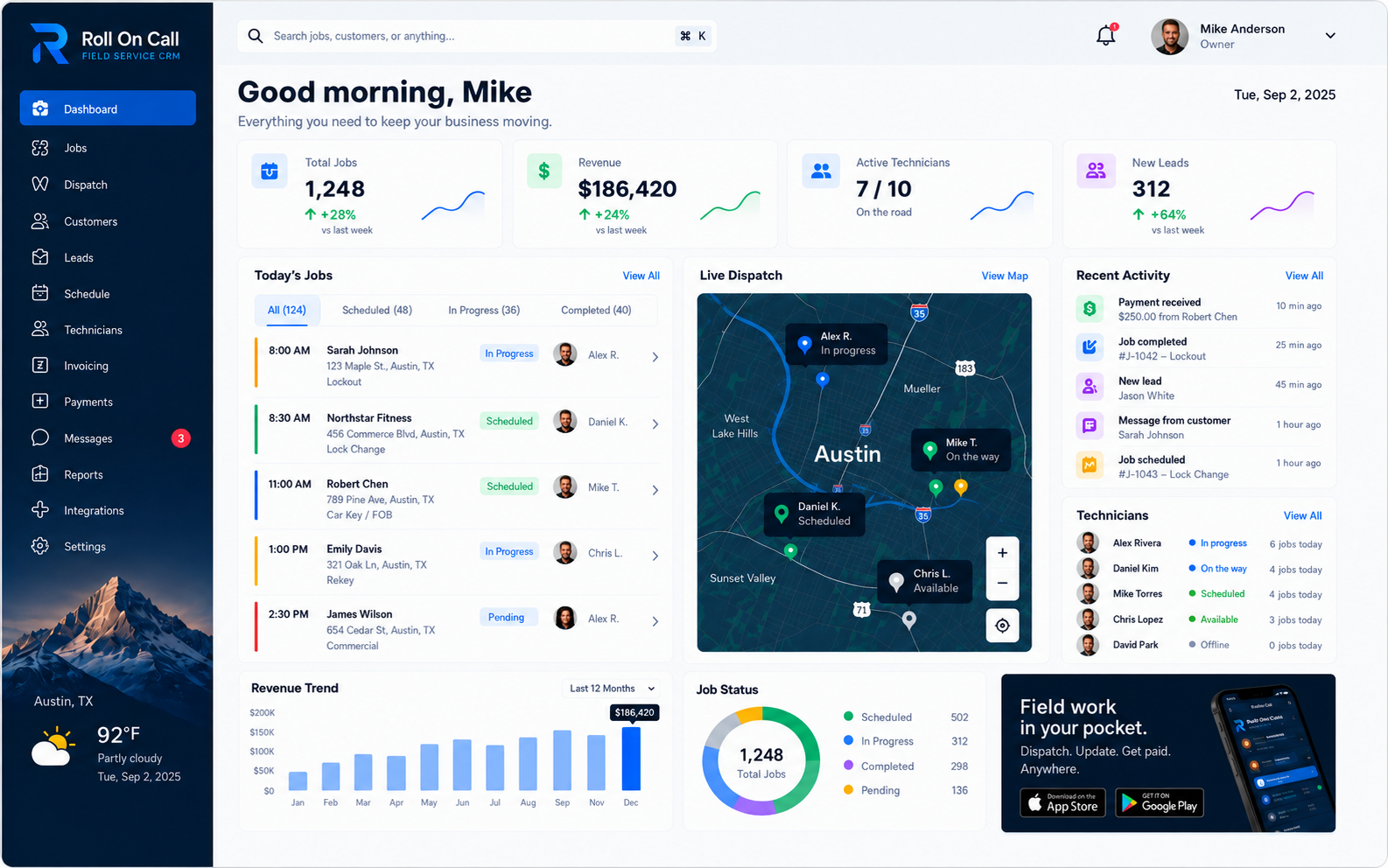
Welcome to the Operations Resource Center
Service businesses face recurring challenges that do not disappear simply because new software is installed. The physical reality of the work demands clear communication, reliable records, and deliberate decisions made by experienced people. This resource center is dedicated to explaining those mechanics in plain terms. It provides educational material intended to help owners, dispatchers, and managers understand the systems they use every day.
The materials collected here focus on practical routines that help the office and field team work from the same facts. Instead, they focus on the practical work of connecting a customer call to a completed job. When a dispatcher answers the phone, they must establish who is calling, determine what needs to be done, confirm the exact location, and fit the new request into a schedule that is constantly shifting. The articles in this hub examine how a business can support those steps with consistent procedures and accessible records.
Whether a team is moving from paper records to a shared platform or evaluating an existing digital process, foundational knowledge is a valuable asset. The goal of this hub is to clarify concepts, define terms accurately, and describe workflows as they occur in reality. Software is a tool for the office; the office stays in charge of the outcome.
Featured Guide: What is Field Service Management?
For anyone seeking a comprehensive understanding of field service operations, our primary authority guide offers an in-depth examination of the subject. It defines the core terms, contrasts working records with traditional sales tools, and details the typical sequence of a service job from the initial request to completion.
Browse the field service guides library for this foundational guide and the detailed educational guide to field service CRM.
What is Field Service Management?
Read our definitive guide to the field service workflow. Learn how dispatchers manage schedules, how SMS briefs communicate necessary details, and how teams maintain accurate customer and location records.
Read the Full GuideThe guide is an essential starting point for evaluating current processes. It covers critical distinctions, such as why a service location must be selected separately from a customer billing address, and how authorized users record payment status for job context without replacing formal accounting. It is highly recommended reading before comparing different platforms.
Foundational Knowledge
Operational success relies on a shared understanding of fundamental concepts. When office staff and field technicians speak the same language, handoffs become smoother and errors are reduced. The resources provided here and throughout the site are designed to establish that common vocabulary. By defining terms clearly, businesses can set realistic expectations for what software can accomplish and what responsibilities remain with the team.
Accurate information helps the whole team make better decisions. Keep appointment times, customer details and job notes current, and use enabled live technician location alongside those records to understand the day's work. Device-reported location and team-entered statuses serve different purposes: neither guarantees what is happening at a property. Confirm details directly when safety, access or a time-sensitive decision depends on them.
We encourage teams to review these concepts together. Discussing how an incoming call is documented, how an emergency job displaces planned work, or what constitutes a completed status helps align the office around practical standards.
Use the field service glossary when the team needs concise definitions for the terms used throughout these resources.
Visit the field service templates library for a practical, copy-ready starting point that teams can adapt to their own procedures.
Use the field service calculators hub to model configurable business scenarios while keeping policy decisions with the team.
Explore the field service checklists hub for practical prompts that teams can adapt for intake, field handoffs, and completion review.
Field Service Management Software
Evaluating software requires understanding what the category actually offers. Our dedicated Field Service Management Software page explores how an office uses a shared workspace to manage daily activities. It explains how connecting customer details, scheduling context, technician communication, and job tracking into a single flow helps a team coordinate effectively.
The page discusses the value of geographic context during scheduling, reminding readers that a map view supports a dispatcher rather than dictating a route autonomously. It also covers the realities of multi-location operations, emphasizing that consistent practices are necessary when scaling a workforce across different areas.
Readers will find guidance on structured job intake, emergency workflows, and the difference between an operational completion status and a financial invoice. It serves as a practical overview of how a team uses a service platform day to day.
The Operational CRM
Not all customer relationship management systems serve the same purpose. Our Field Service CRM page explains why a service business requires a shared record rather than a standard sales pipeline. In field service, the relationship continues long after a deal is closed, and the historical context of previous jobs becomes critical information for future requests.
The CRM material details the anatomy of a service record, highlighting the importance of managing multiple service locations for a single customer. It describes how incoming calls are handled when the dispatcher has immediate access to past communication notes and completed work history.
Crucially, the CRM page connects customer data directly to dispatch. It illustrates how a customer-to-job creation process preserves continuity, ensuring that relevant notes and addresses carry over into the scheduled work and the eventual technician brief.
Features and Workflows
To understand the specific tools available in a service workspace, the Features page outlines the core components of the platform.
The features covered include the unified customer record, the map-based dispatch board, SMS communication for technicians, and the status tracking system. Each feature is presented as a mechanism for organizing information, requiring deliberate user interaction to function correctly.
By reviewing the features, businesses can see exactly how the software handles data entry, scheduling, and communication, providing a concrete basis for comparing their current methods against a shared digital workspace.
Industry Applications
While the fundamental challenges of scheduling and dispatch are common, different trades have distinct requirements. The Industries page provides specific context for how various service businesses apply operational principles. It acknowledges that a locksmith handling urgent lockouts operates differently than an HVAC company managing seasonal maintenance.
The industry material provides examples for plumbers, electricians, garage door technicians, mobile mechanics, towing services, pest control, and property maintenance. In each case, it highlights how a shared platform supports their specific coordination needs.
This perspective reinforces the idea that software is flexible but must be adapted to the business's own rules for safety, priority, and documentation.
Specialized Solutions
For a deeper look into specific everyday challenges, the Solutions section breaks down the workflow into distinct practice areas. This allows a business to focus on the particular segment of their operation that requires the most attention, whether that is intake, scheduling, or field communication.
The solutions covered include customer management, where the focus is on maintaining accurate records; dispatch management, which examines the scheduling board and map context; and technician communication, detailing the use of SMS briefs.
Additionally, the solutions section covers job management and field workforce coordination, providing a comprehensive view of how the platform supports a job from creation to completion.
Future Content Categories
This resource center is intended to grow over time, expanding its educational scope to address the evolving needs of service operations. We are currently developing material across several new categories. These upcoming topics will delve into specific tactics and structural advice for managing a field service business. The following sections outline the subjects we plan to explore in detail, providing a preview of the knowledge base we are building.
These categories will not introduce new software features or promise automated miracles; they will remain firmly rooted in the practical, reality of daily operations. They are designed to help teams refine their existing practices, train new staff, and establish clearer procedures.
Dispatch Strategies
Future material on dispatch strategies will examine the decision-making process behind the scheduling board. It will cover how dispatchers evaluate competing priorities, such as proximity, technician capability, and customer urgency. The content will explore methods for balancing a full day of scheduled maintenance with the inevitable disruption of emergency calls.
We will discuss the importance of leaving buffer time, how to handle jobs that run long, and the communication protocols necessary when a technician is delayed. The goal is to provide dispatchers with practical frameworks for managing a dynamic schedule without relying on algorithms to make judgment calls for them.
Advanced Customer Management
Building on our CRM foundations, future articles will focus on the nuances of maintaining a clean and useful customer database. Topics will include strategies for standardizing data entry, auditing records for accuracy, and handling complex account structures, such as property managers who oversee multiple service locations.
We will also explore the role of historical context in customer service, detailing how dispatchers can use past job notes to anticipate issues and prepare technicians more effectively. The emphasis will remain on careful, consistent recordkeeping as the basis for strong customer relationships.
Technician Communication Practices
Clear communication between the office and the field is a perpetual challenge. Upcoming resources will dissect the elements of an effective job brief. We will analyze what information a technician truly needs to begin work safely and efficiently, and what details are better left in the office record.
This category will also address the limitations of mobile communication, reinforcing the reality of carrier delays and coverage gaps. We will provide guidance on establishing backup contact methods and defining clear rules for when a technician must call the office directly versus relying on a status update.
Workflow Basics and Training
As teams grow, standardizing the workflow becomes critical. Future content will offer guides on documenting operating procedures and training new staff. We will break down the fundamental steps of creating a job, selecting a location, making an assignment, and closing out a ticket.
These materials will be designed as practical training aids, helping managers explain not just how to use a software interface, but why each step matters to the overall operation. A strong foundational workflow prevents the slow accumulation of bad data that eventually degrades system performance.
Industry-Specific Operations
Expanding on our current industry overviews, we plan to publish deeper operational profiles for specific trades. These pieces will examine the unique dispatch rhythms and documentation requirements of fields like commercial HVAC, emergency locksmithing, and complex plumbing installations.
By providing targeted examples, we aim to show how a shared, flexible platform accommodates different service models. The focus will be on adapting a standard workflow to meet the specific safety, regulatory, and customer expectations of individual trades.
The Human Element in Service Operations
Throughout all our resources, one principle remains constant: service operations are a human endeavor. Software provides a structure, a memory, and a communication channel, but it does not fix a broken pipe, calm an anxious customer, or navigate rush hour traffic. The quality of the service depends entirely on the people performing the work and the people coordinating it.
A platform cannot compensate for a lack of communication or poor decision-making. If a dispatcher assigns a job without confirming the scope, or a technician leaves a site without recording the outcome, the digital record will fail to reflect reality. Education must therefore focus on human discipline as much as technical capability.
Recognizing the human element means designing processes that support staff rather than attempting to bypass them. It means giving dispatchers the context they need to apply their local knowledge, and giving technicians clear, concise information they can actually use in the field.
Setting Practical Expectations
A significant part of operational education is understanding boundaries. Many frustrations with service software arise from a misunderstanding of what the technology is supposed to do. This resource center is committed to defining those boundaries clearly. Live technician location is enabled at launch for dispatch visibility, and we explain its limits plainly. We explicitly avoid promising guaranteed location accuracy, autonomous dispatch, automatic route optimization, or automatic diagnostics.
When evaluating a system, buyers should ask what happens when the technology encounters the physical world. A job pin shows where work is scheduled; live technician location, when enabled, shows where the technician's device last reported. A customer pays an invoice by card, but the deposit has not reached the bank yet.
By setting practical expectations, a business can build resilient procedures. If the office knows an SMS might be delayed, they establish a rule for confirming urgent dispatch. Teams that understand the difference between paid and deposited keep their reconciliation routine in the accounting software. Acknowledging limits is the foundation of reliability.
How to Use This Resource Center
This hub is organized to be a reference tool. We recommend starting with the featured guide, What is Field Service Management?, as it establishes the core vocabulary and workflow structure. From there, readers can explore the specific pages on CRM, Features, Industries, and Solutions based on their immediate needs.
Managers can use these pages as reading material for team discussions or as reference points when drafting their own internal procedures. The goal is to provide clear, factual descriptions of mechanics that a business can rely on when training staff or refining their daily practices.
As we add new content in the future categories described above, this hub will continue to serve as a practical library for service operations. We encourage teams to return periodically to review new guidance and reinforce their foundational knowledge.
Summary and Next Steps
Field service operations require a blend of human judgment, clear communication, and consistent recordkeeping. A shared software workspace can support these elements by keeping customer history, job details, schedule context, and payment status in one accessible location. However, the success of the operation ultimately depends on the team's commitment to accurate data entry and established procedures.
We invite you to read the featured FSM guide to gain a thorough understanding of the workflow. Review the existing pages linked throughout this hub to see how these concepts apply to specific features and industries. By grounding your evaluation in practical reality, you can build a resilient, effective service operation that serves your customers reliably.