
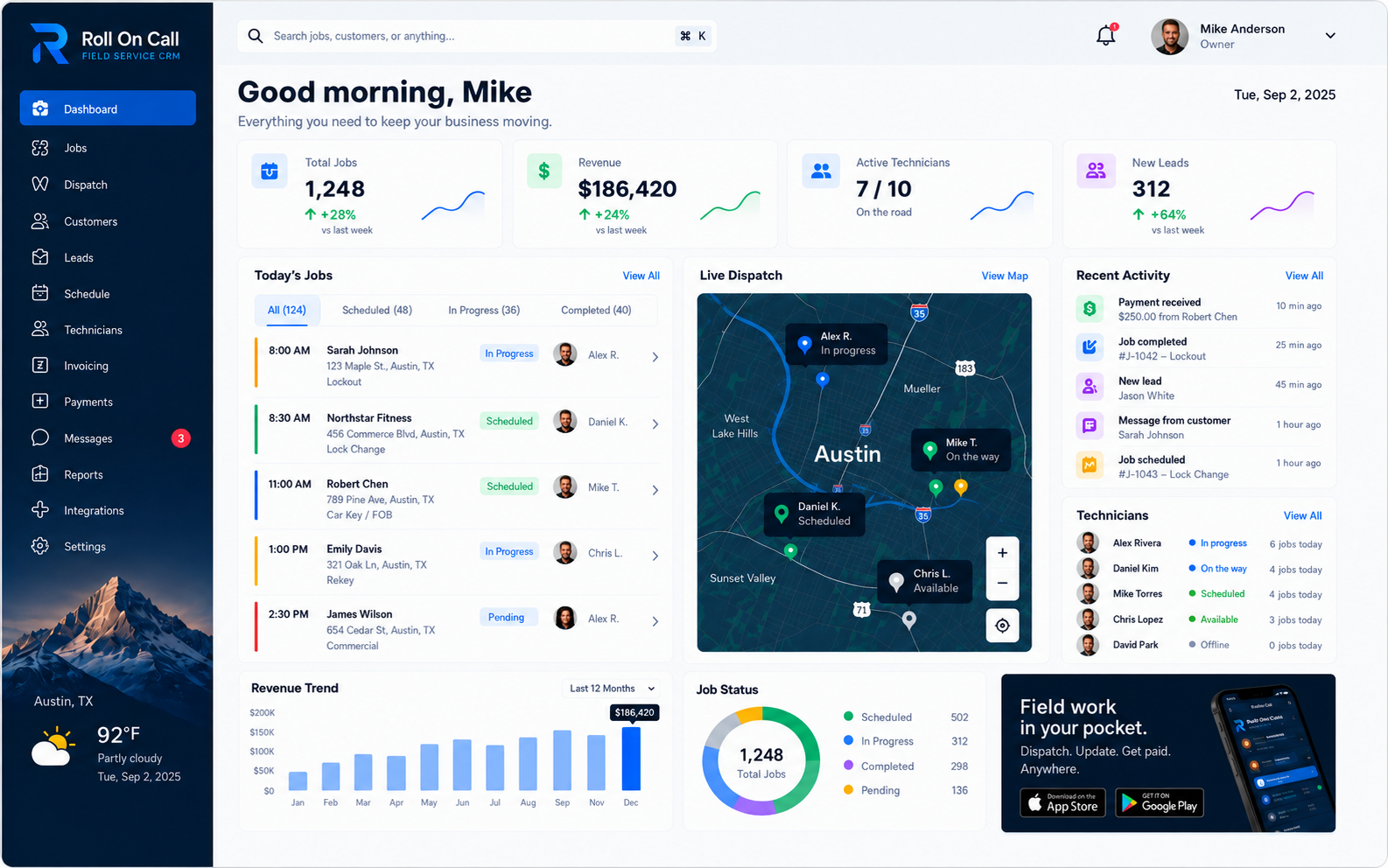
Definitional Boundaries of Field Service Management
Field service management is the consistent habits of organizing, dispatching, and tracking a mobile workforce executing repairs, maintenance, or installations at customer locations. The primary objective is to align customer requests, available personnel, and geographic constraints. This structured approach transitions businesses from reactive firefighting to methodical execution. It provides the framework for processing requests, determining steps, and coordinating required staff.
The digital platform functions purely as a centralized repository for job data. You run the business; the software keeps the record. It is a passive tool requiring active human input. If a dispatcher omits a detail, the system remains ignorant of it. The system relies entirely on office and field staff to record accurate information manually. Without human discipline, the platform fails.
Field service management establishes predictable routines in an unpredictable environment. Traffic delays and broken parts are inevitable. The goal is creating resilient communication and recordkeeping that helps human teams adapt to these variables quickly.
The Field Service CRM: The Operational Core
A field service CRM serves as the database layer supporting the field service workflow. Standing for Customer Relationship Management, the term is frequently misunderstood due to its origins in sales operations. A field service CRM is built around real jobs, not hypothetical sales pipelines. Instead, it is a shared recordkeeping system for customer details, physical property addresses, chronological job history, and communication notes. It gives the office a shared reference for the information its users recorded.
A general CRM often treats a customer as an entity moving through a sales funnel. A field service CRM instead supports an ongoing operational relationship involving one or more physical properties. As authorized users add accurate job records, the resulting history can give a dispatcher context to review during future requests.
Generic software may not represent job data in the way a field service team needs. A field service CRM distinguishes the customer record from the selected physical destination and associates job history with the relevant record. The usefulness of those categories still depends on accurate input.
The field service CRM can act as a primary reference point for the office. When a customer calls, the dispatcher may review the contact information and historical context that staff previously recorded. If another staff member saved notes from an earlier conversation, those notes can give the next user useful context. Their completeness still depends on the original entry.
Distinguishing FMS from FSM
Within the software landscape, overlapping acronyms create confusion. FSM (Field Service Management) and FMS (Field Management Software) function as synonymous alternative acronyms. Both terms describe the exact consistent habits of coordinating, dispatching, and tracking a mobile workforce. They refer to the identical practice of scheduling external service calls and recording the results.
Using FMS emphasizes the management of the field itself. The business executing the FMS workflow is a third-party contractor arriving at a customer property to perform a task. They do not own the property, and scheduling revolves around distinct customer requests.
Evaluating software requires interrogating the core architecture of the database. A field management software platform expects a dynamic geographical footprint. It coordinates human movement between independent sites and maintains separate historical records for each site. Understanding that FMS and FSM are functionally interchangeable helps service businesses focus on actual features rather than semantic distinctions.
Dispatch: The Human Coordination Engine
Dispatch is the active process of assigning human resources to specific tasks at specific times. It transforms a customer request into a concrete operational commitment. Dispatching is a complex puzzle requiring constant negotiation between competing priorities. The dispatcher weighs the urgency of emergency calls against existing commitments, factoring in the geographic reality of where technicians are currently working.
Crucially, dispatch must remain a strictly function. A software platform cannot observe physical reality. A platform cannot reliably predict repair durations, rendering automated schedules brittle and prone to cascading failure.
Field service software supports the dispatcher with a visual board, a calendar and customer history. The dispatcher synthesizes these recorded facts with local geographic knowledge, an intimate understanding of team members, and professional intuition to create a workable schedule. When a schedule inevitably breaks due to unforeseen complications, the dispatcher negotiates the recovery, apologizing to customers and reorganizing the board manually.
Scheduling: Forward Planning and Time Management
While dispatch addresses immediate assignment decisions, scheduling is the broader discipline of forward planning. Staff place known, recurring, or future work on a calendar while reviewing recorded workload and availability. The plan may include maintenance, inspections, and installation projects. The scheduler decides how much flexibility to retain for changes or urgent requests.
The scheduling interface must allow for total human flexibility. Rigid algorithms fail completely when applied to repair work. If a technician is scheduled in tight blocks with zero buffer time, the first job that runs long causes cascading failure across the afternoon. A human scheduler understands that diagnostic work carries time variance and manually inserts buffer zones to protect remaining appointments. The software provides the grid, but humans dictate the pacing.
Geographic density is a primary concern during forward scheduling. A human scheduler looks at a list of upcoming visits and groups them by neighborhood. Clustering jobs geographically reduces unbillable travel time. The system provides foundational data for the dispatcher to construct an efficient day based on their geographic knowledge.
Scheduling requires clear communication with the customer. When staff agree on a future date, they can record that appointment in the system and use their established procedures to confirm or revise it. Scheduling involves reviewing commitments and keeping the recorded plan current as circumstances change.
Job Management: Tracking Work from Start to Finish
Job management encompasses the lifecycle of a specific work order from creation to final resolution. A job ticket is the digital container holding relevant details for a single dispatch event. It is distinct from the broader customer record. The ticket organizes the facts of the requested repair, including reported symptoms, assigned technician, scheduled time block, and a link to the separately selected service location.
The core function of job management is maintaining a clear status workflow. The office needs to know the recorded state of every job on the board. This visibility is not achieved automatically through tracking technology. It requires the assigned technician or dispatcher to manually update the status based on physical reality. The software provides status categories, but human action moves the job from one state to the next.
Effective job management helps staff notice customer requests that still require attention. A structured platform organizes recorded job context, while authorized users stay in charge of reviewing and updating each record. Regular staff review can identify jobs that need another day-to-day decision.
The job ticket can serve as a collection point for textual details recorded during or after a visit. Staff can associate written findings and completion notes with the specific job, giving future users a more organized reference than disconnected messages. The quality of that reference depends on what the team recorded.
Technician Communication: Bridging the Office and the Field
Operating a mobile workforce requires clear communication between the office and technicians in the field. When a dispatcher assigns a job, the office can send an SMS brief containing the selected service address and relevant notes. The technician and office stay in charge of verifying critical details through the business's established procedures.
SMS uses a familiar communication format. A concise job brief can carry the selected service address and relevant notes to the assigned technician. The technician stays in charge of reviewing the message, confirming the destination, and using the tools and procedures approved by the business. The goal is to provide recorded job context in an accessible format.
However, it is critical to acknowledge the hard limitations of SMS communication. Standard text messaging relies entirely on third-party mobile devices, external cellular carrier networks, device settings, and local signal coverage. Because of uncontrollable variables, there are absolutely no guaranteed delivery receipts or read guarantees. A message might be delayed by network congestion or blocked by carrier filters without notification back to the sender.
Because of these technological limits, the business should establish human backup procedures. For urgent work, a dispatcher may follow an SMS brief with a direct voice call to confirm that the technician received and understood the assignment. The software provides a transmission method, but it cannot replace human verification when the stakes are high.
Service Locations vs Customer Records: The Geographic Imperative
One of the most important structural concepts in field service management is separating the customer record from the selected physical service location. A customer record identifies the person or organization responsible for the relationship with the service business. A service location identifies the property address selected for a particular job. Keeping these concepts distinct helps staff avoid assuming that a customer contact address is also the destination for every service request.
Consider a property management company overseeing many residential rental houses. The company may be the customer contact while each rental house is a distinct service location. If a dispatcher records a heater repair without separately selecting the affected property, the assigned technician could receive the wrong destination. Accurate selection depends on the information gathered and reviewed by the office.
Sound field service recordkeeping uses separately selected service locations. When creating a job, the dispatcher identifies the customer record and selects the property where the work was requested. If staff have not recorded that property before, an authorized user can add a location record and associate it with the customer.
This structure prompts the operator to review the destination independently of the customer identity. It avoids assuming that the caller is physically located at the property needing service. The quality of the result still depends on accurate information and deliberate staff selection. Separating the records also lets authorized users associate recorded job history with the selected property.
Job History: The Cumulative Organizational Memory
The value of a recordkeeping system can grow as authorized users add useful job history. When staff record textual details after a visit, those notes can be associated with the selected service location and customer record. The resulting history gives future staff a reference that is less dependent on any one person's memory, provided the original notes were clear and accurate.
Job history can provide context for future site visits. When a customer reports a leaking pipe, the dispatcher may review the recorded history. If earlier notes mention high water pressure, staff can include that recorded context in the new job brief. The assigned technician must still assess the current conditions independently.
Maintaining useful job history requires strict consistent habits regarding notes. The technician's notes describe the repair as it happened. It reflects what the team enters. If a technician resolves a complex physical issue but writes generic text in the notes field, the historical record is functionally useless for future reference. Management must train the team to write clear, factual, and highly descriptive completion notes.
The system presents what the team recorded. Its usefulness relies on users adding accurate information after the job. Treating job history as a daily practice can reduce dependence on individual memory and give dispatchers recorded context to review. That context is not independently verified physical ground truth.
Invoice and Payment Status: Field Visibility
Invoice and payment status is the billing stage of a job: not yet invoiced, invoiced, paid or overdue. In field service software it sits on the job record so dispatch and billing see the same thing.
In Roll On Call, a completed job becomes an invoice and the customer can pay by card through Stripe. The status updates on the job, so a dispatcher booking a returning customer can see whether earlier work is still open and follow the business's credit policy.
This is different from a general ledger. Field service software tracks what was billed and collected for jobs; accounting software keeps the books, payroll and tax.