
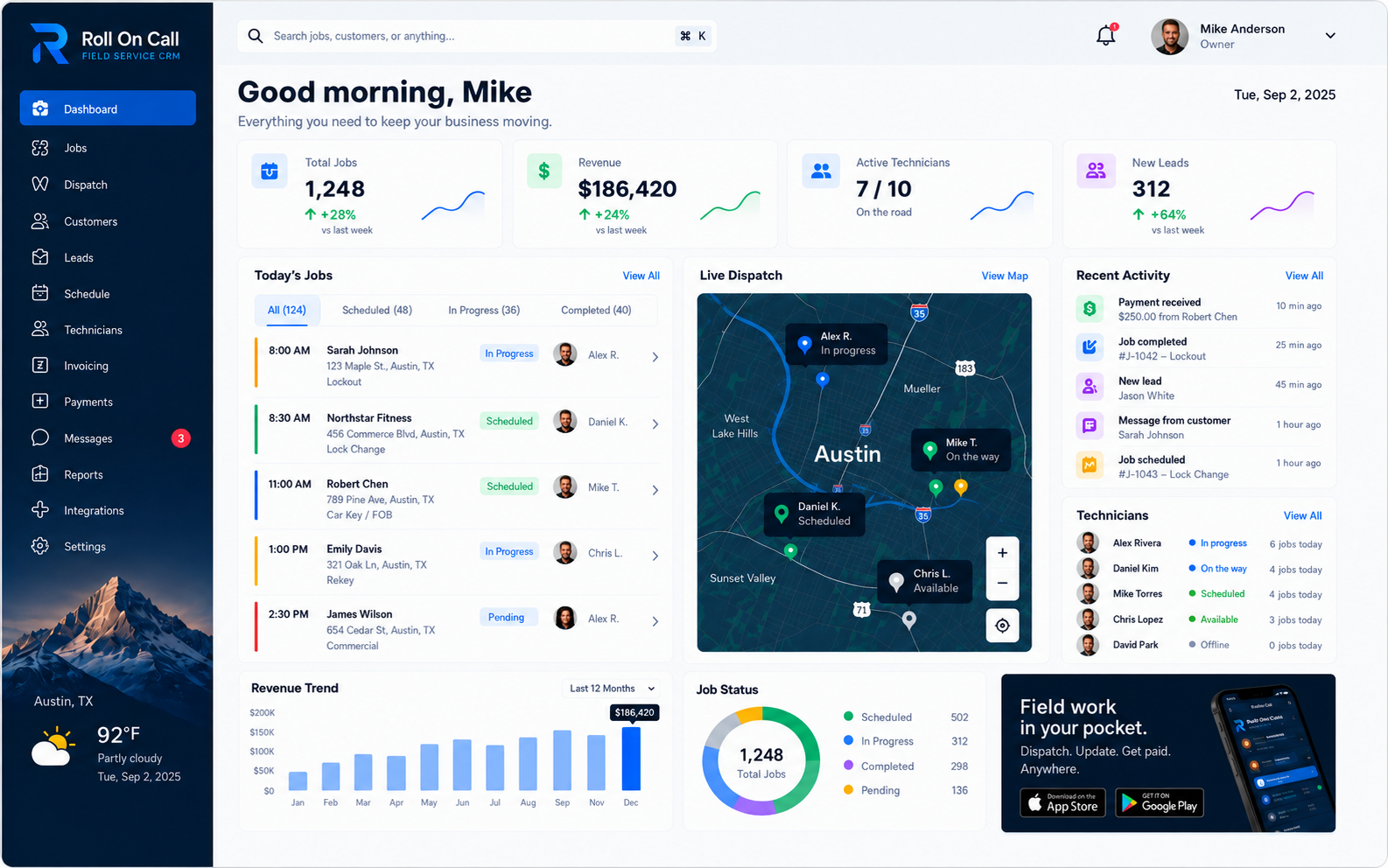
Introduction to the Field Service CRM
Operating a field service business is an exercise in managing physical reality. Unlike digital enterprises where transactions occur entirely on screens, service companies coordinate people, heavy equipment, specific materials, and unpredictable physical environments. To maintain order over this complexity, the office requires a system of record that aligns directly with the requirements of the work. The field service CRM serves as the foundational memory of the organization, storing the critical details necessary to answer a customer call intelligently and schedule a job accurately.
Because the acronym stands for Customer Relationship Management, many businesses assume that any platform bearing that name will serve their needs. They often adopt generic software designed for office-bound sales teams, discovering later that it cannot handle multiple property addresses or track the historical context of physical repairs. A field service CRM is a fundamentally different class of software, engineered specifically for the ongoing maintenance of properties, installations, and equipment.
This educational guide breaks down the operational CRM. We examine the exact structure of customer records, the requirement for separately selected service locations, and how notes preserve vital context. We trace how this data flows from the initial intake call into the dispatcher's schedule and the technician's SMS brief.
General CRMs vs Field Service CRMs
The distinction between a general CRM and a field service CRM is the difference between tracking a pipeline and managing an operation. Many general CRMs are built around the concept of a sales funnel. They track leads, prospects, opportunities, and closed-won deals. The data structures are optimized for forecasting revenue and logging sales calls. When a deal is categorized as won, the record's utility can drop significantly, as the primary goal of the software has been achieved.
A field service CRM discards the sales funnel in favor of the lifecycle. While it stores contact information, its architecture centers around the service location and the job history. The focus is on execution. When a customer calls, the field service CRM presents the dispatcher with a view of what work has already been recorded and what the team needs to know before returning. It is a tool designed for managing physical labor, not hypothetical revenue pipelines.
Businesses sometimes find that attempting to force a service operation into a general CRM requires workarounds, such as repurposing sales opportunities just to schedule a technician visit, or stuffing critical access instructions into generic text fields because the software lacks a dedicated service location architecture. By adopting a dedicated field service CRM, the business aligns its software directly with its daily reality, reducing friction and allowing the office to focus on coordination.
CRM vs Field Service Management
It is necessary to clarify the relationship between the field service CRM and the broader category of Field Service Management software. The CRM is the foundational layer; it is the database that holds the identities, the addresses, the histories, and the communication notes. Field Service Management represents the entire workflow built on top of that foundation. FSM includes the dispatch board, the scheduling workflow, the field execution tracking, and the overall coordination of the mobile workforce.
The two concepts are linked but serve different immediate purposes. A dispatcher uses the CRM to understand who is calling and what has happened previously. They then use the FSM tools to determine when the new work can be scheduled and who will perform it. The CRM provides the context; the FSM provides the action. Without the CRM, the dispatch board is just a calendar full of disconnected names. Without the FSM workflow, the CRM is just a static digital filing cabinet.
In a practical software platform, these components are integrated. The process of customer-to-job creation bridges the gap, allowing a user to pull a customer record from the CRM and create a schedulable job on the FSM dispatch board, carrying the relevant historical context forward.
Customer Records and Service Locations
An operational customer record is designed to support rapid comprehension during time-sensitive phone calls. When a dispatcher answers a call, they have seconds to ascertain the necessary facts. A well-designed record presents the primary contact information clearly, allowing the staff member to verify identity immediately. Beneath the contact details, the record splits into the critical operational components, displaying a consolidated list of separately selected service locations associated with that customer.
Separating the customer entity from the physical service location is a structural requirement. A person is a billing entity who may authorize work at any number of physical locations. Failing to distinguish between the two is the leading cause of technicians arriving at the wrong destination. A separately selected service location directs every job created in the system to explicitly state its physical destination, preventing the dangerous assumption that the person paying the bill resides at the property experiencing the malfunction.
The importance of separate service locations becomes undeniable when managing complex accounts. Commercial clients, property management firms, and retail chains represent a single billing entity responsible for dozens of physical sites. The CRM allows the dispatcher to quickly search the associated locations, verify the street address, and confirm any specific unit numbers. This process relies heavily on the call-taker's diligence and the software's structural clarity to maintain organized, geographical records.
Job History and Staff-Entered Notes
Every completed job adds a permanent layer of intelligence to the operational CRM. The job history is a chronological factual record of what the team recorded about the work at a specific location. It contains the original stated scope of work, the technician who was assigned, the dates of the visit, the final completion status, and any team-recorded completion context regarding the outcome of the repair. This history provides authorized review capabilities when future work is requested.
The value of job history is realized during the intake of repeat requests. When a returning customer contacts the office, the dispatcher actively uses the CRM to establish context. By reviewing the most recent jobs, they can guide the conversation efficiently. They must still explicitly confirm that the address has not changed and that the new scope of work is accurately documented.
Additionally, much of the day-to-day reality of field service is unstructured. This information is captured through notes, serving as the flexible, human-readable narrative within the CRM. These notes provide the connective tissue between interactions, ensuring vital context is available to the dispatcher every time that customer or location is accessed. Maintaining the clarity of these notes by auditing outdated warnings is a shared responsibility of the office team.
Dispatch Context and Human Decisions
The operational CRM does not exist in a vacuum; it is the engine that drives the dispatch board. The process of customer-to-job creation is the moment when CRM data becomes dispatch context. When a dispatcher takes a call, confirms the customer details, and selects the service location, they pull the structured data from the CRM to populate a new job ticket. This helps build the schedule on recorded historical facts rather than manual, error-prone re-entry.
The CRM provides the context; the dispatcher makes the call. A dispatch board populated with accurate CRM data presents a visual map of the day's commitments, but it cannot determine the optimal assignment on its own. The dispatcher looks at the CRM data and applies their local knowledge to synthesize the digital record with physical reality.
Educational integrity requires explicitly rejecting claims of autonomous dispatch optimization. Software that attempts to automate assignments frequently produces brittle schedules that shatter upon the first emergency call or traffic delay. The operational CRM exists to empower the dispatcher, giving them the clear, recorded facts they need to apply their judgment rapidly and confidently. It is a vital support tool, not a replacement for human intelligence and coordination.
SMS Briefs and Carrier Limits
Once the dispatcher makes the assignment decision, the context gathered in the CRM must be transmitted to the technician in the field. The standard practice is for the dispatcher to generate a job brief directly from the job record. This brief compiles the separately selected service location, the primary contact phone number, the scope of work, and any relevant notes. The dispatcher acts as a filter, helping the technician receive relevant details while excluding irrelevant administrative commentary.
We advocate for the use of SMS briefs as a primary communication method. By sending the job details directly to the technician's native text messaging application, the business utilizes a familiar tool. An SMS brief provides low-barrier access to the CRM context, allowing the technician to tap the service address and open it directly in their preferred navigation app. This simplicity reduces the amount of time technicians spend navigating software in the field.
However, SMS is heavily dependent on variables outside the control of the service business. A message sent from the CRM must successfully reach a specific mobile device. SMS is subject to carrier delays, network outages, device settings, and coverage gaps. Because of these limits, there are absolutely no delivery or read guarantees.
Repeat and Emergency Work
The strength of an operational CRM is demonstrated when managing repeat work. When a returning customer contacts the office, the intake process relies on existing data. The dispatcher pulls up the record, verifies the contact details, and reviews the separately selected service locations already established. They then review the job history to understand the previous work performed. This context alerts the technician to the possibility of a related issue and helps the office provide a knowledgeable customer experience.
Emergency service scenarios stress every part of a field operation. When a high-priority call comes in, the standard schedule must be disrupted, and resources reallocated rapidly. The CRM supports this process by providing authorized access to the recorded data. The dispatcher quickly identifies the customer, confirms the emergency service location, and creates a job ticket. The dispatcher relies on the map context, but their decisions are informed by the notes regarding specific site access.
Not all field service is reactive. Coordinating scheduled service requires a different application of the CRM. Rather than rapid triage, the office uses the system for methodical forward planning. They create future job tickets based on the intervals established in the customer record. The dispatcher reviews the map context to group routine visits geographically, drastically reducing unbillable travel time. This geographic density planning relies heavily on accurate CRM location data.
Completion Context and Payment Status
A job does not end when the technician drives away. The team marks the job complete and records what was found, whether the issue was fully resolved and whether a second visit is needed.
The completed job then becomes an invoice. Customer, address and line items carry over, the customer can pay by card through Stripe, and the job shows whether the invoice is sent, paid or overdue.
That visibility helps the office apply its own credit policy before sending another truck to an account with open balances. Bookkeeping and tax stay in the accounting software the business already uses.
Practical Trade Examples
To ground these concepts, consider the daily operations of a plumbing and HVAC business. These trades balance urgent emergency calls with a steady baseline of scheduled maintenance. When an emergency call arrives, the dispatcher relies on the customer record to quickly confirm the address and uses the map view to locate an available technician. If the CRM history indicates that a specific boiler has required multiple prior repairs, the dispatcher prepares the technician for the correct historical context.
Electrical contractors operate in an environment where exact documentation is paramount. The notes within the CRM often carry warnings about non-standard wiring, unresolved code violations, or specific hazards discovered during previous visits. If a dispatcher fails to review these notes before generating an SMS brief, they place their technician in danger. The CRM acts as a necessary safety repository that relies on the team to record the information accurately.
Property maintenance companies test a CRM's ability to handle multiple service locations. A single client may be a property management firm overseeing fifty different rental addresses. When the firm reports a broken fence, the dispatcher uses the CRM to link that specific work order to the exact rental property while retaining the parent firm's billing association. Without a separately selected service location architecture, tracking this work accurately is logistically impossible.
Migration and Evaluation
When a service business implements a field service CRM, the migration process requires careful planning. The most common mistake is attempting to export years of messy, unstructured data from an old system and dump it directly into the new platform. If you migrate bad data, you corrupt the new shared workspace. Before migrating, the business must audit its existing customer records, merging duplicates, deleting outdated contacts, and correcting vague addresses to establish a clean hierarchy.
If you are evaluating software for your service business, you must ask vendors highly specific questions. Do not accept vague assurances about automation or artificial intelligence. Ask them to demonstrate the exact workflow. How does a dispatcher create a new job from an existing customer record? Show the exact steps required to assign a separately selected service location to a ticket. Demand to see the physical reality of the interface, not a marketing presentation.
Interrogate claims about technological limitations. If a vendor promises guaranteed SMS delivery, autonomous route optimization, or automatic estimated times of arrival, you should view their platform with extreme skepticism. A trustworthy vendor understands telecommunications limits and physical constraints, designing their software to help humans navigate those challenges rather than pretending the challenges do not exist. Choose a platform built for reality.
Conclusion and Next Steps
Mastering field service operations requires accepting the complexity of the work and implementing a recordkeeping structure that respects that physical reality. The field service CRM is a disciplined framework. It demands accurate initial data entry, careful management of separately selected service locations, the consistent logging of job history, and the intelligent application of notes. When these elements are maintained, the CRM provides the dispatcher with the comprehensive context required to coordinate a mobile workforce effectively.
Your next step is to evaluate your own organization against these factual standards.