
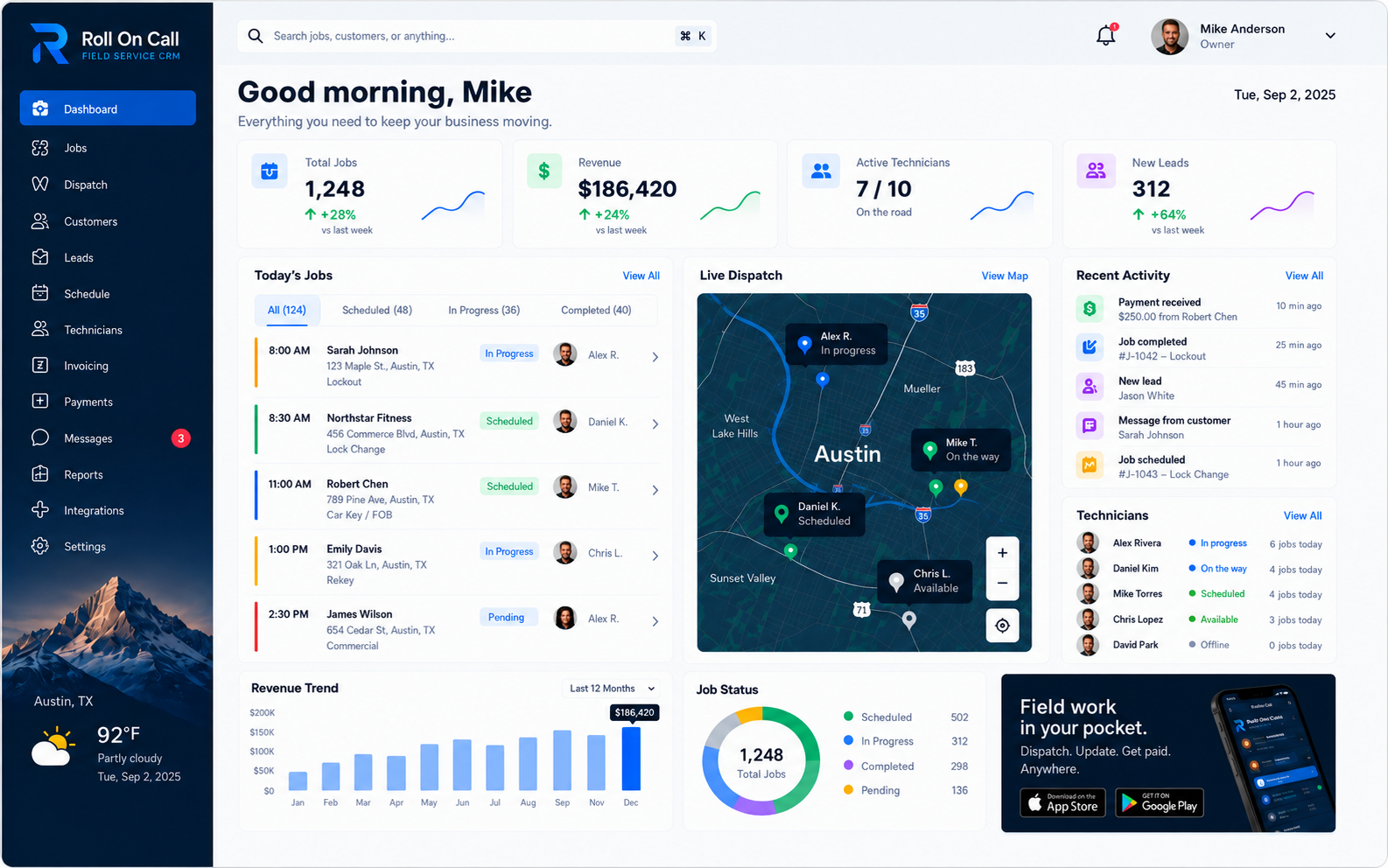
Introduction to Field Service Management
Field service operations require constant coordination between an office and a distributed mobile workforce. Every day, businesses dispatch technicians to customer properties to perform repairs, installations, maintenance, and consultations. Managing this process efficiently is the core objective of field service management. It is not an abstract concept; it is the physical reality of moving people, information, and equipment to the right place at the right time.
Historically, this coordination relied heavily on paper tickets, whiteboards, and fragmented phone calls. While those methods can work for small teams, they struggle under the weight of volume, urgency, and the need for historical reference. A shared software workspace provides a digital structure for these activities. The work itself stays the same; the record around it gets clearer. A platform provides a place to record context and view a schedule, but the dispatcher must still make the assignment, and the technician must still perform the labor.
This guide provides an exhaustive examination of the field service management workflow. It defines the working records required to support the office, outlines the sequence of events from a customer's initial call to the final job completion, and details the limitations of technology in a physical world. By understanding these mechanics, service businesses can evaluate their procedures realistically and set appropriate expectations for what a software platform can provide.
Related reading includes the field service management software overview, the field service CRM guide, verified product features, practical examples across field service industries, and focused operational solutions.
Defining Field Service Operations
Field service operations encompass all activities required to deliver skilled labor at a customer's location. This involves a chain of distinct but connected steps. The office must capture the customer's details, identify the specific service address, document the reported problem, determine an appropriate time for the visit, and assign a capable technician. Once the technician is dispatched, the office must track the progress of the job, handle any necessary follow-up communication, and eventually record the work as complete and note the payment status.
The complexity arises from the variable nature of field work. Unlike a manufacturing line, where conditions are controlled, a field service environment is inherently unpredictable. Traffic delays a technician's arrival. A reported simple fix turns into a major repair requiring new parts. An emergency call forces a dispatcher to rearrange an entire afternoon's schedule. Field service management is the practice of maintaining order and accurate records despite these constant disruptions.
A successful operation requires a system of record that the entire team trusts. If a dispatcher cannot rely on the customer history shown on their screen, they will revert to asking the customer repetitive questions. If a technician does not receive an accurate address in their brief, they will waste time driving to the wrong location. The primary function of field service management software is to serve as a dependable, shared memory for the business.
CRM Versus Field Service Management
A common point of confusion is the difference between a traditional Customer Relationship Management tool and a Field Service Management platform. While they share some terminology, their operational focus is fundamentally different. A standard sales CRM is designed to track a prospect through a sales pipeline. Its goal is to secure a signed contract or a closed deal. Once the sale is made, the traditional CRM's primary job is largely finished until it is time for a renewal or an upsell.
In contrast, field service management treats the initial booking as the beginning of the shared record, not the end. The focus shifts entirely to execution. A field service CRM must track service addresses, maintain a history of completed jobs, preserve communication notes about property access or equipment quirks, and connect all this context to the daily dispatch board. The record must support the ongoing physical relationship between the business and the customer's property.
When a repeat customer calls, the dispatcher does not need to see a probability score for closing a deal; they need to see what work was recorded last month, which technician was assigned, and whether the invoice was paid. The operational CRM connects customer information with scheduling and dispatch context so staff can review prior records while creating a new job.
The Workflow: Call to Job
The daily workflow typically begins when a customer contacts the office. This intake process is critical; incomplete or inaccurate information captured here will cause problems throughout the entire job lifecycle. The dispatcher or call-taker must act as a structured filter, extracting the necessary facts from the customer's narrative.
The first step is identification. The office searches the operational CRM to determine if the caller is a new or existing customer. If returning, the dispatcher can review previous job details and communication notes, which provides valuable context and demonstrates competence to the customer. However, the dispatcher must still verify current details. Assuming an old note is still accurate without checking can lead to sending a technician to a former address or preparing for the wrong issue.
Once identity is established, the dispatcher creates a new job record. This involves writing a clear scope of work based on the reported symptoms. Vague entries like "fix unit" are insufficient. A practical brief includes the specific nature of the request, any known constraints, and relevant access instructions. The dispatcher must also deliberately select the correct service location for this specific job, ensuring the physical destination is unambiguous.
The Workflow: Dispatch to Technician
With a job record created, the focus moves to scheduling and dispatch. The dispatcher reviews the available schedule, considering the geographic context provided by the map view, the current status of field technicians, and the priority of pending work. This is a complex cognitive task that relies heavily on local knowledge and judgment.
The software provides visibility, but the dispatcher makes the decision. They must weigh the efficiency of routing against the necessity of matching a specific technician's capability with a difficult job, or deciding whether to delay a routine maintenance visit to accommodate an emergency repair. Roll On Call presents the recorded facts so the dispatcher can decide.
Once an assignment is made, the details must be communicated to the field. In a practical workflow, the office sends an SMS job brief to the assigned technician's mobile device. This brief includes the selected service address, the job scope, and any pertinent customer notes. The dispatcher must review this message before sending, ensuring it is concise, accurate, and free of unnecessary sensitive information. The assignment is then marked on the dispatch board, moving the job into an active state.
The Workflow: Execution to Completion
After dispatch, the technician travels to the location and performs the work. During this execution phase, the office relies on status updates to maintain situational awareness. The technician or the dispatcher updates the job status to reflect progress, such as indicating work is in progress, paused for parts, or completed.
These statuses are operational markers, not omniscient tracking. If a technician forgets to update a status, the board will show outdated information. The office must cultivate a discipline of regular communication to ensure the schedule reflects reality. When the physical labor is finished, the job is marked complete in the system.
Completion signifies the end of the field execution, but office follow-up remains. The dispatcher may need to record final notes, schedule a return visit if the issue was only partially resolved, and update the payment status based on the business's collection procedures. The completed job and its associated data then become part of the customer's history for authorized review during a later service call.
Customer Records in an Operational Context
An operational customer record is more than a digital address book. It is a consolidated view of a business's interactions with a client. The record holds primary contact details, an aggregated list of associated service locations, a chronological history of jobs, and persistent communication notes.
The value of this record lies in its accessibility during time-sensitive moments. When a customer calls with a frantic request, the dispatcher does not have time to dig through physical files or search multiple disconnected applications. Having a unified view allows the office to quickly ascertain who the customer is, what equipment they might have based on past work, and whether there are any outstanding issues or pending payments.
Maintaining these records requires continuous effort. Staff must be trained to update contact information, add meaningful notes after significant conversations, and avoid creating duplicate entries. A software platform can store the data reliably, but the team's consistent habits determines whether that data is actually useful. Clean records lead to efficient intake; messy records lead to confusion and wasted time.
Separately Selected Service-Location Records
One of the most critical structural elements in field service management is the separation of the customer entity from the service location. A fundamental flaw in basic tracking methods is assuming a customer only has one address. In reality, landlords manage multiple rental properties, businesses operate from several storefronts, and homeowners move while retaining their service providers.
To handle this complexity, a robust platform requires the dispatcher to select a specific service location for every new job. The customer record may hold a primary billing address, but the job record must dictate the exact physical destination for the technician. This prevents the common error of dispatching a crew to a property management office instead of the apartment building experiencing a leak.
This separation also clarifies job history. When reviewing a customer with multiple properties, the office can see exactly which location received service on a given date. The geographic context of the work is preserved accurately, supporting better decision-making for future visits to those specific sites.
Navigating Dispatch and Scheduling
The dispatch board is the nerve center of a service operation. It is where the office visualizes the commitments for the day, week, or month. A practical dispatch interface combines time-based scheduling with geographic context, typically presenting a calendar or list view alongside a map showing job locations and technician assignments.
This combination allows the dispatcher to evaluate the feasibility of the schedule. If two jobs are assigned to the same technician back-to-back but are located on opposite sides of a congested city, the map context makes that physical impossibility obvious.
Scheduling is inherently fluid. A job takes longer than expected, a technician calls in sick, or a high-priority customer demands immediate attention. The dispatcher uses the board to assess the impact of changes, identify which lower-priority jobs can be moved, and reassign work accordingly. It is a continuous process of human adjustment, not a rigid mathematical puzzle solved by an algorithm.
Managing Job History
Every completed service call adds a layer to a customer's job history. This historical record is a powerful operational asset. It contains the original scope, the assigned location, the technician who performed the work, any communication notes added by the office, the final completion status, and the invoice and payment.
When a customer reports that a recently fixed issue has recurred, the dispatcher can consult the job history to understand exactly what was previously attempted. This context allows the office to prepare the returning technician properly, perhaps suggesting different parts or warning them of a persistent underlying problem. It transforms a blind callback into an informed follow-up.
Job history also supports internal accountability. Managers can review past work to identify recurring patterns, evaluate the accuracy of initial intake scopes versus actual outcomes, and ensure that all necessary administrative follow-up was completed. The history provides a factual basis for continuous operational improvement.
SMS Briefs and Carrier Limitations
Transmitting the job assignment to the field technician efficiently is a practical necessity. A field app has to be simple enough to use with gloves on and a weak signal. Using SMS to deliver structured job briefs provides a familiar, low-barrier method for communication.
An SMS brief generated from the job record typically includes the service address, the scope of work, and relevant access notes. Roll On Call pairs its technician app with an SMS brief, so the technician always has a concise reference on their phone.
However, a professional operation must acknowledge the limitations of this technology. SMS is subject to carrier networks, device settings, and variable local coverage. There are no guaranteed delivery receipts or read confirmations. A message may be delayed or dropped entirely. Therefore, the office must establish backup procedures. Acknowledging these limitations prevents catastrophic communication failures.
Invoice and Payment Status
Field service management ends with getting paid. Connecting the invoice to the job means the office is not re-entering work from paper tickets at the end of the week.
In Roll On Call, the completed job becomes an invoice and the customer can pay it by card through Stripe. A dispatcher reviewing the customer's history can see which earlier work is paid before scheduling new work.
Field service software is not a general ledger. Most teams keep accounting software for bookkeeping, payroll and tax.
Handling Emergency Work
Emergency service requests test the resilience of any dispatch operation. When a critical failure occurs, such as a burst pipe or a major electrical fault, the standard schedule must be immediately reconsidered. The dispatcher's role shifts from routine coordination to rapid triage and reassignment.
The shared workspace supports this by presenting recorded schedule, job-location, assignment, and status context. The dispatcher reviews that information and decides which technician may be suitable for the emergency. They must determine whether current work can be safely paused and how later appointments may be affected.
Once the decision is made, the dispatcher creates the emergency job, assigns it, and sends the SMS brief. Crucially, they must then manage the consequences. Customers whose appointments were displaced may need to be contacted, and staff must update the board to reflect the new plan. The software records the changes, but the dispatcher executes the complex reprioritization.
Coordinating Recurring Work
Many service businesses rely on recurring work, such as seasonal HVAC maintenance, scheduled property inspections, or routine pest control treatments. Managing these appointments requires foresight and deliberate scheduling to ensure a steady baseline of activity without overwhelming the capacity needed for urgent calls.
While a platform allows jobs to be created for future dates, the scheduling of recurring work remains a strategic human task. A dispatcher must consider geographic density, attempting to group routine visits in the same area on the same day to minimize travel time. They must also monitor the overall schedule density, ensuring enough buffer remains to handle daily emergencies.
When a future recurring job approaches, the office may confirm the appointment with the customer and finalize the technician assignment. The historical record provides context about what the team recorded during the previous cycle. Consistent procedures help the office coordinate recurring work without assuming every visit will follow the same pattern.
Multi-Location Operations
As a service business expands, managing operations across multiple geographic zones or branches introduces significant complexity. A whiteboard that works for a single city becomes unmanageable when coordinating fleets across different regions. A shared digital workspace allows authorized users to manage schedules across these varied locations from a unified interface.
However, software alone does not solve the challenges of scale. The business must establish clear governance. Who has authorization to assign work in a neighboring territory? How are cross-zone emergencies handled? What naming conventions ensure a customer with properties in three different cities is tracked accurately?
Consistent procedures become mandatory. If one branch uses different status definitions or ignores communication notes, the shared platform becomes fragmented and confusing. Multi-location success requires management to enforce standards, using the software to provide visibility while relying on human discipline to maintain order across the expanded footprint.
Practical Trade Example: Plumbing and HVAC
Plumbing and HVAC operations balance a mix of urgent repairs and scheduled maintenance. A customer calling about a failed air conditioner in mid-summer or a flooded basement requires immediate triage. The dispatcher uses the intake process to document specific symptoms, which are crucial for the technician's preparation.
For these trades, the separately selected service location is vital, as a caller may be a landlord reporting an issue at a tenant's property. The map view helps the dispatcher locate a technician working nearby, allowing for a rapid reassignment if necessary. The job history is equally important; knowing the age and service record of a specific furnace or water heater allows the office to provide better advice and the technician to arrive with appropriate parts in mind.
Practical Trade Example: Electrical and Locksmith
Electrical work demands precision, safety, and careful documentation. When a dispatcher creates a job for an electrical fault, the communication notes should distinguish reported information from a professional diagnosis. Job history can provide context about previously recorded work at the specific service location.
Locksmiths frequently operate in a high-urgency, mobile environment. A customer locked out of a business needs rapid response. The dispatcher relies on map visibility and clear status updates to find an available technician immediately. Because locksmiths handle sensitive security issues, maintaining an accurate operational CRM history of who requested service at a specific address supports accountability and professional service delivery.
Practical Trade Example: Property Maintenance and Garage Doors
Property maintenance companies deal with complex customer relationships, often involving property managers, owners, and individual tenants. The separation of the customer record from the service location is essential here; a single management company may generate jobs across dozens of addresses. Persistent communication notes are used to track specific access instructions, gate codes, or tenant availability requirements.
Garage door repair teams coordinate planned installations with urgent repair calls. During intake, the dispatcher can record customer-reported details such as door size or opener brand, while leaving diagnosis and final preparation decisions to qualified people. Completed jobs become invoices that customers can pay by card through Stripe.
Buyer Evaluation Questions
When evaluating field service management software, buyers should ask questions grounded in day-to-day reality rather than marketing claims. A practical evaluation focuses on how the platform handles the specific challenges of daily coordination.
- How does the system distinguish between a customer's billing address and the actual physical location of the job?
- What information is included when a job brief is transmitted to a technician, and what are the fallback procedures if an SMS is delayed?
- Can dispatchers view historical jobs and communication notes while creating a new assignment?
- How is job status updated, and who is responsible for ensuring the dispatch board remains accurate?
- How does the platform turn a completed job into an invoice, and how do customers pay it?
By demanding clear answers to these structural questions, a business can cut through abstraction and determine if a platform will actually support their workflows.
The Fallacy of Automated Field Operations
A persistent fallacy in software marketing is the promise of complete automation. Vendors often claim that algorithms can autonomously optimize routes, match skills perfectly, predict travel times with pinpoint accuracy, and eliminate the need for human dispatchers. In the physical reality of field service, these claims are fundamentally flawed.
Algorithms cannot account for a technician spending an extra hour calming a frustrated customer, a sudden road closure, or the nuanced decision to prioritize a long-standing client's minor issue over a new caller's routine request. Automation assumes a closed, predictable environment; field service is open and inherently unpredictable.
Attempting to force a human workforce into an autonomously optimized schedule can produce brittle operations and frustrated staff. A practical approach recognizes that software is a tool for visibility and communication, not a replacement for judgment. A shared workspace presents recorded locations, history, and current status so experienced dispatchers and technicians can make informed decisions in an imperfect world. The value of field service management lies in supporting people, not attempting to replace them.
For a definition-first comparison of related terms, see the Field Service Management glossary entry.
Frequently Asked Questions
Review these common questions regarding the scope and definitions of field service management.