
01The Core of Field Workforce Management
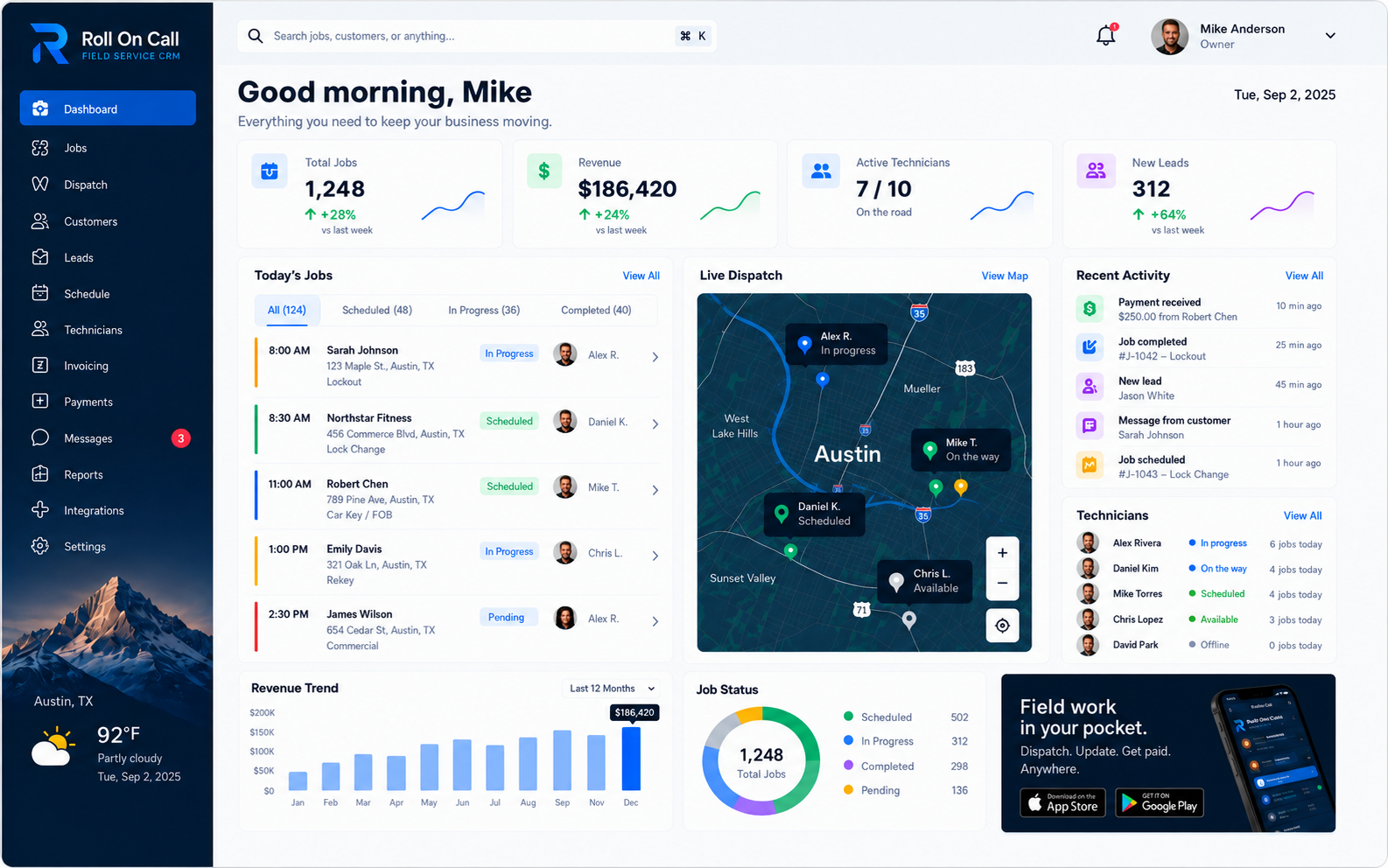
Field workforce management brings office planning and field execution into one operating rhythm. A service organization needs to place customer requests, planned appointments, assignments, and relevant history in a workspace its authorized office users can consult. That is more useful than scattering the day's plan across paper calendars, private messages, and individual notes. The result is a shared record of what has been planned, not proof of what is happening at each job site.
Roll On Call organizes requested work, scheduled appointments, and assignments. Dispatchers interpret those records, speak with customers and field personnel, and decide what to do next. A maintained board can serve as a useful reference for authorized users, but its value depends on the completeness and timeliness of human-entered information.
In practice, the dispatcher remains the decision-maker. The workspace helps them compare incoming requests with recorded commitments and document the plan they choose. Businesses still define who may see or change records, how exceptions are escalated, and when direct confirmation is required. For a wider view of the operating model, see our field service management software guide.
02Understanding Technician Availability Context
A schedule gives dispatchers context for an availability decision. A two-hour block at a service address is a plan. Travel, access problems, additional work, and customer decisions can change the actual timeline.
A dispatcher may compare a new request with the sequence of service addresses and time blocks already recorded. That comparison can reveal an obvious conflict or suggest a practical option, but it is only a starting point. When timing matters, the dispatcher should contact the field team and confirm the proposed change before promising an arrival window. Roll On Call supplies the planning view; people supply current situational knowledge and approval.
Live technician location is enabled at launch, so the office can see where the field team is, but Roll On Call does not predict exact finish times or plan routes. Schedule and job details are information entered by authorized users. A sound operating practice is to distinguish a booked slot from confirmed capacity, include reasonable travel and work buffers, and use direct communication for urgent changes. These are management choices, not automated platform functions.
03Assignment Decisions
Assigning field work is a judgment. Customer priorities, travel conditions, property access, existing commitments, and job complexity may all matter. Your dispatcher weighs suitability and selects the person.
The dispatcher can compare a recorded service address, the reported problem, and existing schedule blocks in the dispatch management view. They then confirm actual availability, relevant qualifications, equipment, and customer constraints outside any assumptions suggested by the board. If a change affects working hours or another appointment, the responsible people decide whether the tradeoff is acceptable.
The platform records the assignment decision; operating staff remain accountable for making and confirming it. Businesses should define who has assignment authority, what information must be checked, and which cases require escalation. Local knowledge can inform a decision, but it should not be confused with a product-generated assessment of skills or preparedness.
04Structuring and Managing Schedules
A visual schedule sets out the planned order of work. Office users can create appointment blocks and account for expected travel or administrative time when building the day. Seeing those blocks together can help a dispatcher notice apparent overlaps before confirming an assignment. The dispatcher checks conflicts and travel before committing the plan.
However, the schedule is a working plan, not a permanent physical reality. Service work inherently involves delays, cancellations, and scope expansions. When a technician discovers that a routine inspection actually requires a complex repair, the schedule must absorb that impact. The dispatcher reviews the board, identifies downstream conflicts, and begins the necessary process of contacting affected customers. It presents the conflict clearly so the dispatcher can apply their local knowledge and judgment to resolve the issue.
Effective schedule management is an operating discipline. The office reviews the board, obtains updates through its chosen process, and communicates approved changes to field personnel and customers. The board records those decisions but does not make them. See the features overview for more detail on the scheduling interface.
As an operating practice, teams can reserve time for travel, documentation, and known access constraints rather than filling every visible gap. They can also define when a delayed appointment triggers a customer call and when a proposed reassignment needs supervisor approval. Your business sets those thresholds and policies. Authorized users apply them while maintaining the recorded schedule.
05The Role of Team-Recorded Job Status
Job statuses provide a compact record of reported progress. In Roll On Call, an authorized user can set a job record to the applicable configured stage, such as dispatched, en route, in progress, or completed. The office decides who is allowed to make those updates and how reports from the field are collected. A status is useful context for authorized viewers, not a verified account of current activity.
Each status reflects a manual entry based on information available to that user. “In progress” does not verify a worker's location, equipment, actions, or safety. “Completed” does not prove acceptance, documentation, or billing readiness. Different industries and businesses define these stages differently, so the organization should publish its own criteria.
A practical status policy identifies the authorized role, the source of the update, the expected timing, and the evidence needed for sensitive milestones. Periodic review can uncover stale or inconsistent records. Those controls belong to the business's operating process; the product supplies fields in which authorized users record the resulting information.
06Office and Field Coordination Principles
Coordination starts with deciding what the office needs to record and what the field team needs for a visit. Roll On Call gives authorized office users a structured CRM interface for customer details, notes, and reported access requirements. These entries reflect information supplied by users and customers. They should be checked when an error could affect safety, entry, or service.
An office user reviews the recorded context and prepares the relevant job brief. This can keep administrative work with the dispatch function while giving the recipient a concise set of details. A quick confirmation still keeps everyone aligned. The business chooses what to record, who may access it, and how long it is retained; the presence of a field does not make its contents complete or correct.
Good operating practice is to clarify ambiguous requests, distinguish customer reports from confirmed facts, and give recipients a route for raising questions. Dispatchers also need a clear escalation path when the job brief conflicts with conditions at the site. These are human procedures supported by an organized record, not outcomes the software produces on its own.
07Multi-Team Visibility and Planning
A service operation may plan several technicians or crews in one workspace. Roll On Call can display the recorded schedules configured for that workspace, giving authorized users a broader reference than separate calendars.
A dispatcher can compare visible schedule blocks and identify apparent overlaps or commitments that a proposed change could affect. All such conclusions depend on the records shown. The dispatcher must verify those matters through the business's normal channels before committing the plan.
Coordination remains manual. Authorized staff decide whether teams are compatible, obtain approvals, record each assignment, and communicate the consolidated plan to everyone affected. A common view can reduce duplicate calendar checking for the users who have access, but it neither grants enterprise-wide permissions nor coordinates multiple teams automatically.
08SMS Job Briefs in Practice
Roll On Call can send a standard job brief by SMS to the number selected by an authorized office user. The brief can carry the recorded customer name, service address, reported issue, and notes. SMS gives the brief a second path alongside the technician app.
Sending is not the same as delivery or access. Receipt depends on the destination device, its settings, the mobile carrier, and local coverage. A powered-off device, filtered message, incorrect number, roaming condition, or dead zone may delay or prevent access. A reply or status update from the technician confirms the brief was received.
The appropriate confirmation method is an operating decision. For urgent, safety-sensitive, or time-critical changes, a business may require a voice conversation or another approved channel and document the response. Sensitive information should be handled under the organization's privacy and security policy.
09Managing Emergency Reshuffling
Emergency calls can disrupt a carefully planned day. When one arrives, a responsible dispatcher triages the report under the organization's procedures and reviews the recorded schedule. Roll On Call supplies planning context for that review. Your team assesses the hazard, sets the priority and dispatches the response.
The visual schedule shows recorded commitments and statuses, and live technician location, when enabled, adds where the team is. Emergency reshuffling stays deliberate: the dispatcher checks current circumstances, identifies a possible responder, confirms the person's availability and suitability, and obtains any required approval. Cancelling visits, choosing a responder and moving appointments stay in the dispatcher's hands.
After the people involved confirm a change, an authorized user records the revised blocks and the office contacts affected customers. A practical emergency procedure also identifies who can override the normal plan, what must be documented, and how unresolved requests are handed over. Those controls are business practices. The product remains the place where authorized users record the decisions.
The dispatcher should keep the difference between a reported emergency and an assessed condition clear in the record. If the event involves immediate danger, the organization's safety procedure and appropriate emergency services take precedence over ordinary scheduling. Roll On Call is not a hazard assessment or emergency response system. Its role is limited to displaying and recording the job information entered by authorized users.
10Differentiating Context from Verified Accuracy
Recorded context and verified facts are different. Service addresses, access instructions, customer phone numbers, appointment details, and job statuses represent what has been recorded. Their appearance on the board is not a certification of accuracy.
Records can become stale or contain entry errors. A customer may change an access code, a contact number may be mistyped, or an authorized user may select the wrong status. Critical details should be checked directly under the organization's procedures, especially when safety, property access, or urgent timing is involved.
Teams should therefore treat recorded entries as a planning and historical record, and treat live technician location as dispatch visibility rather than covert monitoring or verification of work. Useful controls include naming record owners, reviewing old instructions, correcting discrepancies, and using direct confirmation when the consequence of an error is high. These controls improve the business's process, but they do not convert recorded data into independently verified data.
11Handling Complex Skill and Equipment Requirements
Some service requests require particular licenses, experience, tools, parts, vehicles, or protective equipment. Roll On Call can hold job notes and customer equipment history entered by authorized users, allowing a dispatcher to review recorded requirements beside the request. Skills and equipment are confirmed by the team as part of assignment.
The dispatcher manually compares those notes with information held in the business's approved qualification and inventory sources. They should confirm current certification, authorization, tools, parts, and vehicle needs through the appropriate people or systems. The dispatcher confirms skills, truck stock and readiness before assigning.
For a complex assignment, the responsible dispatcher confirms requirements before finalizing the plan and escalates any uncertainty. That check may include speaking with the proposed worker, a supervisor, or the person responsible for inventory. Software can organize the recorded brief, while qualified people decide whether the assignment is appropriate and what additional preparation is needed.
12Operating Rules for Shared Visibility
A shared dispatch board benefits from clear operating rules. The business defines who is authorized to create or edit job records, who approves schedule changes, and what its own status labels mean. These policies are separate from the product's display of information and should match the organization's staffing, compliance, and escalation needs.
A concise intake standard can specify required fields, distinguish reported details from confirmed facts, and identify notes that should not be sent by SMS. A change-control rule can state when an authorized user may edit another person's assignment and who must be notified. Roll On Call provides structured records, but it cannot make users ask the right questions or follow an internal policy.
Management may choose to train authorized users, review a sample of records, and correct ambiguous status usage. A handover routine can identify unresolved jobs, customer commitments, and changes awaiting confirmation. Return to our home page for the broader Roll On Call approach.
13Implementation Strategies for Workforce Workflows
Introducing a field workforce platform is a change to the operating process, not just a software installation. Before configuration, management can document how requests are received, how assignments are approved, which details are confirmed, and how exceptions are escalated. This work reveals where a product record ends and a human decision begins.
A phased rollout may begin with a defined group of authorized office users and a limited set of records. Training can cover status definitions, schedule ownership, corrections, privacy, and the construction of an SMS job brief. Teams should also rehearse manual reassignment, emergency reshuffling, and confirmation procedures before relying on the board during a busy period.
After launch, managers can review whether records are timely, whether users understand the labels, and whether messages contain only appropriate information. Any gaps should lead to a process or training adjustment rather than an assumption that the software will correct them.
A useful review can compare a small sample of completed records with the organization's source documents and speak with the people who used the workflow. The aim is to find unclear labels, duplicated entry, missing handoffs, or messages that need a better confirmation step. Changes should be documented, assigned to an owner, and introduced deliberately. This is implementation guidance, not an automated audit or product-generated recommendation.
For a focused planning framework, read the technician scheduling guide.