
01The Lifecycle of a Field Service Job
A field service job usually starts before anyone has inspected the site. A customer describes a need, the office interprets that report, and a dispatcher decides how the request should enter the working day. The record should therefore preserve the source and limits of early information rather than present every entry as established fact.
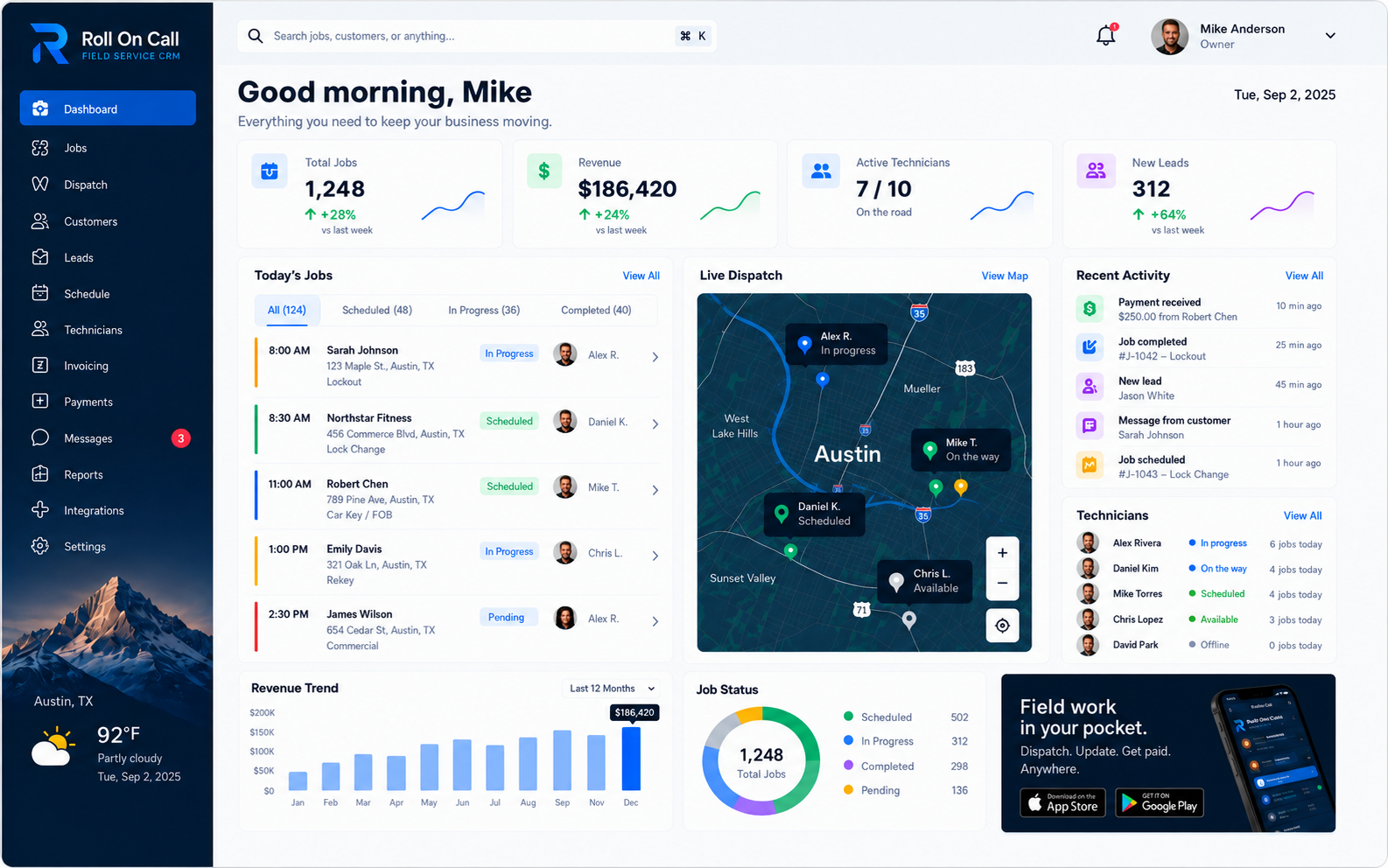
Roll On Call supports that lifecycle with a structured job file. Completion and invoice and payment status extend the file into office follow-up and later history.
The record is a shared reference, not an independent authority. It reflects entries made by the team and should be read with their dates, sources, and job context in mind. Businesses still decide how to confirm urgent requests, approve scope changes, supervise work, and review completed files. For a broader view of this category, read the field service management software overview.
02Customer Intake and the Initial Report
Intake turns a conversation into a usable starting point. The office can record who requested service, how the customer described the issue, and which location the request concerns. Useful phrasing preserves the customer's own level of certainty: "customer reports no cooling" is more faithful than an unconfirmed diagnosis of a failed component.
Roll On Call can associate the request with the relevant customer record and selected service location. That connection gives an authorized office user a place to review available history before deciding what belongs in the new job.
A disciplined intake practice can ask about access, immediate hazards, equipment identifiers, preferred contact details, and the difference between the billing address and service site. Those are choices each business makes for itself. The product's role is narrower: retain the details an authorized user chooses to record so they can inform assignment and the brief.
03Distinguishing Symptoms from Verified Facts
Customer language often describes an effect rather than a cause. "The unit is dead," "the drain is blocked," or "the panel is faulty" may be a reasonable report, but none establishes a diagnosis. A premium job record keeps that distinction visible instead of polishing uncertainty into a fact.
Roll On Call provides space for customer-reported details and office-entered scope. The team supplies the language and judgment. At intake, qualifiers such as "customer reports," "believed to be," and "not yet confirmed" can preserve provenance. If more information arrives later, an authorized user can record it in the appropriate job context.
Site conditions, diagnoses, identities and work performed are verified by your people. A later entry remains a team-recorded entry, even when it summarizes an on-site observation. Businesses should set their own standards for who may revise a scope, what supporting information is required, and how a disputed detail is handled. The job record makes those selected entries available; it does not certify them.
04Defining the Anticipated Scope of Work
The anticipated scope translates an intake report into an office plan. It can describe the purpose of the visit, the equipment or area named by the customer, and the action the office expects, such as inspection, maintenance, or a specified repair. Concise scope language helps distinguish the planned task from background notes.
In Roll On Call, this scope is entered by the office from the information available at that time. Duration, inventory and the outcome of a visit come from your team's experience.
Good operating practice is to use scope language that a dispatcher can evaluate without overstating certainty. "Inspect reported loss of cooling at rooftop unit 2" carries more decision value than "fix AC." Staffing, qualification, tools, materials, timing, customer authorization, and safety remain human decisions made under the business's own procedures.
05Establishing the Service Location Context
A customer may have several properties, a billing address that differs from the work site, or multiple units at one street address. Selecting the intended service location is therefore a deliberate intake step. Unit, suite, building, floor, or entrance details can be placed in the relevant record fields or notes when supplied.
Roll On Call lets an authorized user select a service location for the job and gives the office map context for that recorded address. The service location is user-selected data. It is not a verified coordinate, optimized route, arrival prediction, or confirmation that the assignee has reached the site. Where the technician is right now comes from live technician location, a separate capability enabled at launch on the dispatch map.
Offices can reduce avoidable ambiguity by reading the service address back to the customer and recording only current access details that matter to this visit. That is procedural advice rather than a product function. Roll On Call retains the selected location and chosen context so an authorized user can include pertinent details in the job brief.
06Attaching Job Notes and Context
Notes are most useful when they change how the office prepares or communicates a visit. Examples include a customer-reported access restriction, a named contact point, parking instructions, or a warning the customer asked the team to consider. A note should have a clear operational reason to appear in the current file.
Roll On Call allows authorized users to add selected relevant notes to a job. Historical notes do not automatically propagate, synchronize, or become current instructions. If previous context appears relevant, a person reviews it and decides whether to enter it for the present visit. The resulting note remains recorded information, not independent verification.
Selectivity matters. Copying every prior remark can bury the details needed for this visit, while omitting a material restriction can leave the brief incomplete. Teams should decide what belongs, remove stale wording, and handle sensitive information under their own privacy and access policies. The product supports the record; it does not make those editorial or compliance decisions.
07Technician Assignment Decisions
Assignment connects the office's understanding of a job with a named person responsible for the planned visit. A dispatcher may consider the office-entered scope, selected location, existing commitments, customer priority, qualifications, and local operating conditions. Those considerations are interpreted by a person, not resolved by the software.
Roll On Call records an assignment. The office stays in charge of checking the facts and applying its own staffing standards. Learn how the job record relates to dispatch management.
The board and team-recorded statuses can contribute context, but they should not be mistaken for exact availability or physical position. A status is simply the label an authorized user recorded. Dispatchers may need direct confirmation when timing matters. Once selected, the assignment becomes part of the job record and can be reflected in the outgoing brief.
08Creating the Structured Job Brief
A job brief is the practical handoff between the office record and the person assigned to the visit. Its purpose is not to reproduce the entire customer history. It should present the selected service location, customer-reported issue, anticipated scope, and current notes that the office considers relevant.
Roll On Call supports a structured brief using those selected job details. An authorized user reviews what has been entered and sends the SMS.
Clear briefs use direct labels and preserve uncertainty. They separate "customer reports" from "office scope" and keep access information distinct from the work request. Teams should use another communication channel for lengthy, sensitive, or changing instructions when appropriate. The brief is a concise working reference, not a substitute for supervision or site judgment.
09Field Communication via SMS
Roll On Call sends the job brief through SMS to the phone number used for the assignment. The same job also appears in the technician app, so the SMS acts as a quick summary and a backup. It is still a message sent over external device and carrier infrastructure.
Delivery and access depend on the recipient's device, mobile carrier, settings, and coverage. A delayed, filtered, truncated, inaccessible, or unseen message is possible. Sending a brief does not prove that it arrived, that the intended person read it, or that the information remains current after it was sent.
Businesses should set a separate confirmation method for urgent, safety-sensitive, or time-critical jobs, such as a direct call and documented response. That confirmation practice belongs to the operator. Roll On Call's product role is to send the SMS brief prepared from the job record. See the features guide for related product detail.
10The Significance of Team-Recorded Status
A team-recorded status gives the office a concise workflow label for a job. Depending on the team's process, an authorized user can record the relevant stage so colleagues have a common administrative reference. The important point is authorship: the label exists because an authorized person entered it.
The status is entered by a person. It is not set from live technician location, route monitoring or an automatic assessment of work. It is an operational entry and should be interpreted accordingly.
Consistent office procedures can make status labels easier to interpret. A business might define who is authorized to record changes, what information must be confirmed first, and when direct contact is required. Roll On Call supplies the status field and shared view. Accuracy, timeliness, and any customer communication remain the responsibility of the team.
11Handling Discoveries and Scope Adjustments
Conditions encountered during a visit may differ from the intake report. A request described as routine maintenance may require a different assessment once the equipment or site is examined. That does not make the original intake defective; it shows why customer-reported details and office-entered scope should remain clearly labeled.
Technicians add discoveries to the job, and the office decides where they carry forward. Information reaches the record only when it is communicated through the team's chosen process and an authorized user records the selected detail. The team decides what source to cite, whether customer authorization is needed, and who may revise the anticipated scope.
The product does not price additions, generate change orders, reserve inventory, reschedule other work, or promise that an expanded task can proceed. Those are separate business decisions. The job file can retain the office-entered scope and selected updated context, giving later reviewers a more coherent account of what the team recorded during the job lifecycle.
12Recording Specialized Site Requirements
Site requirements can materially affect a visit. A customer may report restricted service hours, a loading entrance, a unit identifier, a contact-on-arrival request, or a parking limitation. When relevant to the current job, an authorized user can place that information in the job's selected job notes.
These entries should preserve their source. A customer-reported access window is not a guarantee that a door will be open, and a historical note may no longer be current. Needs also vary across industries.
A sensible office review asks whether each instruction is current, necessary, and appropriate to send by SMS. Sensitive credentials may require another approved channel under the business's policies.
13Work Completion and Administrative Handoff
Completion is a recorded stage in the job lifecycle. An authorized user can record the job as complete after the team's chosen confirmation process.
Roll On Call keeps completion with the rest of the job context so the office can review the record as a whole. An administrative review may compare the original report, office-entered scope, notes, later recorded context, and status history. The business determines whether another visit, customer contact, or internal action is required.
A completion label should not silently close unresolved questions. Teams can define a review checklist appropriate to their service, including whether selected job details are understandable to a future reader. This is operating advice, not an automated product control. The software retains what authorized users record and makes it available for continuity.
14Invoices and Payment Status
When the work is done, the office or the technician turns the job into an invoice. The customer, service address and line items carry over from the job record, so nobody retypes them from a notebook.
Customers can pay the invoice by card through Stripe. The job shows whether its invoice is unsent, sent, paid or overdue, so the office can see at a glance which completed work is still open.
Decide who may edit an invoice after it is sent and how disputes are handled. Keeping billing on the job means the full history, from first call to payment, lives in one place.
15Maintaining Historical Continuity
After completion, the job record can inform later service. An authorized user reviewing customer history can see what the team previously recorded, including the customer report, office-entered scope, selected location, relevant notes, assignment, status, completion, and invoice and payment status. This reduces dependence on memory without turning old entries into current facts.
On a later call, the office can consult prior records within the connected field service CRM context and decide what is relevant to the new request.
Useful continuity depends on restrained, legible records. Teams can favor specific dates, clear sources, and concise descriptions while avoiding unsupported conclusions. Roll On Call preserves the selected history for human review.
For a definition-first comparison with jobs, estimates, invoices, and customer records, see the Work Order glossary entry.