
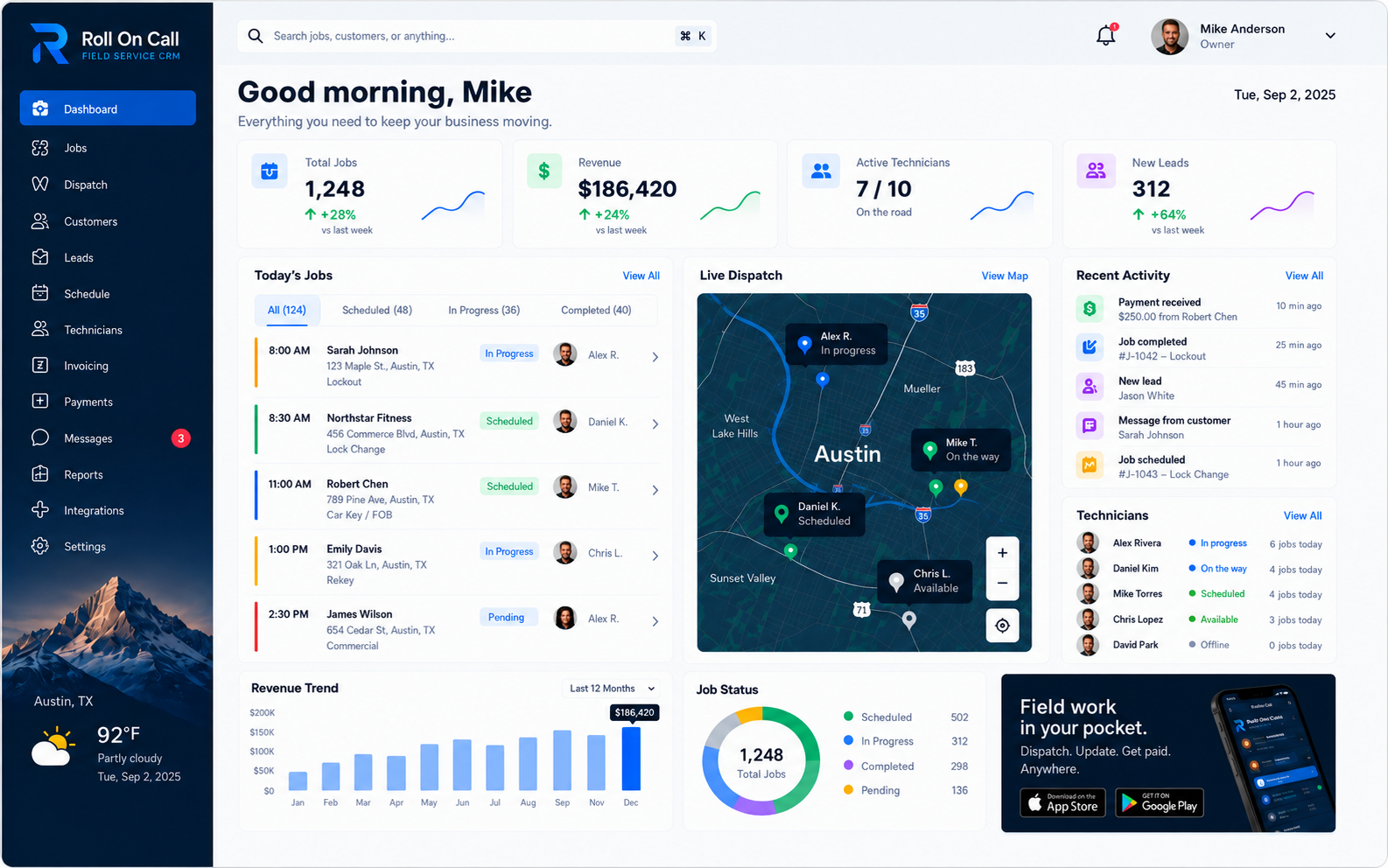

01The Connected Call-to-Payment Workflow
Field service information moves from the customer's initial call to the scheduling board, then to the technician's phone and back to the office for closeout and payment review. Some businesses divide that sequence among an address book, a calendar or whiteboard, individual text threads, and paper notes. In that setup, a technician asking for an access instruction or a customer requesting a job update can require the dispatcher to check several sources. Roll On Call brings that whole sequence into one workspace: customer records, jobs, scheduling and dispatch, the technician app, SMS, notes, invoices and payments.
The dispatcher can locate a customer record, create a job, make an assignment using schedule and map context, and send the job brief by SMS. Those are product capabilities; reduced re-entry or fewer handoffs are possible workflow benefits, not guaranteed outcomes. Staff must still choose the relevant notes, check addresses and timing, decide who receives the work, and record status changes. Clear procedures for who owns each entry and when it should be reviewed remain the foundation of a dependable dispatch operation. Roll On Call provides structure for coordination, while the business supplies the process and judgment.
Ultimately, the value of a connected call-to-payment workflow is not full automation, but practical visibility. The dispatcher can use the dashboard to review active jobs, assignment context, recorded statuses, and pending operational follow-ups. The office can compare what was entered with what the team has recorded as work progresses. This shared reference can support more informed decisions without pretending to replace direct confirmation when circumstances are unclear. To see how this fits into the broader software landscape, review our Field Service Management Software Guide.
02Customer Records and CRM Capabilities
For most service businesses, the daily workflow begins when a customer calls the office. A dispatcher needs to determine whether the caller is a returning client or a new prospect, where service is requested, and what relevant work has already been documented. Without an accessible customer record, the office may ask the caller to repeat basic details or search elsewhere for prior context. Roll On Call centers intake around customer records. The office can look up customer information and review available job notes before creating the next work item.
This customer relationship management approach gives the dispatcher recorded context for more targeted questions. For example, if the team previously noted a narrow driveway, a gate code, or an unusual installation condition, the dispatcher can consult the relevant record and confirm the detail with the caller. The record is only as useful as what the team enters, so agree on what belongs in it. History is a reference rather than a guarantee. Addresses, phone numbers, access instructions, and equipment conditions can change, so staff should verify details that affect access, safety, or scheduling.
Effective customer management depends on the quality of customer and job notes captured by staff. Vague entries provide little value during a future call. As an operating practice, teams should define the details required for a new customer, the circumstances that belong in a job note, and who verifies changes. Roll On Call provides the records and notes used in this process; it should not be treated as a separate archive of every call, text exchange, billing contact, or property relationship. Consistent, specific entries make the available history more useful for intake and dispatch. Learn more about managing client history in our Field Service CRM Guide.
03Job Creation and Structured Work Details
Once the customer and the service location are identified, the dispatcher must translate the caller's request into a coherent work item. This is a critical stage in the field service workflow, as the quality of the job description directly impacts the technician's ability to prepare for the visit. Vague intake notes, such as "system broken" or "needs service," provide the field team with almost no context. Such descriptions increase the risk that the technician will arrive without the necessary equipment, face an unexpected safety hazard, or fail to meet the customer's unstated expectations. While no remote intake process can successfully diagnose every mechanical or physical issue over the phone, a structured approach significantly reduces preventable errors.
Roll On Call allows the office to create a job in the context of a customer record and capture the service address, reported problem, timing, and useful notes. The appropriate detail varies by trade and circumstance. A routine maintenance visit requires different intake questions from an emergency repair call, so each business should define its own call script and minimum documentation standard.
The resulting job entry serves as the foundation for the dispatch decision. It should state what the customer reported, where the work is taking place, when service is expected, and which notes matter to this visit. Before finalizing it, the dispatcher should ask whether the brief gives the technician enough information to approach the work safely. Significant uncertainty should be stated explicitly. The job details provide context for the dispatch board and SMS brief, but the office stays in charge of review, judgment, and communication of later changes. The Job Management guide follows the complete record through assignment, completion, and payment status.
04Dispatch, Scheduling, and Map Context
The dispatch board is the central coordination point for field service operations. Many teams manage scheduling through basic digital calendars or physical whiteboards. While a calendar is a useful tool for tracking time, it often fails to communicate the geographic reality of a field service operation. A technician might have an open slot at two o'clock, but if the preceding job is an hour's drive away, that schedule is practically useless. Traffic, variable job durations, technician skill levels, and urgent incoming calls constantly threaten to disrupt the daily plan. Dispatchers need more than just a timeline; they need enough context to revise the schedule on the fly without treating an initial plan as a rigid promise.
Roll On Call presents a map alongside job, technician, schedule, and recorded status context. When a request arrives, the dispatcher can use that view to understand where the work is located relative to other known work and then consult the schedule before deciding. The map shows where each job is and, when live technician location is enabled, where technicians are, so the dispatcher can group nearby work and then confirm availability and qualifications before assigning.
The map provides decision context, while assignment remains a human responsibility. The dispatcher should weigh what the screen shows against local knowledge, job requirements, travel conditions checked through appropriate sources, and direct confirmation when needed. Recorded statuses can also become stale or be entered incorrectly. See the dispatch management solution guide for a complete call-to-closeout workflow.
05Technician Assignment and Schedule Changes
Choosing a technician for a job means balancing factors your dispatcher knows best. The dispatcher may need to consider licensing, experience, equipment, travel, existing commitments, and safety requirements. Roll On Call provides job, schedule, technician, map, and recorded status context for that review. Assignment is an office decision, and qualifications should be confirmed through the business's own records and procedures.
Field service plans often change. A routine repair can uncover a larger problem, or an urgent request can affect planned work. The dispatcher can use shared schedule and job context when deciding whether to change an assignment or appointment. Staff should review affected jobs deliberately and record the revised plan.
A schedule change is only useful when communicated clearly. Your team decides who to contact about a delay and how to resolve it, using the record as the reference. The dispatcher stays in charge of reviewing the board, updating the relevant work, sending the appropriate brief, and using a backup contact method when confirmation matters. This is a recommended operating procedure, not an automated reallocation capability.
06SMS Technician Briefs
A dispatch decision must be accompanied by a useful job brief. An address without a problem description leaves the technician short of context, while a long unstructured message can hide the instruction that matters most. Teams should decide which notes belong in every brief, how urgent or safety-related information is identified, and when a phone call is required in addition to a text. Roll On Call delivers the brief in the technician app and can also send it by SMS.
Roll On Call uses SMS for technician dispatch communication. The office can send a structured text brief containing the service address, problem description, and relevant notes to the technician's phone. SMS gives the brief a second path for technicians who are offline or between screens.
However, SMS has inherent limitations that businesses must acknowledge. Delivery depends entirely on the technician's mobile carrier, their device settings, and their physical location in relation to cell towers. Messages can be delayed or occasionally dropped, and SMS is not an appropriate channel for transmitting highly sensitive personal health information or complex, multi-page technical manuals. Businesses using SMS for dispatch should define clear backup contact methods for highly urgent or safety-critical work, and establish protocols for confirming receipt of particularly important instructions. The Technician Communication guide follows the full job-brief handoff and change-management process.
07Field Workforce Coordination and Shared Status
Coordinating a distributed workforce requires communication after the dispatch brief is sent. The office needs a consistent way to distinguish planned, active, and completed work without assuming that the original schedule still describes field conditions. Roll On Call provides a dashboard where scheduled work appears alongside job statuses recorded by the team, such as "in progress" or "completed." This does not imply technicians necessarily update these values themselves; responsibility can remain with whichever team member the business assigns.
These indicators give the office a shared reference for the stage recorded on a job. They are separate from live technician location and are not an independently verified account of physical field conditions. A status can be reported late, entered incorrectly, or left unchanged when the team misses a step. Dispatchers should treat the board as recorded job context and seek direct confirmation for safety-critical, urgent, or ambiguous situations.
To make shared status awareness useful, the business should establish internal definitions. The team needs to know who records each status, what event must occur before a label is applied, and when the dispatcher should verify an item directly. For example, does "completed" mean work at the property ended, or that office review is also finished? Clear definitions make the board more useful for later dispatch decisions and reduce ambiguity about what each label means.
08Work Completion and Office Review
Finishing work at the customer's property is only one part of closeout. The office also needs an accurate record of the result and a clear indication of whether the job is still active or has reached the team's defined completion point. When those details are kept on paper or communicated only in conversation, office review may have to wait or rely on incomplete context. A job status and relevant notes give the team a shared reference for the next step.
Roll On Call provides a recorded completion status that the office can review on the operational board. A clear completion protocol should define the required steps for closing out a job. Marking work "completed" should not be interpreted as proof that the underlying issue is permanently resolved, that every closeout task is finished, or that a technician is available for another assignment. Travel, diagnostic notes, follow-up work, or office review may still be required.
As a recommended practice, the office should review completed work and confirm that the team recorded the notes needed for future service. That might include what the customer reported, what action was taken, or whether another visit is required. The service business stays in charge of defining and enforcing its closeout standard.
09Estimates, Payments, and Job Status
After the work is done, the job moves to billing. Roll On Call turns the job into an invoice using the customer, address and line items already on the record, and customers can pay that invoice by card through Stripe.
Each job shows whether its invoice is unsent, sent, paid or overdue. The dashboard brings open invoices and estimates into the same view as the day's work, so follow-up does not depend on someone's memory.
Roll On Call covers invoicing and collection for field work. It is not a general ledger, so most teams keep their accounting software for bookkeeping, payroll and tax.
10Multi-Location Operations and Scaling Concepts
As a field service business grows, coordinating more people and a wider service area can place strain on informal tools. A calendar or whiteboard may become harder to interpret as job volume and geographic coverage increase. Teams covering wider areas can use these same records with clear ownership for each region.
The evidenced product value is a shared shared view of customers, jobs, technicians, map context, and recorded statuses. A business serving more than one area may use that view as one input to coordination, subject to the account structure actually available to it. The product should be evaluated against the buyer's specific location and access requirements rather than assumed to support every organizational model. Consistent intake, naming, assignment, and status practices remain important regardless of software.
Software alone does not establish governance. Teams covering multiple areas should document service boundaries, naming conventions, data ownership, staffing responsibility, and escalation paths outside the product where necessary. Do not assume complex permissions, territory enforcement, automatic routing, or branch-level reporting unless those requirements have been separately verified. For details on how different trades apply the core coordination concepts, see our industries we serve page.
11Operational Dashboard Visibility
A connected field service workflow gives the office job context in one place. Roll On Call's dashboard presents active jobs, a dispatch map, weather context, technicians, and recorded statuses in a unified view. It is a current workspace based on known data, not a guaranteed complete picture of the business.
This visibility is practical when used carefully. A dispatcher can review active work, job locations, technician status and open invoices, then decide what needs attention. A long-running status may prompt a call, but it does not prove there is a problem. The dashboard organizes operational cues for human review rather than drawing conclusions automatically.
The dashboard is only as accurate and useful as the data recorded by the team. If a status is stale or a job description is incomplete, the display reflects that limitation. Roll On Call keeps the essentials in one place so the dispatcher can act quickly. Its role is narrower and useful: present job information so people can review priorities, verify exceptions, and make dispatch decisions using their own procedures and judgment.