
Definitional Boundaries of Dispatch
Field service dispatch is the consistent habits of actively coordinating a mobile workforce on the day of service. It involves taking customer requests, reviewing recorded staff availability, and communicating specific assignments to field workers. The dispatcher acts as the bridge between office intake and field execution, relying heavily on the information entered by other staff members to understand the requirements of a requested job.
Software tools provide a structured workspace for this coordination. They display the text and dates that users have deliberately typed into the system. The digital platform does not run the business, evaluate physical conditions, or make operational choices. It functions as a passive repository that holds the data human operators enter and review. If a critical detail is not typed into the job record, the system remains unaware of it.
Dispatching requires continuous adaptation to variables, such as traffic congestion or complex repairs that run longer than anticipated. The software gives the dispatcher a place to organize records and update the board, but the dispatcher solves the puzzle. A strong dispatch process creates resilient communication and recordkeeping, which helps human teams adapt to physical reality quickly and effectively. For broader context, see the resources available in the glossary.
Distinguishing Dispatch from Scheduling
Dispatch and forward scheduling represent related but fundamentally distinct functions within field service management. Scheduling is the broader act of planning future operational capacity. An office staff member reviews calendar availability and places a known commitment, such as a routine maintenance visit or a large installation project, on a future date.
Dispatch, by contrast, is the active and immediate management of the current day. When the scheduled day arrives, the dispatcher must guide the execution of that previously established plan. Because field work is inherently unpredictable, the original schedule often requires adjustment. If a morning assignment takes longer than expected, the dispatcher intervenes to adjust the afternoon plan, communicating delays to customers and reorganizing the board.
A scheduler creates the initial daily structure, but the dispatcher navigates the friction of real-world execution. The software platform displays the planned calendar grid, but it cannot determine whether a scheduled sequence remains feasible once the day begins. For an overview of this software category, review our field service management glossary. The dispatcher uses the recorded schedule as a starting point.
Technician Assignment
Assigning a field worker to a particular job is a complex day-to-day decision requiring nuance and experience. This selection demands careful judgment about technical skills, current workload, geographic familiarity, and customer relationship history.
Technician assignment remains a process. The software provides the grid and the recorded job details, while human staff evaluate the constraints and make the final selection. Human review considers factors such as a technician experiencing fatigue or a customer requesting a specific communication approach.
The dispatcher picks the technician and the route; live location, when enabled, gives useful context. The software provides the workspace, but human staff dictate the pacing and base their decisions on direct communication and judgment.
An operator brings an understanding of their team that software algorithms lack. A dispatcher might pair a specific technician with an apprentice for a training opportunity, or assign a senior technician to a complex commercial client based on past positive interactions. These subtle, qualitative decisions support a successful service operation and highlight the necessity of human review.
Job Records and Triage
The dispatch coordination cycle begins with gathering actionable information. When a service request arrives, office staff create a digital job record. This digital ticket holds the reported symptoms, the expected scope of work, and any relevant notes regarding property access or safety protocols. A well-constructed job record gives the assigned technician the context they need to prepare the right tools and approach the property safely.
The job record reflects what the staff member typed during the intake conversation. It serves as an operational note rather than an objective, verified assessment of the physical problem. The assigned technician assesses the current physical issue upon arrival. The system acts as a structured container for text.
Thorough triage helps the dispatcher understand the general shape of the request, but the usefulness of that understanding depends on the discipline of the intake staff. If a dispatcher creates a ticket with vague notes, the technician arrives unprepared. Clear, descriptive intake notes provide the field team with a strong starting point for their day.
Effective dispatch requires clear standards for data entry. The office staff must ask probing questions during the initial call to uncover useful details. These details, once recorded, help the dispatcher make informed scheduling decisions and help the technician arrive with a clear understanding of the reported issue.
Separately Selected Service Locations
Effective dispatch requires a clear destination. A properly structured field service CRM maintains a structural separation between the customer profile and the separately selected service location. The customer record identifies the entity requesting the work and taking responsibility for the billing relationship. The customer could be a homeowner, a regional property management firm, or a commercial real estate holding company.
The service location is the distinct physical property where the technician must travel to perform the requested labor. If the software lacks a separate service location concept, a dispatcher might mistakenly attach the management company headquarters to the dispatch ticket, sending a field worker miles away from the repair site.
By requiring a separately selected service location for every job record, the system prompts the dispatcher to confirm the physical destination independently of the billing contact identity. This operational habit helps lower costly travel errors and missed appointments. The software stores the address data, but human staff select the location for each individual dispatch event. The quality of the dispatch depends on that deliberate human selection.
When authorized users associate job records with the selected service location, later staff can review the recorded history for that property. That history may provide context for a new request, but its usefulness depends on the accuracy and relevance of the original entries.
Technician Communication Constraints
After making an assignment decision, the dispatcher communicates relevant job details to the chosen field worker. An SMS brief can carry the selected service address, customer contact context, and notes recorded during intake.
SMS reaches technicians on the phones they already carry, alongside the job details in the Roll On Call technician app. A text message can be referenced easily while on site, providing a written record of the dispatcher instructions.
Operators should understand that SMS operates under unavoidable technological limits. Message delivery depends on third-party mobile devices, external cellular carrier networks, device configuration settings, and local geographic signal coverage. There are no guaranteed delivery receipts and no guaranteed read notifications built into standard text messaging.
Because of these external dependencies, a dispatched text message might be delayed by carrier filters or network congestion without any warning returning to the office sender. Consequently, dispatchers use direct voice phone calls as a backup communication method to confirm receipt and understanding for highly urgent or safety-sensitive assignments.
The Dispatch Board and Context
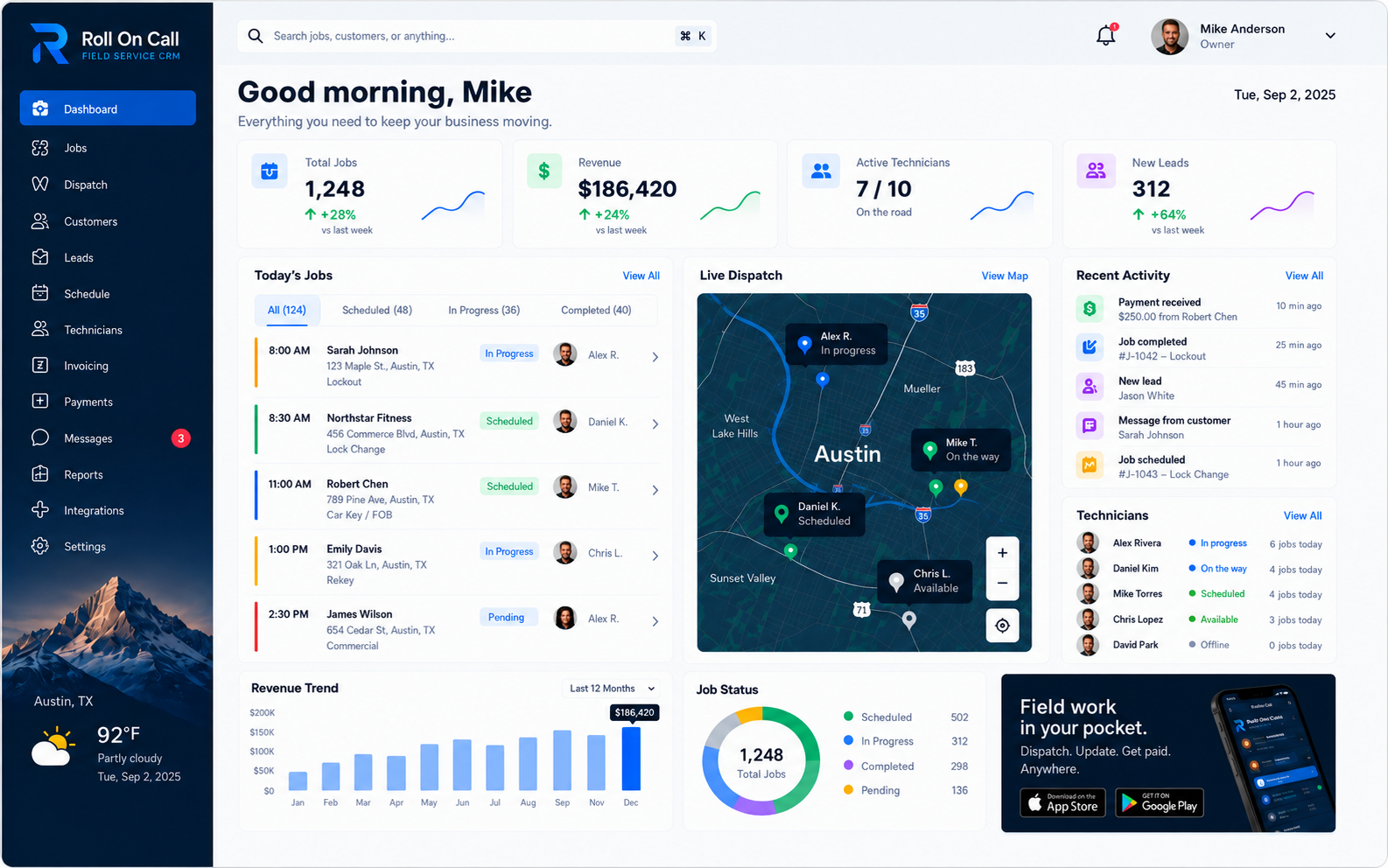
A dispatch board gives office staff a visual place to review recorded jobs, selected service locations, and the calendar layout. The dispatcher interprets that entered context and reviews existing commitments before making scheduling or assignment decisions.
The map view displayed on the dispatch board plots the selected service addresses for the scheduled jobs. It offers basic geographic context to help the dispatcher visualize the general distribution of work across the region. The map plots the service addresses on the day's schedule so the dispatcher can see where work is clustered. Live technician location is enabled at launch, so dispatchers can also see where technicians are relative to that work. It supports dispatch decisions; it does not optimize routes, guarantee accuracy or serve as covert surveillance.
The dispatcher uses this recorded geographic context to discuss travel expectations and timing with the field team. Arrival times for customers come from the dispatcher, who can text updates from the business number. Human staff estimate arrival windows based on their own professional experience, local traffic knowledge, and direct technician communication.
A dispatcher might notice that morning appointments are clustered in one neighborhood while afternoon appointments are in another. They use this visual grouping to structure the day, but they must still confirm travel feasibility with the field staff. The board provides the visual layout, while the operator finalizes the logistics.
Staff-Recorded Status Updates
To maintain coordination throughout the busy workday, the field team and the office continuously update the recorded status of each job ticket. A job status is a simple text label, such as dispatched, arriving, in progress, or completed. An authorized user manually selects this label from a list to indicate the reported progress of a specific assignment.
When a dispatcher looks at the centralized board, they can easily see which jobs have been marked as currently in progress. This visual context helps them evaluate whether the current daily plan is holding together or if an intervention is required.
A staff-recorded status update is a manual data entry. The technician on site confirms what is real. Statuses are not set from live technician location, and the software does not use geofencing to mark arrival automatically.
Status updates represent the communication intent of the staff, not ground-truth activity tracking. The business relies on the discipline and honesty of its team to select accurate statuses at the appropriate times. These entries build a chronological record of the day, helping the office track progress without interrupting the field worker with constant phone calls.
Managing Emergency Work
Field service operations frequently face unexpected disruptions, such as sudden emergency repair requests. When an urgent call arrives, such as a major water leak or a critical power failure, the dispatcher evaluates the severity of the reported issue against the existing schedule of recorded commitments.
The dispatcher looks at the dispatch board to understand current assignments and review staff-recorded progress markers. They contact technicians directly to determine who might be able to pivot safely to the emergency location. The board shows the whole day at once, so the dispatcher can decide what moves.
Managing an emergency response is an active negotiation. The dispatcher may need to delay a routine maintenance visit, call the affected customer to explain the delay, and manually reassign the emergency ticket to a different field worker. The platform holds the records, while the operator directs the operation and handles communication. Read more in our guide on how to dispatch field technicians.
Recorded Completion Context
When a field worker finishes an assignment, they communicate the outcome back to the coordinating office. The digital job record provides a dedicated place to store text notes regarding what work was performed and whether any follow-up visits are necessary.
This recorded completion context helps the office prepare for administrative next steps. The dispatcher reviews the submitted notes to understand if a secondary visit should be scheduled for the following week. The software saves the text as entered by the field staff, supporting a text-based workflow dependent on human review.
The value of the completion record depends on the clarity and detail provided by the author. Helpful notes give the office a useful reference, while vague notes leave the team guessing. The system relies on disciplined human communication.
A descriptive completion note might detail the specific parts replaced, the condition of the surrounding equipment, and conversations held with the customer. This recorded context builds a historical log that future dispatchers and technicians can review during subsequent visits. Learn more on our dispatch management page.