
Welcome to the Guides Library
Adopting a new software platform often comes with the expectation that technology will independently solve everyday challenges. However, the physical reality of coordinating people and equipment across a service area cannot be completely digitized. Software provides a shared digital structure for the team, but the team must still supply the effort, the professional judgment, and the accurate data entry required to make the system function. Without deliberate human discipline, a shared workspace fails to produce reliable results.
This library explores that critical human element in detail. Understanding the mechanics of scheduling, dispatching, and recordkeeping is more helpful than memorizing a long list of specific software features. Software is a tool that depends entirely on the skill of the person using it. A dispatcher who understands why a service location must be recorded accurately relies on their own expertise rather than expecting an algorithm to guess a destination based on incomplete or fragmented data.
The guides contained in this hub are designed to be thorough, factual, and strictly grounded in the realities of field service work. They are intended for owners, managers, dispatchers, and anyone tasked with evaluating or improving a daily workflow. By reading these materials, you will gain a clearer vocabulary for discussing everyday challenges, a framework for setting realistic expectations, and a grounded perspective on what technology can actually support in a physical environment.
Treat this library as an ongoing resource. Return to these pages when training new staff members, refining internal procedures, or evaluating a new software solution.
Our Educational Philosophy
The field service software market frequently relies on exaggerated claims and unrealistic promises. Vendors suggest their platforms will automate the dispatch process, prevent human error entirely, and optimize every route without requiring deliberate input from the office. Our educational philosophy explicitly rejects that approach. Presenting software as a complete replacement for human intelligence is inaccurate and unhelpful to the service businesses that rely on these systems to coordinate their daily schedules.
Our guides focus entirely on the concept of operations. We write about software as a shared shared record that supports an operator. When we describe a dispatch board, we emphasize the dispatcher's responsibility to interpret the schedule, weigh competing priorities, and make a final assignment decision based on their own local knowledge. These guides focus on the decisions the office makes every day and how good records support them.
This philosophy extends to every piece of material we publish. When discussing customer records, we highlight the necessity of careful data entry by authorized office staff. When detailing field communication, we openly acknowledge the limitations of mobile devices, carrier networks, and SMS delivery. Maintaining a strictly factual tone helps build trust with our readers. We want service professionals to recognize their daily challenges in our writing and find practical advice.
Education must reflect reality. A guide that assumes perfect internet connectivity and entirely predictable traffic patterns is useless to a dispatcher handling an emergency reroute in the middle of a storm. Our materials address the real world, where unexpected events are standard and human adaptability remains the most valuable asset a service business possesses.
Featured Guide: What is Field Service Management?
Our foundational guide to the operational category provides a comprehensive overview of how a service business functions. Field service management encompasses the lifecycle of a service request, starting from the moment a customer contacts the office and ending when the final payment status is recorded. This guide breaks down that sequence, explaining the mechanics of job creation, scheduling, dispatch, execution, and follow-up. It is a necessary starting point for formalizing a team's understanding of the workflow.
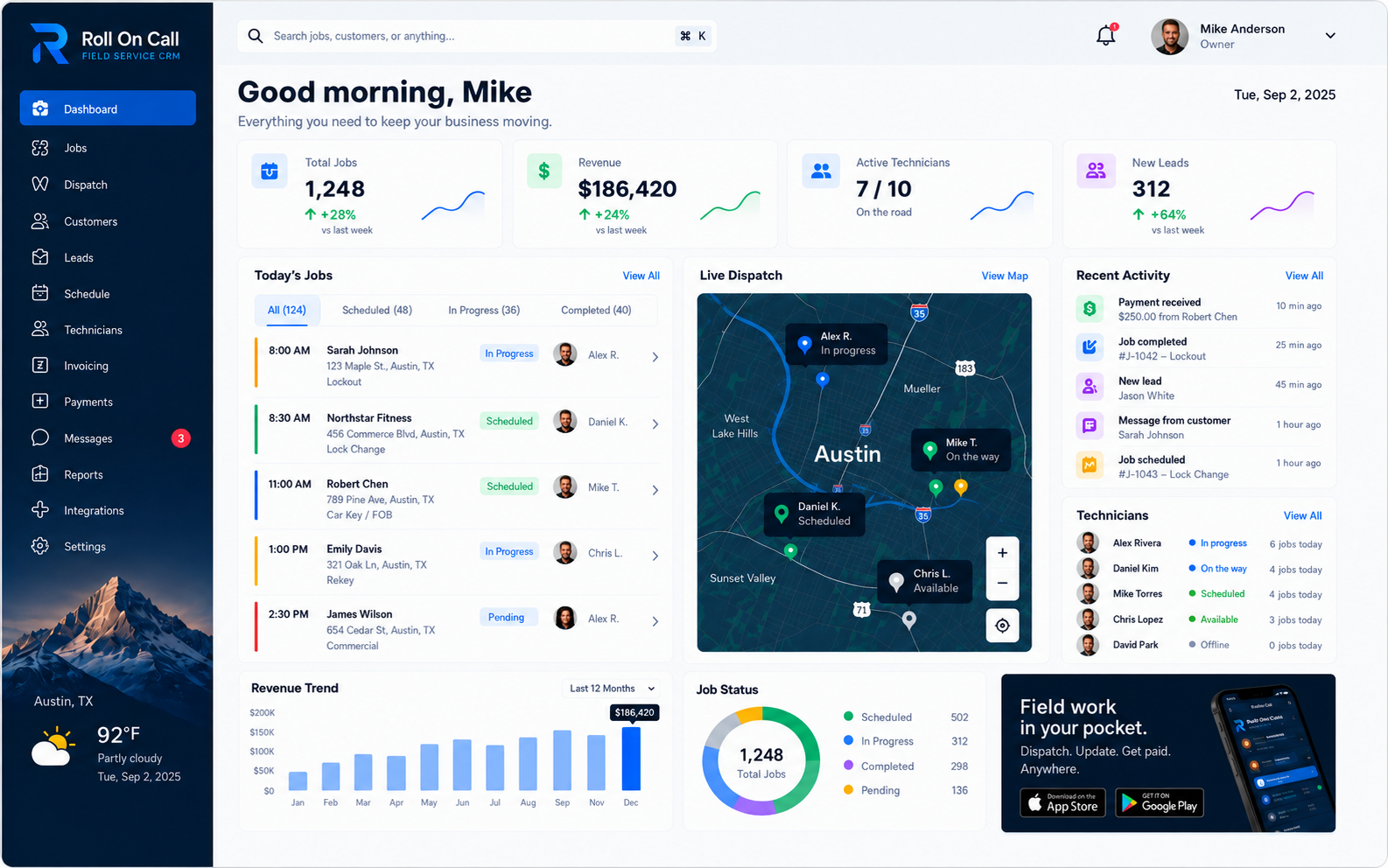
The guide details the difference between managing a physical operation and managing a digital sales pipeline. It explains why a map view is helpful for understanding the geographic context of a schedule, and how a dispatcher uses that visual information to help make assignment decisions. It also covers the importance of maintaining an accurate memory, ensuring the history of past work is available for authorized review when a repeat customer calls for service.
The field service management guide explores the practical realities of coordinating a distributed workforce. It discusses managing multi-location operations, establishing communication protocols between the office and the field, and adapting a standard workflow to meet specific regulatory and safety requirements.
What is Field Service Management?
Read our definitive educational guide to the field service workflow. Learn how dispatchers manage schedules, how SMS briefs communicate necessary details, and how teams maintain accurate customer and location records.
Read the FSM GuideGuide: The Educational Field Service CRM
While field service management covers the entire workflow, the operational CRM represents the foundational layer of customer and location data that supports that workflow. This specific guide focuses explicitly on this critical component. It explores why a service business requires a different type of recordkeeping system than a traditional sales organization, and it details the specific anatomy of an operational service record used in daily dispatching.
The CRM guide explains the necessity of separately selecting service locations from customer billing details. It discusses how notes provide vital context for future dispatch decisions, and how an invoice and payment status helps the office maintain visibility without replacing formal accounting. It is a detailed look at how service data stays organized from the first call to the paid invoice.
For teams addressing missing addresses or disconnected job histories, this guide provides the conceptual framework needed to clean up a database and establish better intake habits. It clarifies the relationship between the customer record and the dispatch board, demonstrating how a well-maintained CRM feeds accurate information directly into the scheduling process.
The Field Service CRM
Explore our comprehensive educational guide on the operational CRM.
Read the CRM GuideThe Role of the Dispatcher
The dispatcher occupies a demanding position in any service business. They organize incoming requests into a coherent schedule and communicate instructions to a distributed workforce. It is a role requiring concentration, decision-making, and the capacity for holding complex situational context in mind. They act as the central coordinator, connecting the office records to the technicians operating in the field.
Our materials explore how a dispatcher uses a shared digital workspace to manage complexity. A visual dispatch board displays the geographic spread of the day's commitments, helping them group jobs and minimize unbillable travel. The CRM provides historical context to help them understand a returning customer's unique requirements. We always stress that the dispatcher actively manages the board rather than passively watching it run itself.
When an emergency call disrupts a planned afternoon, the dispatcher must triage the situation. They review available technician locations, evaluate the priority of pending work, decide which appointments must be rescheduled, and contact the affected customers. The software records the outcome of these human decisions, but it cannot make the decisions for them.
Supporting the dispatcher means providing software that responds to their inputs and presents information clearly. It also means establishing operational rules so the dispatcher is not forced to guess how the business wants a specific scenario handled. The guides offer frameworks for building rules, providing the dispatcher with the procedural backing they need to succeed.
The Technician's Reality
The technician operates on the front lines, where reality is dictated by the job site conditions and the limitations of mobile devices. The information they receive from the office must be concise and actionable. A technician does not have the time to scroll through lengthy, unstructured customer histories while attempting a complex physical repair on a ladder or in a crawlspace.
This library explains the mechanics of SMS job briefs, which provide a practical method for transmitting context to the field. A properly formatted brief contains the separately selected service location, a description of the problem, and specific access notes. Pairing the technician app with an SMS brief means the job still reaches the technician in areas with poor data coverage.
We also educate readers on recognizing field limitations. SMS messaging is subject to carrier delays, network outages, device settings, and coverage gaps. If an instruction is critical to safety or job success, the office must establish a backup procedure, such as a direct voice call, to confirm receipt.
The technician's responsibility is to execute the work and report the outcome accurately. They update the job status so the office knows the work is complete, and they provide necessary team-recorded context regarding follow-up requirements. A successful operation provides exactly what the technician needs to start the job, and asks for exactly what the office needs to close it out.
Accurate Data Entry
A software platform depends entirely on the quality of the information entered into it. It has no independent awareness of the physical world. If a call-taker misspells a customer's name, records the wrong service location, or summarizes a complex issue with a single vague word, the resulting digital record is actively misleading. The entire daily workflow rests firmly on the foundation of accurate initial data entry.
Our guides dedicate significant attention to the intake process. We distinguish between a helpful, specific note and a vague comment that will confuse a dispatcher later. Deliberate data entry is the core action that builds the company's memory over time.
When a business struggles with its software, the root cause is frequently a lack of data discipline. Duplicate customer records proliferate because staff fail to search before typing. Technicians arrive at wrong properties because the office failed to select the service location separately from the billing address. Addressing these problems requires focused training and consistent management enforcement.
Treating data entry as a critical skill helps a shared workspace remain a reliable reference. Managers must explain the reasoning behind data entry requirements, demonstrating how careful recording during a phone call prevents wasted effort in the field and supports smoother dispatch operations overall.
Understanding Automation Limits
A persistent misconception in the service industry is that scheduling and dispatch can be fully automated. The guides explicitly address this fallacy. Local service work changes too often for a fully automated plan to hold, which is why these guides center on the dispatcher.
Standard route optimization calculates the shortest distance between points based on historical traffic data. The dispatcher possesses contextual awareness that the automation lacks. Automation cannot replace a conversation between the office and the customer regarding site access.
Similarly, live technician location is most useful as dispatch visibility, not as oversight. Roll On Call enables it at launch so a dispatcher can see who is nearby when work changes. A dot on the map still does not tell the office whether the technician is fixing the problem or filling out paperwork, so job status markers, updated deliberately by the team, remain the record of where the job stands.
Setting practical boundaries around automation allows a business to build resilient procedures. Acknowledging that the system cannot schedule jobs autonomously encourages investing in a capable dispatcher. Acknowledging that SMS delivery is not guaranteed leads to a mandatory callback rule for emergencies. Understanding limits is a prerequisite for achieving operational stability.
Field Communication
Communication between the office and the field is the connective tissue of a service business. When communication is clear, jobs proceed smoothly. When it is fragmented, errors multiply rapidly. Our educational material focuses on establishing reliable communication workflows that do not overburden the technician or confuse the customer with unnecessary technical jargon.
The foundation is the job brief. A structured brief separates necessary facts from irrelevant administrative history. The technician needs the separately selected service location, contact name, scope of work, and hazard warnings. They do not need the entire chronological history of billing disputes. Curating the information helps the technician focus entirely on the physical task at hand.
Standardizing status updates is equally critical. The office relies on the technician to report when work has begun, when it is paused, and when it is completed. These team-recorded updates feed the dispatch board, helping the coordinator adjust the schedule dynamically. If technicians use different methods to report status, the shared workspace loses its accuracy and usefulness.
Practical communication acknowledges that voice calls remain necessary. While SMS handles routine briefs, complex diagnoses, safety concerns, and urgent schedule changes often require a direct conversation. A resilient operation uses digital text for structure and memory, and voice communication for immediate, verified confirmation.
Building Resilient Procedures
Operational theory becomes valuable when translated into concrete standard operating procedures. A procedure is a documented agreement on how a specific task will be performed. Software provides the environment where the task occurs, but the procedure governs the behavior of the humans operating within that environment. Resilient procedures help protect a business from miscommunications and the departure of key personnel.
A resilient procedure for job intake dictates that the call-taker must search for existing customer records before creating a new one, confirm the service address verbally, and write a scope of work that includes specific symptoms. This procedure relies on the operational CRM to store the data, but the discipline belongs entirely to the staff who follow the steps.
A procedure for emergency dispatch outlines the sequence of events required to displace a scheduled appointment. It defines who is authorized to make the change, how the reassigned technician is notified via SMS, and what the office will say to inform the delayed customer. Documenting this sequence helps the team handle emergencies consistently, without panic or confusion.
The knowledge in these guides provides the foundation for writing effective procedures. Understanding the mechanics of job history, location management, and status tracking allows managers to design rules that support the workflow. A business built on well-understood procedures can scale with confidence.
Conclusion and Next Steps
Field service operations are complex and require a continuous commitment to structural clarity, accurate recordkeeping, and human judgment. Software platforms support this work, but they depend entirely on the discipline of the teams that use them. There are no shortcuts that bypass the need for a competent dispatcher, a skilled technician, and a meticulously maintained shared record.
This Guides Hub exists to clarify those realities. We avoid marketing rhetoric and automated promises in favor of factual explanations of how the work gets done. By focusing on separately selected service locations, notes, SMS communication limitations, and the boundary between job status and formal accounting, we provide the knowledge necessary for sustained improvement.
Engage directly with the material. Begin with the featured guide on Field Service Management, then explore the Field Service CRM guide for customer and location records. For focused operating procedures, continue with the guides to dispatching field technicians and technician scheduling.