
01The Core of Dispatch Management
Field service dispatch is the operating center between a customer request and field work. Many service organizations begin with whiteboards, paper calendars, and individual text threads. Those methods may be familiar, but they separate the details a dispatcher needs: customer history, scheduled work, service addresses, and communication records. An incoming call can then become a search across tools and a reliance on memory or verbal updates.
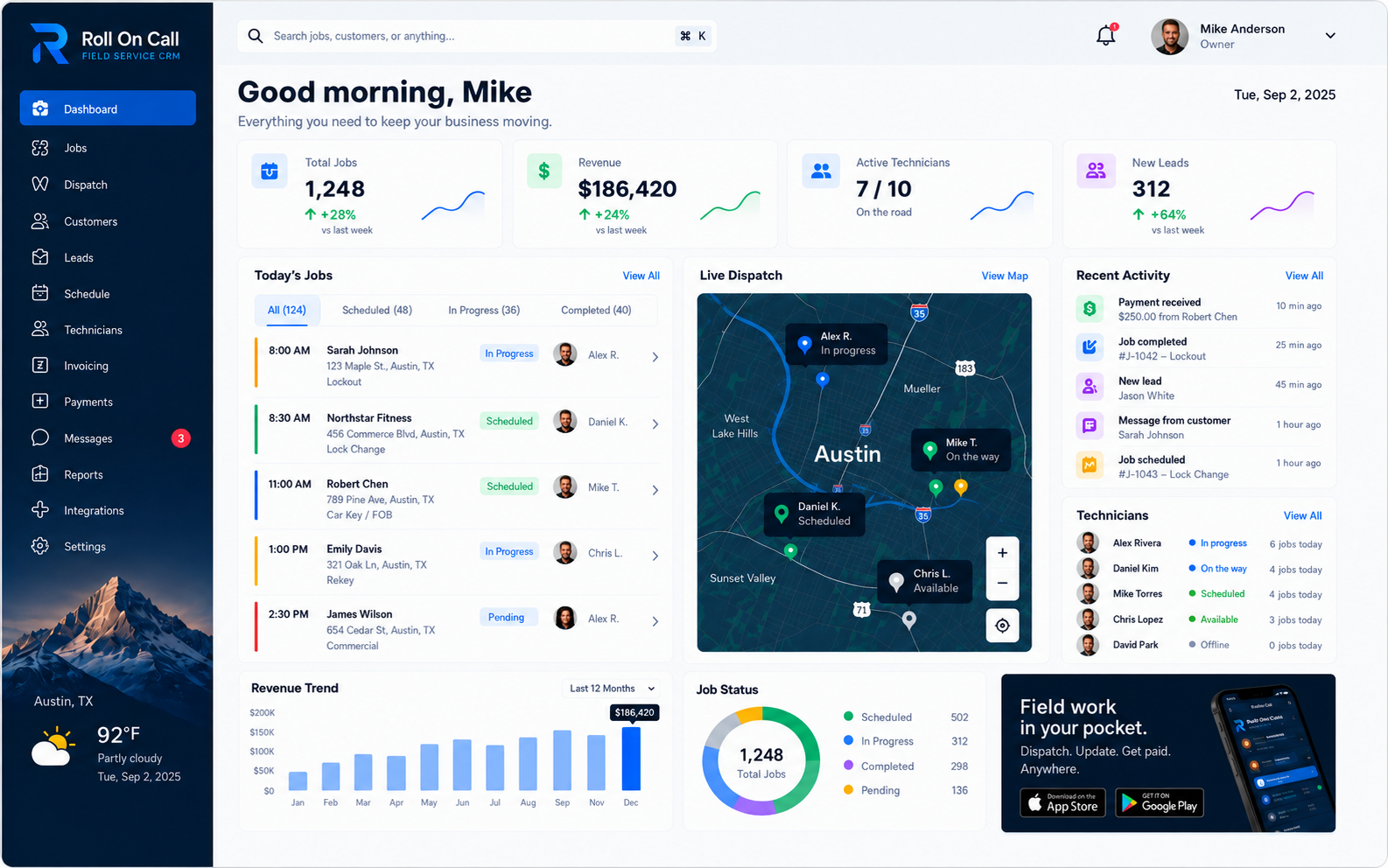
A dispatch platform brings those working records into one workspace. Its purpose is to give office staff context for a scheduling decision, not to make that decision for them. A typical workflow captures the call, identifies the customer, documents the request, reviews the day, assigns a technician, communicates the brief, records progress, and notes the job's payment status. Roll On Call connects those stages in a shared record.
Organizing customer records, job details, schedule timing, and invoice and payment status can make handoffs easier to review. The record reflects what the team enters, so operating rules and consistent data entry matter. For a broader view, explore our field service management software guide.
02Incoming Calls and Managing Context
The dispatch process begins when a customer contacts the service business. Without an accessible customer-history record, dispatchers may need to start each conversation from scratch, asking for addresses, previous work details, and property access instructions. That repetition adds work for the office and can frustrate returning customers.
Roll On Call centers the intake process on accessible and documented customer history. When an incoming call is received, the dispatcher can promptly locate the correct customer profile to review past service visits, standing technical notes, and relevant equipment records. It is fundamentally important to remember that this history represents recorded context, not an infallible or universally updated profile. Phone numbers change frequently, commercial properties are sold to new owners, and security access codes are regularly updated by property managers.
The dispatcher should use existing records to guide the conversation and confirm critical details before scheduling. Careful data entry can reduce downstream errors and give the field team clearer information than an unchecked note. Effective dispatch relies on a field service CRM and on the team's process for maintaining customer records.
03Translating Requests into Job Creation
Once the customer identity and location are firmly established, the dispatcher must translate the customer request into a structured job record. Vague or incomplete job descriptions create significant risks for the field team. If a job is recorded simply as a broken system or a generic service request, the assigned technician lacks the specific context needed to prepare the correct diagnostic tools, required materials, and necessary safety equipment. This lack of preparation very often leads to avoidable return visits, wasted travel time across the city, and decidedly poor customer experiences.
Effective job creation requires a disciplined and consistent triage process. The dispatcher should carefully capture the reported symptoms, the expected scope of work, any pressing scheduling constraints, and specific notes relevant to the upcoming visit. Roll On Call allows the office staff to attach these captured details directly to the active job record. The required depth of this intake process depends entirely on the trade industry and the specific nature of the request. A routine seasonal maintenance check requires vastly different context than an urgent structural repair or an emergency leak response.
The resulting job record serves as the foundational working brief for the field assignment. It is the core responsibility of the office staff to review the captured information thoughtfully and determine whether the dispatched technician will have what they genuinely need to proceed safely and efficiently. A structured approach to job creation reduces ambiguity and sets the standard for the entire service visit.
04The Dispatch Board and Map Context
Scheduling field service work involves several variables at once. A calendar shows times and appointments, while field work also has service addresses. Map context lets dispatchers consider the recorded locations of requested and scheduled work when planning the day. It is a useful starting point for a conversation about travel, not a measurement of vehicle position, drive time, or whether an appointment is feasible.
Roll On Call presents scheduled jobs, team-recorded statuses, and map-based service-location context in one board. A dispatcher can use that view to consider whether nearby work may be worth discussing or whether the planned sequence needs review. With live technician location enabled, the board adds where technicians are; a quick check-in confirms availability before the dispatcher commits. To see the complete set of tools, review the software features.
The map combines recorded job context with live technician location, which is enabled at launch so dispatchers can see where the field team is. It is a dispatch view, not covert surveillance or emergency navigation, and device-reported location can be imprecise. Route choices and traffic calls stay with your team. A dispatcher applies local knowledge, technician input, weather, customer constraints, and company policy when turning the board into a workable plan.
05Technician Assignment and Availability
Choosing a technician is a judgment, not a mathematical result. A dispatcher may need to consider the request, qualifications, certifications, truck inventory, shift limits, customer commitments, and direct input from the team.
The dispatch board displays the recorded schedule alongside team-job statuses. It gives the dispatcher context to review before contacting or assigning someone. The software neither predicts future availability nor automatically assigns urgent work.
An assignment is a plan based on information available at that moment. When progress, readiness, or timing is uncertain, the dispatcher should confirm it directly with the appropriate team member rather than treat the recorded schedule as fact.
06Job Details and Structured Briefs
After an assignment decision, the office needs to communicate the relevant details to the field worker. Voice calls can be useful, but a spoken address, gate code, and multi-step work description are easy to mishear or forget. A written brief gives the recipient a reference to consult at the job site.
Roll On Call supports assembling a structured job brief from the customer record, service location, and intake notes. The dispatcher decides what to include and should confirm critical details during intake.
The usefulness of the brief depends on careful intake and review. A clear brief can reduce clarification calls, while an incomplete one may require the field worker to contact the office before proceeding. Teams should treat new information from the site as an update to the record, not as a failure of the original plan.
07Communication via SMS
Transmitting the comprehensive job brief to the technician is a surprisingly common friction point in many field service operations. Field apps fail when they are hard to use. Slow sync, confusing screens and text that is unreadable in bright sunlight all push technicians back to calling the office. Roll On Call keeps the technician app focused on the assigned job and backs it up with an SMS brief.
Roll On Call uses SMS to send structured job briefs from the office to the assigned field worker. The message can include the recorded service address, customer name, problem description, and access notes. The SMS brief is useful for technicians who are between screens or have weak data coverage. Whether a link opens a navigation app and how the message is handled depend on the recipient's device and settings.
SMS delivery is not guaranteed. It depends on the phone, carrier, device settings, and local coverage. Businesses should avoid sending sensitive financial or highly confidential information by text. For urgent or safety-critical work, use a backup protocol such as a direct voice call to confirm receipt and understanding.
08Tracking Progress with Recorded Status Context
Dispatchers need timely information to respond to changes during the day. Without recorded progress, new requests and customer updates rely more heavily on calls, memory, and assumptions. Status records can make the office's working picture easier to review, but they do not establish what is happening in the field.
Roll On Call lets the team maintain shared awareness through team-recorded status updates. Jobs on the board can be marked dispatched, en route, in progress, or completed. These labels provide context about the stage recorded for a job. Different industries may define and use them differently.
Statuses are team-recorded information, not automated physical verification. The business should define who records statuses, when they do so, and what each label means. Those are operating recommendations, not product capabilities.
09Navigating Schedule Changes
No field service schedule survives the actual workday perfectly intact. Jobs routinely take much longer than initially expected because of hidden structural complications or unforeseen equipment damage. Heavy traffic unexpectedly delays a technician arrival by a full hour. Customers suddenly cancel their appointments at the absolute last minute. The true defining test of a professional dispatch operation is not how well it executes a theoretically perfect plan, but exactly how gracefully it handles inevitable daily disruptions.
When the schedule changes, the dispatcher can review the board's recorded context before making an adjustment. The map view shows service locations, and statuses show what the team has recorded. Neither establishes who is closest, available, or able to take additional work. Direct contact and local judgment remain necessary.
Schedule changes are made by the dispatcher, with every note still attached. If a job runs long, the dispatcher reviews downstream commitments, decides whether to reassign or reschedule, and communicates with the affected customer. The platform presents recorded information; the dispatcher makes and carries out the operating decision.
10Managing Emergency Work
Emergency service requests can disrupt a busy field service day. A burst pipe, commercial security lockout, or HVAC failure in severe weather may require rapid triage and a change to existing commitments. The appropriate response depends on the reported risk and the business's emergency procedures.
When an emergency call is received, intake should focus on safety information, the reported location, and the nature of the threat. The office can review map context and team-recorded statuses, then use direct communication and its emergency procedure to decide how to respond.
A response may involve calling a selected field worker, communicating the priority, and sending a job brief by SMS. The dispatcher then manages the resulting schedule changes and customer communications. For safety-sensitive work, follow the business's own escalation policy and confirm critical details by direct contact.
11Office-to-Field Coordination Tradeoffs
Connecting the central office and the remote field team involves continuous and deliberate operational tradeoffs. Providing too much raw information can easily overwhelm a busy technician attempting to read a small screen, while providing too little severely leaves them unprepared for the task at hand. Relying entirely on digital text communication can sometimes feel starkly impersonal and heavily risks technical misinterpretation, while relying entirely on constant phone calls is deeply inefficient and completely lacks a searchable audit trail for future reference.
Roll On Call keeps customer and scheduling records in the office workflow while using SMS for job briefs to the field. Technicians get the same job in the app and by text, whichever they check first. The right communication method remains an operating choice for each business.
This approach leaves the office responsible for much of the data entry and schedule management. The dispatcher records information received by text or voice call in the system of record. Software provides the workspace, while people coordinate the work. Training and clear communication practices support that process. Learn more about Roll On Call operations.
12Work Completion and Operational Handoffs
The end of a field visit is a transition point in the operating cycle. On-site work may be finished while the office still needs to review the record, arrange follow-up, or handle billing. In disconnected workflows, that handoff may wait for a later call or paperwork return.
Roll On Call lets the team record a job status indicating that on-site work is finished. That entry gives dispatch and administration a cue to review the job record.
Teams should define what completed means in their business. It may mean a repair is resolved, or only that today's visit has ended and parts or further work are needed. The software records the status selected by the team, creating a handoff point for administrative review rather than a guarantee about the outcome.
13Invoices and Payment Status
After the work is complete, the focus shifts to getting paid. When dispatch and billing live in separate places, office staff spend hours matching finished jobs against paper receipts and bank deposits.
When the work is done, the office or the technician turns the job into an invoice. The customer, service address and line items carry over from the job record, so nobody retypes them from a notebook.
Customers can pay the invoice by card through Stripe. The job shows whether its invoice is unsent, sent, paid or overdue, so the office can see at a glance which completed work is still open.
Bookkeeping, payroll and tax stay in the accounting software the business already uses. Dispatch gets a clear view of which finished jobs still need follow-up.
14Implementation and Human Decision-Making
Deploying modern dispatch management software is fundamentally an exercise in disciplined change management. Moving from comfortable whiteboards and paper ledgers to a shared digital board requires the entire team to adjust their deeply ingrained daily habits. The long-term success of the transition depends heavily on how the service business thoughtfully approaches the initial implementation. A well-planned, phased rollout is usually the most effective strategy to ensure lasting adoption.
The service business should invariably begin by defining their core operating processes on paper. What specific information must be captured during every incoming call? What do the different daily schedule statuses actually mean? Who is strictly authorized to change a payment status? Once these essential rules are fully documented, the office team can begin using the system safely for customer intake and job creation before fully migrating the live dispatch board.
Training helps office dispatchers manage the board and helps field workers read SMS job briefs and communicate relevant updates. The business should define how the team records statuses and how the office verifies time-sensitive information.
For a step-by-step educational workflow, read the guide to dispatching field technicians.
For a concise definition and related terminology, see the Dispatch glossary entry.