
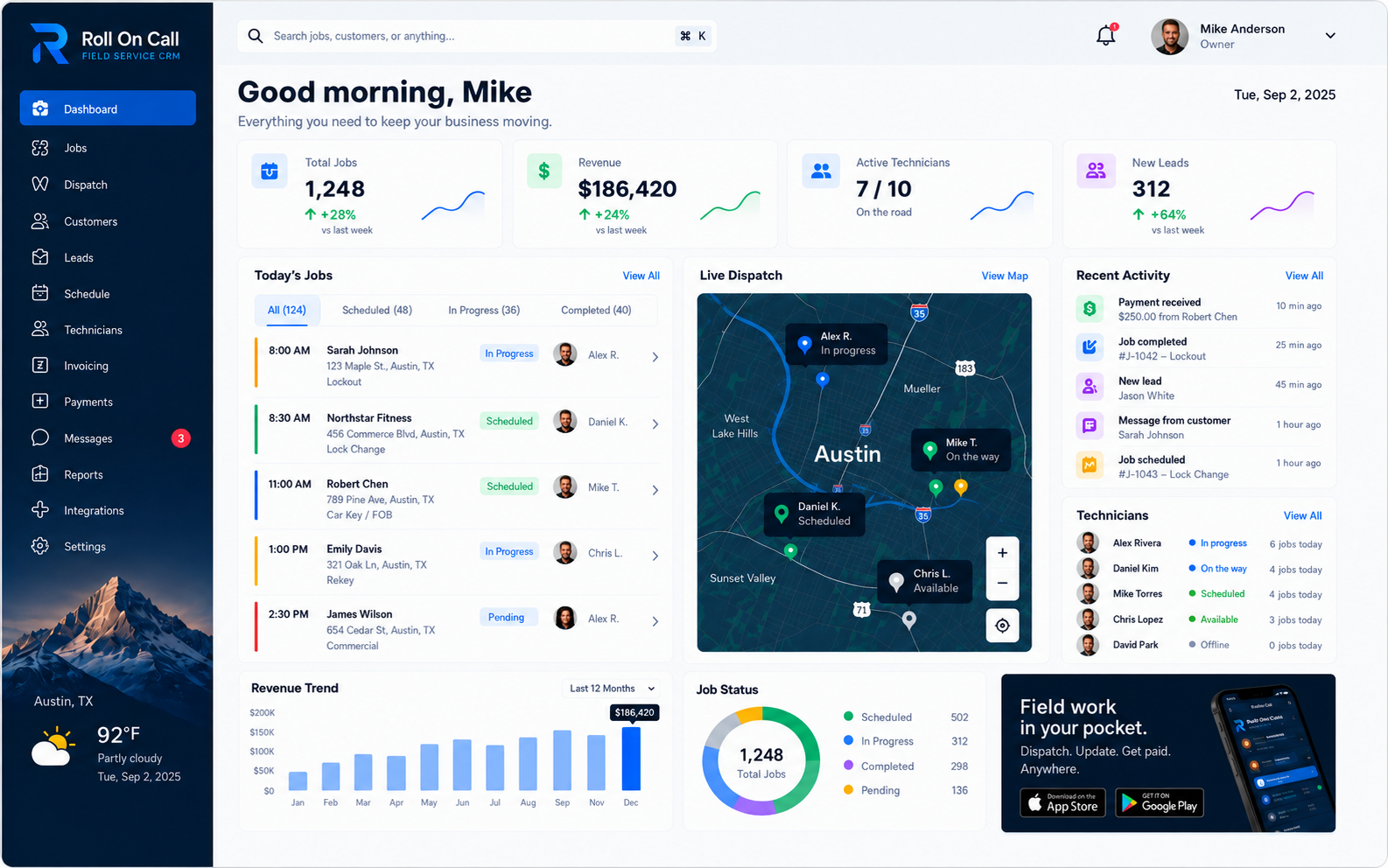
01The Foundation of Customer Management
Customer management in field service is operational work. It begins when a staff member creates a record from the details available during intake, then develops through subsequent conversations and jobs. Contact information, selected service locations, prior job records, and communication context give the office a useful starting point when the customer calls again.
Roll On Call keeps those details available for review in the customer workflow. An authorized user can look at the relevant history, identify the location involved, and decide what context belongs in the next job.
That distinction shapes a sound process. Staff should treat the record as working context, confirm current details during intake, and make deliberate choices before creating work. Clear ownership of record entry and review is more valuable than collecting every possible detail. The purpose is to help the next authorized user understand what was recorded and what still needs confirmation.
02Creating the Initial Customer Record
The initial record begins with staff entry. During the first conversation, an authorized user records the contact details supplied for use and captures enough context to continue the request. A concise record is easier to review than an intake note crowded with assumptions, commentary, or details unrelated to service.
The person entering the record should confirm spelling, the preferred contact detail, and the location involved in the request. These are customer-reported details, not independently authenticated information. If the location, contact person, or access circumstances are unclear, the office should resolve the question through its normal procedures before creating the job.
Record selection matters just as much as record creation. Before adding a new request, staff can check whether the customer already has repeat-service history and compare the available contact and location context. Choosing the intended record keeps the new job associated with the prior jobs the user meant to review, without implying that the software has confirmed the match.
03Organizing Selected Service Locations
One customer can request work at more than one place. A property contact may coordinate several buildings, while another customer may simply call about a different property on a later visit. Recording the available service locations under the customer record helps staff distinguish those possibilities during intake.
Roll On Call lets an authorized user select the service location relevant to a particular job. The user should make that selection only after reviewing the current request. A familiar customer name is not enough: the office still needs to confirm which recorded location is intended and whether the details supplied for that visit are current.
Location context should stay practical. Staff can use selected relevant notes for information such as the entrance named by the customer or a contact instruction for that job, then review whether it still applies. The same principle works across the service industries Roll On Call addresses: select the location deliberately and send only the context needed for the assignment.
04Reviewing Prior Jobs and Work History
Prior job records can sharpen the next intake conversation. Staff can review what was recorded for earlier work and the status the team entered for those jobs. That history may help an authorized user ask whether the new request concerns the same location or resembles an earlier issue. It is context for job management, not a diagnosis.
Review is a human step. The user reads the prior job entry, compares it with what the customer is reporting now, and decides whether any part is relevant. Old descriptions should not be copied forward merely because they exist. Conditions can change, and a similar description can refer to a different problem or service location.
A useful review is focused. Confirm the customer and location, scan the related job records, note any directly relevant communication context, and return to the present request. This avoids making the caller reconstruct every earlier interaction while keeping the office grounded in the information staff actually recorded. When the record is incomplete, the user should ask rather than infer.
05Applying Selected Relevant Notes
Notes are most useful when they answer a practical question about the current work. A customer may describe an entrance, name an on-site contact, or explain a service constraint. Staff can record that context, then decide later whether it is relevant to another job. Specific language and a clear connection to the request make review easier.
Historical notes do not automatically propagate into new work. An authorized user reviews the available context and selects the notes that apply to the present service location and request. Time-sensitive access details deserve particular care because a code, contact, or instruction recorded for an earlier visit may no longer apply.
Selection is an editorial responsibility. The office should omit stale commentary, duplicates, and background that does not help the recipient act. A short, relevant note can be more useful than a long transcript. Roll On Call supports the review and selection step; staff stay in charge of the wording, currency, and appropriateness of what they include.
06Preserving Communication Context
Service requests often change through conversation. A customer may revise a time preference, clarify which location is involved, or provide new access context. An authorized user can record the material point so that a later review starts with more than the original intake description. The value lies in the concise job summary, not a verbatim archive.
Communication context is entered by staff. The record reflects what an authorized user chose to document, so it should be read as a working account rather than an independent recording of the exchange. Names, timing, and specific commitments should be written plainly enough that another authorized user can understand the note without guessing at its meaning.
Before acting on an older communication note, staff can compare it with the current conversation and update the present job context as appropriate. This practice supports continuity when work passes from intake to dispatch. It also keeps the handoff centered on current, selected information instead of assuming that every historical comment remains applicable.
07Handling Repeat Service Continuity
A returning customer should not be treated as either entirely new or completely unchanged. Repeat-service history gives the office a place to begin, while the new conversation determines what is current. Staff can review the customer record, confirm the contact and location involved, and compare the request with prior job records before deciding what belongs in the next job.
Within the operational CRM workflow, continuity comes from reviewing what staff previously entered. Prior jobs may give useful vocabulary for the conversation, and selected service locations can narrow the choices the user needs to confirm. Neither replaces fresh intake. The caller may be describing new work, changed circumstances, or another location.
The goal is a measured handoff between past and present. Review enough history to understand the relationship, ask the questions required for the current request, and select only the context that helps with this assignment.
08Customer Context to Job Creation
Job creation is where reviewed customer context becomes a job brief. Starting from the intended customer record, an authorized user creates the job and considers the current request alongside the available history. This is not a bulk transfer of everything on file. It is a deliberate choice about what the new job needs.
The user selects the relevant service location and identifies notes or communication context that apply. Prior job records can be consulted when they help explain the request, but they should remain distinct from the customer's current description. Keeping those sources clear helps the office produce a brief that is readable and appropriately scoped.
A final review before handoff should answer simple questions: Is this the intended customer? Is the selected location the one discussed? Are the included notes relevant now? Does the communication context explain any special instruction? Staff judgment at this point is the bridge between customer management and active field work.
09Ensuring Dispatch Continuity
Dispatch continuity means the job does not lose its reviewed customer context as it moves from office intake toward field handoff. The dispatcher can use the selected service location, relevant notes, communication context, and prior job records that matter to understand what staff prepared. Assignment and scheduling decisions remain with the people operating the business.
The office chooses who goes; Roll On Call keeps the facts for that choice in one place. Live technician location is available on the dispatch map, but the platform does not plan routes or make predictions. The value of customer context here is narrower and more practical: it lets the dispatcher review the information staff attached to the job before carrying out the team's dispatch procedure.
In dispatch management, continuity is best treated as a review habit. Read the current job brief, check that the selected location matches the request, and resolve unclear notes before the handoff. This gives the field recipient a considered set of customer details without implying that the software made or validated the underlying day-to-day decisions.
10Structuring the Technician Handoff
The office-to-field handoff should be selective. The recipient needs the customer context chosen for the immediate job, not every prior entry associated with the record. Staff can prepare the brief around the selected service location, the current request, relevant communication context, and notes that have been reviewed for this assignment.
Editorial care matters. An authorized user can remove duplicate wording, make the subject of a note clear, and exclude history that does not inform the current visit. If an instruction appears old or ambiguous, the office should confirm it rather than present it as current. A focused brief supports practical field workforce management.
The handoff reflects staff choices. Roll On Call can carry the selected context into the job workflow, but the office stays in charge of what it records and sends. A short pre-send review helps catch the wrong location, an irrelevant note, or wording that assumes more than the customer reported. Good handoffs come from clear selection, not from volume.
11Field Communication Through SMS
Roll On Call supports an SMS handoff for job context prepared by the office. The message can carry the selected information needed for the field assignment, such as the service location and relevant notes. Staff should review the destination and message content before sending, particularly when a customer record includes several locations or older context.
SMS delivery and access depend on the recipient's device, carrier, settings, and coverage. Sending a message is not confirmation that it arrived promptly, was opened, or was understood.
The appropriate confirmation method is a business decision. For work where timing, access, or another condition requires acknowledgment, the office can use its established follow-up procedure. SMS is simply the communication channel described in the features overview. It supports the handoff while leaving supervision and escalation with the team.
12Evaluating Team-Recorded Status
A team-job status is a compact operational label. An authorized user records the status, and another user can refer to that entry when reviewing the job or customer history. It is useful as a shared administrative signal, provided the office understands who updates it and what each status means in its own process.
The label reflects a human entry. It is separate from the live technician location shown on the dispatch map, and it is not independent confirmation of field activity. If timing or current conditions matter, staff should follow the office's communication procedure rather than infer more from the label than the person who recorded it intended.
Consistent status vocabulary makes later review easier. Teams can define when an authorized user should update the label and avoid using one status to mean several different things. When a customer asks for an update, the office can treat the recorded status as the latest staff entry and obtain further confirmation when the situation calls for it.
13Documenting Discoveries and Updates
Field work can add context that was unavailable during intake. A technician may report that the location description needs clarification or that a customer-provided instruction did not match the visit. The office can decide which of those observations should be recorded with the job and whether any portion is useful communication context for later review.
Updates should identify their source and purpose. A team member's field observation, a customer's follow-up statement, and an office instruction are different kinds of context. Clear wording helps a future authorized user review the note without turning it into a broader claim. If an item is relevant to a later job, staff can select it during that job's creation.
Not every discovery belongs in the customer record. Teams can favor details that support future service work and avoid personal commentary or unrelated narrative. Periodic review also gives staff a chance to recognize context that should no longer be used. The aim is a useful shared record shaped by deliberate human entries.
14Tracking Invoices and Payment Status
When the work is done, the office or the technician turns the job into an invoice. The customer, service address and line items carry over from the job record, so nobody retypes them from a notebook.
Customers can pay the invoice by card through Stripe. The job shows whether its invoice is unsent, sent, paid or overdue, so the office can see at a glance which completed work is still open.
On the customer record, those invoices line up with the jobs they belong to. Before booking a new visit, staff can see whether earlier work is paid and follow the business's own policy if it is not.
15Maintaining Consistent Habits
Customer records become useful through consistent human practice. The office can define who creates records, who reviews possible duplicates, when a service location is confirmed, and how notes move into a job. Clear responsibilities make it easier to understand what a given entry represents and what still needs attention.
A short review standard can cover the essential workflow: identify the intended customer record, confirm the current contact and selected service location, read the relevant prior jobs, choose applicable notes, and check the SMS handoff. Job status and invoice edits need equally clear ownership, so decide who may change each one.
Roll On Call supports this sequence from customer context to job creation, dispatch review, and SMS handoff. For related workflows, explore the broader solutions and the guide to field service management software.