
01A Reliable Multi-Location Foundation
Multi-location service becomes difficult when one familiar customer name hides several possible destinations. A facilities coordinator may request work for a shop, warehouse, and administrative building during the same week. Each request belongs to the same customer relationship, but each visit has a different address, access situation, contact, and service history. A dependable operating practice preserves both truths. Staff need enough shared customer context to recognize the relationship, and enough location-specific detail to prepare the visit that is actually being requested.
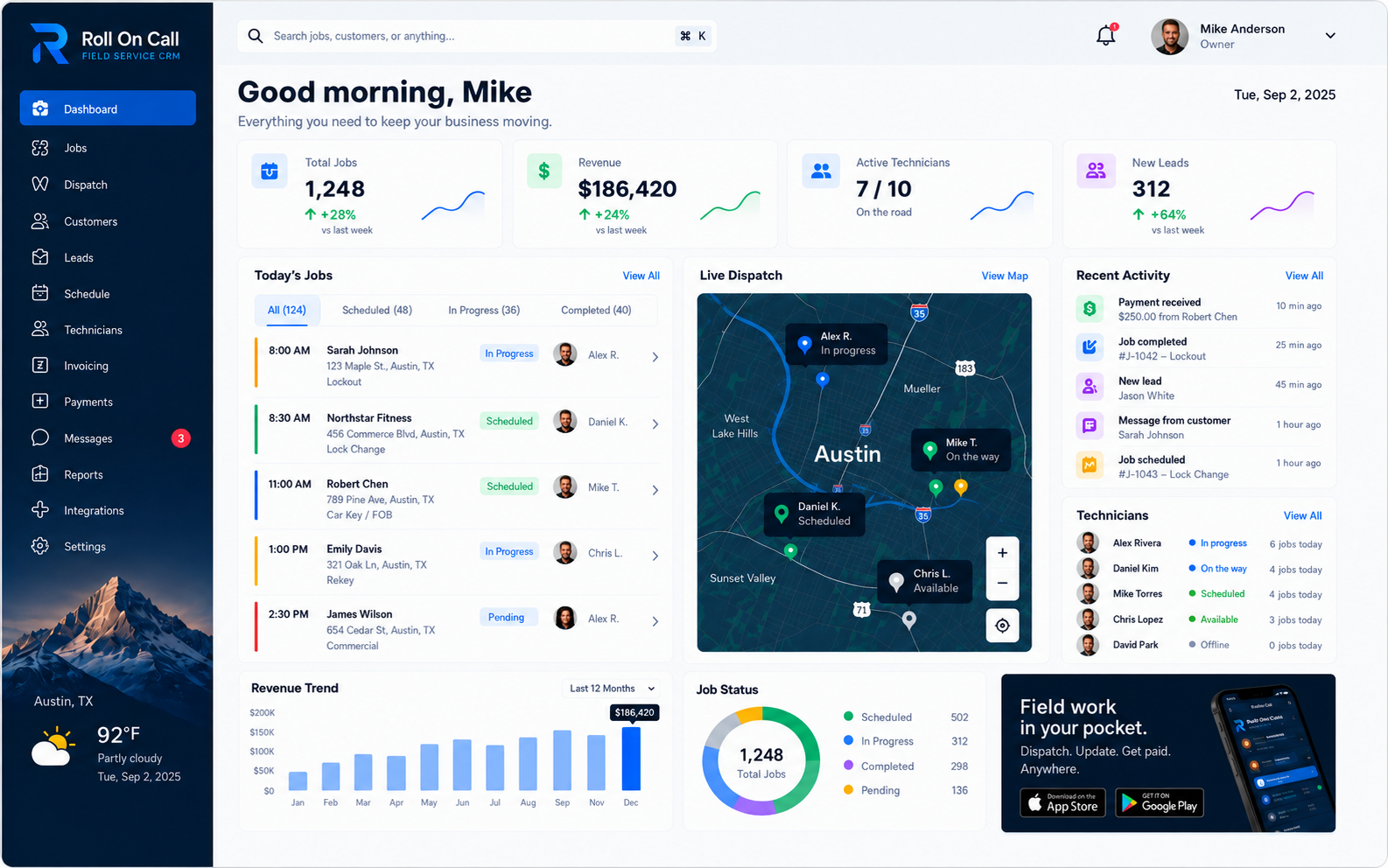
Roll On Call supports customer records with separately recorded service locations. That structure is useful because a team member can begin with the customer, identify the relevant location, review prior jobs and notes, and then create a job after checking the request. The value comes from organized records combined with human attention. The person handling intake confirms the facts and records the decision.
02Start With the Customer Relationship
Before adding locations, decide what the customer record represents in your business. It may represent a company, a property owner, a management firm, or another party that requests service. That choice should be understandable to everyone who creates records. A stable customer identity gives staff a sensible place to review the relationship and its prior work while preventing every address from becoming an unrelated customer entry. It also makes conversations clearer when a central contact asks about work recorded at more than one property.
Staff can create and maintain that information in the CRM context, then record separate service locations as needed. The team should avoid loading the customer record with assumptions about every property. Shared information belongs there only when it genuinely applies to the relationship. A location-specific gate code, loading entrance, or local contact should remain associated with the relevant service location or be deliberately selected for a job brief.
Corporate office, local office, branch, region, and territory are useful business concepts, but they are not dedicated Roll On Call entities or a hierarchy the product validates. If one of those terms helps a human understand a customer or visit, staff may enter it as descriptive context in an appropriate record or note. The team must still confirm what it means. A phrase such as “western region” does not itself establish an address, responsibility, access boundary, or scheduling decision.
03Keep Service Locations Distinct
Separate service locations are most useful when a person can tell them apart at a glance. Use complete, consistent addresses and a recognizable site description when the customer uses one. Include unit, suite, building, or store details only when known and relevant. Normalize abbreviations according to an internal style, and search existing customer information before adding another location. A duplicate with slightly different spelling can divide prior jobs and make the next intake harder to interpret.
Useful location notes are concise and durable across field service industries. Examples include a normal check-in point, a known parking constraint, or a customer-provided site contact. Time-sensitive details, such as “meet the manager at 2 p.m. today,” should be handled as current job context rather than presented as a permanent fact. People change, access procedures expire, and buildings are renovated. Staff should date or qualify notes where that makes their limits easier to understand.
04Use Geographic Context Carefully
Service businesses often describe their own footprint in terms of offices, branches, regions, or territories. Those concepts can be valuable when managers discuss staffing, travel expectations, or customer coverage. Within Roll On Call, however, they should be treated only as descriptive context that staff may write in a record or selected note when it helps explain the work. They are not verified product labels, filters, queues, permission scopes, or automated operating areas.
That distinction changes how staff should use geographic language. Likewise, a business may call one group its north office, yet people still need to review the actual address, current workload, travel requirements, worker suitability, and customer commitment before scheduling.
Keep the vocabulary controlled through training, not by assuming software enforcement. Publish the terms the business uses and define them in plain language. When a customer’s regional terminology differs from your own, state whose wording is being recorded. Retire outdated descriptions through a deliberate staff review. Most importantly, never substitute a broad geographic phrase for a verified service location. The job brief needs the specific destination selected by a person.
06Review Prior Jobs With Care
Prior jobs can answer practical questions during intake. Staff may be able to see how a location was described, what concern was recorded, which notes were selected, and what status the team later entered. That history can help a person ask better follow-up questions.
Good job management reads history in context. A prior job reflects information entered by people at a point in time. Similar descriptions at two properties may be related, coincidental, or simply written with the same vocabulary. Staff can use the record to inform a conversation, but diagnostic and day-to-day decisions remain human work.
07Set Consistent Record Practices
Consistency turns a growing set of records into a practical operating resource. Start with a written standard for customer names, complete addresses, unit details, phone formats, and note language. Decide how staff should handle alternate customer names and moved or closed sites. Require a search before a new customer or service location is created. These are ordinary habits, but they prevent the small variations that make prior work hard to find or cause a person to select the wrong destination.
Notes deserve their own standard. Write observable facts or clearly attribute customer-provided information. Prefer “customer says the east entrance is open after 8 a.m.” to an unqualified promise that access will be available. Avoid vague phrases such as “usual place” or “ask for manager.” Include enough context for the next colleague to understand what was meant, and review old instructions when a caller provides new information.
08Make Job Creation a Human Review
Job creation is where customer context becomes an actionable service request. Keep that step deliberately human. The person creating the job should identify the requester, confirm the selected service location, capture the current issue in plain language, and check any timing or access information. They can review prior jobs and notes, but should select only the context that supports this visit. A short, complete brief is more useful than a long transcript that leaves the field worker to find the important sentence.
Use a verbal or written confirmation pattern that works for every requester. State the full address, including unit or building details. Ask who will be present and how the worker should make contact. Clarify what has changed since any earlier visit. The staff member then creates each job from the reviewed information.
09Coordinate People, Not Abstractions
A larger service footprint usually means more people participate in intake and dispatch. Coordination improves when responsibilities are explicit outside the software. A business may decide that one office normally handles a group of counties or that one coordinator knows a major account well. Record that context in internal procedures and, when relevant to a specific request, in carefully notes. Do not treat an office or region name as a system-enforced boundary or assume it grants or prevents access.
Establish a handoff routine for work that crosses the business’s usual areas of responsibility. The current coordinator can state the customer, confirmed location, requested service, known timing, and unresolved questions. The receiving colleague acknowledges the handoff and takes the next human action. A written procedure should explain when to involve a supervisor, how to avoid two people creating the same job, and where to record a meaningful update.
10Plan Scheduling and Assignments
Once a job is created, people still need to decide when it should happen and who should perform it. dispatch management weighs the customer’s commitment, job urgency, service address, travel realities, worker suitability, and information the team has gathered about current availability.
Use a repeatable scheduling conversation. Confirm the location and requested window. Ask the responsible team member whether there are prerequisite tasks, equipment considerations, or customer constraints. Review the commitments already made by the business, then choose an appropriate person and time. Where an office, branch, or territory concept affects the company’s decision, apply that policy manually and verify the actual address rather than inferring from a descriptive note.
11Prepare Useful SMS Job Briefs
Roll On Call supports SMS job briefs as a practical way to share selected information with a field worker. A useful brief gives the worker the confirmed service location, an understandable description of the requested work, a relevant contact, and the notes the dispatcher chose for this visit. The goal is not to reproduce the entire customer history. It is to give the assigned person clear, focused context for the next human action.
Review before sending. Check that the address belongs to the selected service location, the contact information is intended for this job, and the scope does not contain shorthand that only office staff understand. Exclude old access notes and unrelated information.
SMS has practical dependencies. Messages may be delayed, blocked, truncated by a device presentation, or unread when service is unavailable. The team should maintain a reasonable fallback procedure for urgent or safety-critical communication. The features overview describes the channel, while the business stays in charge of deciding when a call or other direct confirmation is appropriate.
12Maintain Meaningful Job Statuses
A job status gives the team a concise statement of where someone says the work stands. Its usefulness depends on timely, consistent updates by an authorized user or team member. Define internally what each available status means, which event justifies a change, and who is expected to record it. If a field worker reports progress to the office, the responsible person should update the record according to that procedure.
Status discipline matters more as one customer generates work at several locations. Always read the job’s customer and service address before changing its status. A phone update about the downtown property should not be applied to a similarly named job at another site. When the report is ambiguous, ask a follow-up question. Avoid using status as a substitute for a useful note when colleagues need to understand an exception or next step.
A status records what a person or team entered. It is not independent proof of arrival, presence, work performed, or customer acceptance. It reflects the last update from the office or the technician app. For customer communication, staff should review the job record and confirm important facts instead of repeating a status without context.
13Invoices and Payment Status Across Locations
Multi-location customers often have their own billing rules: one invoice per site, or a central accounts office that pays for every location. Agree on the rule with the customer before the first job.
In Roll On Call, each job becomes an invoice tied to its service location, and customers can pay by card through Stripe. Because invoices stay attached to the right site, staff can answer which location still owes without guessing.
Check that you are looking at the right job and location before following up on an open invoice. Bookkeeping and tax stay in the business's accounting software.
14Scale the Operating Practice
Scaling multi-location service is less about adding abstract hierarchy and more about making good habits repeatable. As volume grows, the cost of duplicate customers, incomplete addresses, stale notes, and casual handoffs grows with it. Keep the operating model simple: staff create customer records, add separate service locations, review prior jobs and relevant notes, create jobs after human review, and make scheduling and assignment decisions themselves.
Introduce checkpoints at moments where errors are likely. When onboarding a customer with many properties, agree on the customer naming standard and add locations from reliable information. When a new site is requested, search before creating it and confirm the full address. Before a busy day’s work is scheduled, review unusual access instructions and unresolved questions. After a customer closes or changes a site, have a designated person review affected context.
Offices, branches, regions, and territories may shape how the business organizes its people, but those concepts belong in management procedures and descriptive context. Do not build a process that assumes Roll On Call provides dedicated location directories, territory queues, hierarchy, cross-branch controls, or automatic distribution. Instead, publish who handles which decisions, how responsibility is handed off, and who can answer when the normal coordinator is absent.
15Build Human Governance
Good governance answers ordinary questions before a busy shift forces an improvised answer. Decide which people are authorized by company policy to create customer records, add or correct service locations, edit notes, create jobs, lead scheduling, make assignments, and record job or payment statuses. State when a second review is required and who resolves conflicting information. Keep the policy short enough to use and specific enough that two trained colleagues will handle the same situation similarly.
Write down who may view and edit each customer's records, and review it when staff change. Managers communicate expectations, staff follow them, and supervisors review the work. If certain customer information should be handled only by a particular internal group, document that rule and train the team accordingly. Do not infer software-enforced roles, record-level access restrictions, regional permission scopes, or cross-office visibility behavior from this guidance.
Support the policy with brief training examples. Include examples of similarly named properties and of region language that must not be mistaken for a destination. Refresh the training when the business changes its own procedures.
Multi-location consistency comes from the combination of useful records and accountable people. Roll On Call supplies practical context for field service management, while the business supplies judgment, verification, scheduling, assignment, supervision, and customer communication. Explore field workforce management for related operating guidance, or return to the Roll On Call home page. The durable principle is simple: record each location carefully, review each job deliberately, and make every consequential decision through a responsible person.