
01The Operational Cost of Disconnected Tools
A service office can begin with a worksheet for customer details, a calendar for appointments, paper notes for incoming calls, and personal messages for field instructions. Each tool may serve a narrow purpose, but the team must repeatedly locate and interpret information before making the next decision. A dispatcher may search for an address, compare the schedule, call a colleague for missing context, and compose a fresh message for the technician. The work is not merely typing. It includes deciding which version is current, which note still matters, and who is expected to act.
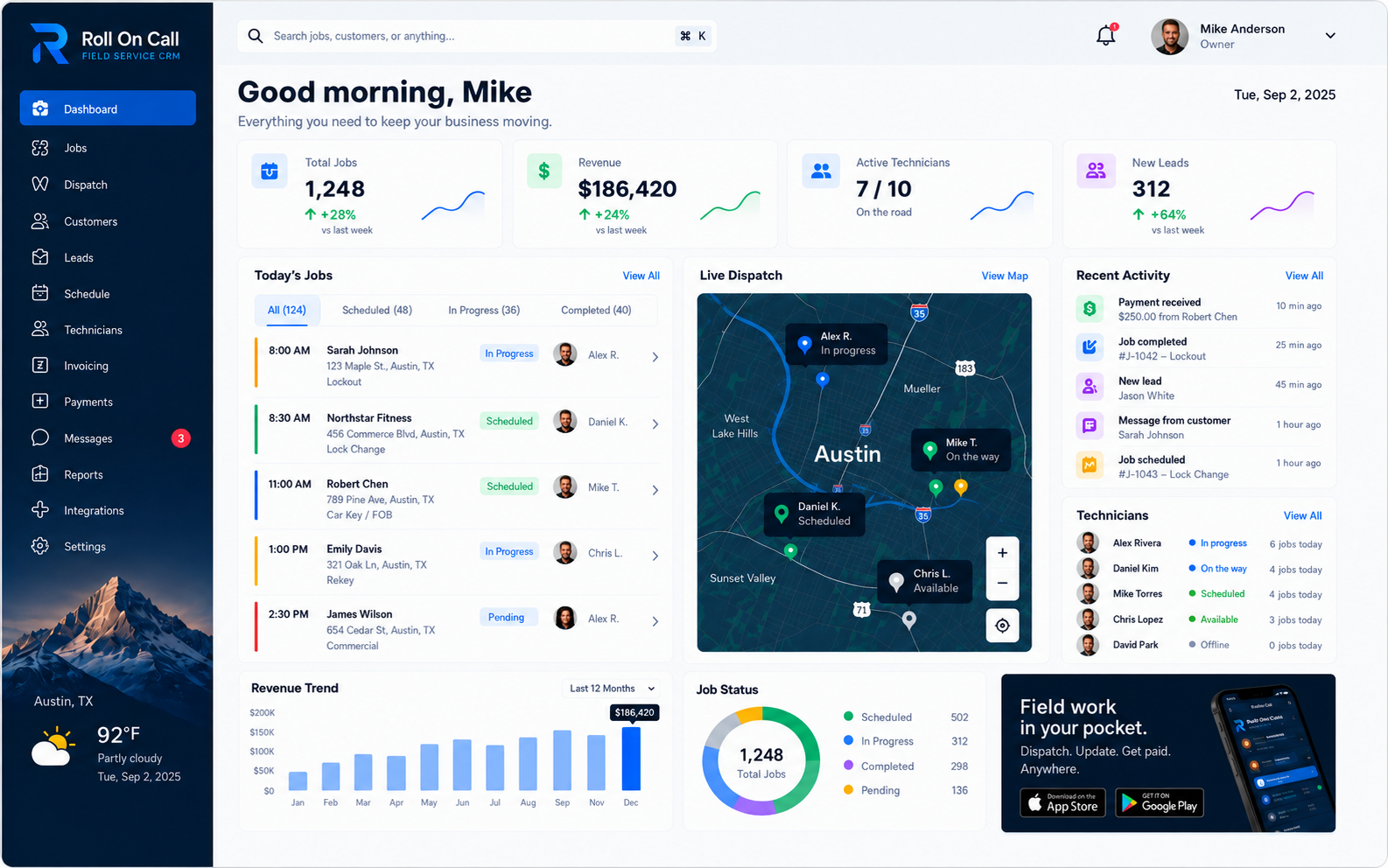
Replacing that arrangement should start with a clear goal: give staff a consistent place to create customer and job records and use them during daily work. Roll On Call centers the selected service location, customer-reported scope, selected instructions, assignment, status, and completion context around the job. Staff still make and record the decisions. The Roll On Call home page introduces this focused approach, while the solutions hub places it in the context of common service-office workflows.
02Understanding the Limits of Shared Spreadsheets
Spreadsheets are adaptable, familiar, and useful for many forms of analysis. Their flexibility can become a constraint when a team uses rows and free-form cells to represent customers, locations, jobs, instructions, assignments, and current status at once. Staff may add columns to answer each new need, then develop local conventions for abbreviations, colors, and comments. A new colleague must learn those conventions before understanding the day. Even experienced users may need to inspect several tabs to establish the context behind one service request.
A purpose-built job workspace gives those operational concepts distinct places without asking a worksheet to carry every relationship. Staff create the customer and job records, choose the relevant location, and record the context needed for scheduling and assignment. This structure does not judge whether an entry is correct or current. That remains a staff responsibility. For organizations operating through more than one branch or service area, the multi-location management guide discusses how teams can establish ownership and review practices across locations.
03The Challenge of Personal Texts and WhatsApp Threads
Personal message threads are convenient for quick exchanges, yet they often carry only the fragment one sender considered important at that moment. The customer name may appear in one message, an address in another, and an access instruction farther up the thread. A colleague taking over later may not know what was selected for the current visit. Informal conversation also mixes commentary with instructions, making it harder for the recipient to distinguish the job brief from discussion around it.
An SMS job brief offers a more deliberate handoff. An authorized team member reviews the job and sends selected details in a consistent format. The source remains the job record, and the sender stays in charge of checking the content before sending. Device conditions and mobile networks still matter. The technician communication guide explains how teams can set expectations around these handoffs.
04Transitioning Away from Whiteboards and Paper Notes
Whiteboards make the day visible to people standing nearby. Paper gives a caller and note taker freedom to capture a situation quickly. Their limitations become apparent during handoffs. A mark can be erased without its reason being recorded, handwriting can require interpretation, and a loose page can become separated from the customer or job it describes. When priorities change, staff may spend time reconstructing what was agreed rather than reviewing a job record with selected context.
The practical alternative is not to reproduce every mark from the board. It is to decide what the business needs staff to record for each active job. Urgent work still calls for active judgment and direct communication. The emergency service management guide considers how a team can use shared job context while retaining human control over changing priorities.
05Establishing a Staff-Maintained Customer Record
A customer record is useful when the business defines what belongs in it and who may maintain it. Staff can create the record with the contact and service context supplied through the business's intake process. This gives the next conversation a starting point, but it does not make every older detail suitable for the new request.
Maintenance is ongoing editorial work. Names change, contacts move, access instructions expire, and a customer may use more than one service location. Staff need a clear practice for confirming what is current and correcting entries when they learn something has changed. Permissions should match the organization's responsibilities, particularly where a note contains sensitive site information. The customer management guide examines how records can support repeat service when teams treat review and upkeep as part of the operating process.
06Maintaining Continuity During Intake
Intake turns a customer's account into information the office can use. The customer may describe symptoms, timing, access constraints, and previous work in a single conversation. The staff member must separate what the customer reported from assumptions about the likely work. When this detail begins on a loose note and is later entered elsewhere, nuance may be lost because the second entry depends on memory and interpretation.
With Roll On Call, staff can review an existing customer record, create the job, select the service location, and write the reported scope in the course of intake. The person entering the information remains accountable for listening carefully and checking ambiguous details with the customer. The record reflects that person's entry rather than an independent verification of events on site. The field service CRM overview describes the role of customer and job context in an intake process.
07Selecting the Appropriate Service Location Context
One customer can request service at a residence, rental property, work site, or another address. The contact's usual address is not necessarily the destination for the present job. During intake, the staff member should ask which location applies, review the answer, and choose the corresponding service location for the job. If the details are incomplete or uncertain, the team should resolve that uncertainty through its normal customer-contact procedure.
The selected location gives scheduling staff and the technician the destination context entered for that job. Access times, gates, parking, site contacts, and similar matters should be recorded only when relevant and reviewed according to company policy. The industries page shows how location context can vary across the trades and service settings Roll On Call is designed to support.
08Documenting the Customer-Reported Scope
A short phrase such as "unit not working" rarely captures enough context for a thoughtful handoff. Intake staff can ask when the issue began, what the customer observed, which equipment or area is affected, and whether access conditions matter. They should record the account as customer-reported scope, without turning an unconfirmed observation into a technical conclusion. Careful attribution helps the technician distinguish the caller's description from findings made during the visit.
The goal is proportionate detail. A long narrative with unrelated history can obscure the immediate request just as easily as an overly brief note can omit useful context. Businesses can define a consistent intake pattern while leaving room for the particulars of each call. Before assignment, the responsible staff member can review the scope alongside the selected location and chosen instructions. The job management guide explores how a job-centered workflow supports this separation between reported need and later completion context.
09Curating Job Notes and Instructions
Notes should earn their place in a technician brief. A standing instruction may still matter, while a comment from a previous visit may have no bearing on today's job. Sending everything places the burden of sorting on the technician and can expose context that was not needed for the current assignment. Sending too little can leave out an access detail or a customer preference that the office already knows.
Roll On Call supports a human selection step. Staff review available customer and job context, choose the notes or instructions relevant to this visit, and check their wording before the brief is sent. The product does not decide which note is material. Businesses should define who may select sensitive instructions, how often standing notes are reviewed, and when direct confirmation is required. The features guide provides more detail about the focused product capabilities that support this staff-managed preparation.
10Executing an Assignment Process
Scheduling and assignment combine information with judgment. A dispatcher may consider the customer-reported scope, selected service location, current commitments, staff qualifications known to the business, urgency, and internal service policies. Some of that knowledge sits outside any software screen. The responsible person weighs those factors, chooses the timing and assignee, and records the decision. Roll On Call supports that process without presenting the decision as a machine-made recommendation.
Clear responsibility matters when conditions change. The team should know who may revise an assignment, how the affected people are contacted, and what context should be recorded with the job. The schedule is a shared view of decisions entered by people, not proof that every external condition remains unchanged. The dispatch management guide discusses how job context and a scheduling view can support considered decisions while keeping responsibility with the dispatcher and the business.
11Structuring the SMS Technician Brief
After assignment, an authorized user can prepare an SMS job brief from selected job information. A useful brief gives the technician the customer and location context needed for the visit, the customer-reported scope, and the notes or instructions staff chose to include. The sender should review the message in relation to the current job. Standard formatting supports a consistent reading order, but content quality still depends on the information entered and selected by the team.
The brief also appears in the technician app, so SMS works as a quick summary. A sent message should not be treated as confirmation that the technician received, opened, or understood it. Businesses need a separate contact practice when circumstances require acknowledgment. The technician communication guide offers further guidance on fitting a standard brief into a broader human communication process.
12Recording the Operational Job Status
A job status is an administrative statement entered by a team member. It helps office staff understand how colleagues have categorized the job at the time of review. To make that statement useful, the business should define who may update status, what event should prompt an update, and how staff handle uncertainty.
Consistent practice is more important than an ambitious status scheme. Teams should choose a small, understandable operating convention and train staff on when to apply it. If completion requires supporting context, that context should be recorded by the responsible person rather than inferred from the status alone. Managers can then review team-job status alongside the schedule and job details. The field workforce management guide considers how these human-entered updates can support office coordination.
13The Boundaries of SMS Communication
SMS passes through external mobile services and ends on a recipient-controlled device. The recipient may have limited coverage, a disabled device, restrictive settings, or another condition that affects delivery or access. For those reasons, sending a job brief is one communication action, not proof of receipt or comprehension. This distinction should be built into office procedures rather than repeated as an afterthought whenever a message is delayed.
Routine jobs and higher-risk situations may warrant different confirmation practices. A business can decide when a dispatcher should call, request a response through an approved channel, or escalate according to internal policy. Safety-critical instructions should never depend solely on an assumption about a text message. Roll On Call provides the SMS brief; the business stays in charge of choosing the communication and confirmation process appropriate to the job, its workforce, and the circumstances.
14Completing the Administrative Lifecycle
Completion is another team-recorded stage, not a conclusion the software reaches on its own. The responsible user records the job status and adds appropriate completion context based on information available to the team. A business may require certain details before staff treat the administrative work as complete. Those requirements should be explicit, proportionate to the work, and understood by everyone who updates jobs.
Useful completion context connects the end of the visit to the original customer-reported scope without overstating what the office knows. Staff should distinguish a technician's reported outcome, a customer comment, and an office action when those distinctions matter. Future users can review what their colleagues recorded, but they must still exercise judgment about relevance and currency. This creates continuity based on staff entries and defined review habits rather than on assumptions that every historical detail remains applicable.
15Invoices and Payment Status
In a spreadsheet, the paid column is usually the least reliable one. Someone has to remember to update it, and it rarely matches the bank.
When the work is done, the office or the technician turns the job into an invoice. The customer, service address and line items carry over from the job record, so nobody retypes them from a notebook.
Customers can pay the invoice by card through Stripe. The job shows whether its invoice is unsent, sent, paid or overdue, so the office can see at a glance which completed work is still open.
Decide who may edit an invoice after it is sent and how corrections are handled. Bookkeeping and tax stay in your accounting software.
16Practical Migration and System Adoption
Replacing spreadsheets is a business-led change. Before entering records into Roll On Call, leaders should decide which customers and current jobs need to be carried forward, which fields staff must review, and who is accountable for the work. Staff then inspect the existing material and manually enter the current records the business chooses to retain. Unclear entries should be checked through an appropriate source rather than copied merely because they appear in an old worksheet.
A phased approach can protect attention. The team might begin with active work and frequently served customers, then review other current records according to business priority. Training should use real operating rules: who creates a customer, how locations are selected, how scope is attributed, who assigns work, and when status is updated. Parallel worksheets should have an explicit retirement plan so staff understand which process leadership expects them to follow and where unresolved questions should go.
17Managing Record Quality and Duplicates
Existing worksheets may contain similar names, outdated contacts, or several entries that appear to describe the same customer. Your office knows whether those entries represent one customer, related customers or distinct service locations. During transition, staff should compare the relevant details, consult an appropriate source when needed, and decide what to enter under the organization's rules.
The same discipline continues after adoption. Before creating a customer record, staff can search according to the business's agreed method and inspect likely matches. When information conflicts, they should follow a review path rather than make an unsupported assumption. Permissions and accountability help contain changes to people with the right context. Record quality therefore comes from careful human review, clear ownership, and consistent entry practices. Roll On Call provides structured customer and job records within which that work takes place.